How to block transfers to paging extension

Status
Not open for further replies.

JK-KPT

Bronze Partner
Joined
Jul 25, 2018
Messages
18
Reaction score
1
Please help. My client is very upset that an irate customer was put on hold locally(not parked) and then transferred to the overhead paging adapter extension when the operator tried paging the corresponding manager to discuss the call first. The customer was heard until my client was able to mute the PA system and the customer eventually hung up. I was able to replicate the same behavior with the client after the fact and confirmed that hitting the hold button on the Yealink T46S and then pressing the key configured as a custom speed dial for the extension of the Algo paging adapter, initiated a blind transfer that could not be brought back. Therefore, is there a way in version 18 to block transfers to specific extensions? Perhaps a parameter like IVR_Direct_Dialing_Grammar that I have configured to prevent such situations from happening through the IVR. Furthermore, attended transfers are not an acceptable workaround for this client, and selecting "Disable External Calls" in the extension options for the paging adapter had no effect either. I have scoured the forums and tried everything I can find, but this appears to be an ongoing issue. Does 3CX or anyone here have a solution?
 
  • Like
Reactions: Jeremy Bero
24 at this client. Why?
 
24 at this client. Why?
I had an idea to specify each phone it’s own SP1-24 to prevent anyone else picking it up
 
No problem, I appreciate your help and will let you know if I find something out. Thanks again.
 
I could see a future feature...sensitive number, a tick box for each and every extension (including system extensions). When checked, a new menu would allow control of who (internally) could, or could not call that extension number.
Allow all calls except...
Block all calls except...
Same format as the outbound rules extension access list.

This could also be implemented to affect the dialing of the SIP ID of the extensions
 
Thanks for the context @JK-KPT!

I personally like @kieferschild's suggestion. It means that no slow down happens with the attended transfer.

I did this by creating a new PA extension - say 400. I created a DTMF IVR for this extension - 405. I then used an Exception to forward all calls (*) to 405. 405 is configured to have a 'pin' code 4040 for example. I added an option for customers to get out of the IVR just in case of an accident using their own code and forwarded that back to the main number. This way I've got a PIN between my customers and the PA system, and my users don't need to know the new PA extension number 400, they don't have to change practice, only enter a code.
How do you enable a pin code for the IVR?
 
Hi @louieblackman,

In the example I mentioned above, it isn't a PIN code for the IVR, it makes the DTMF into a 'pin code' IVR, so you create a DTMF IVR and then assign something like 4040 to forward to extension of whatever you're looking to put a code (a DTMF input - or 'pin code' as I called it above) in front of.
 
No problem, I appreciate your help and will let you know if I find something out. Thanks again.
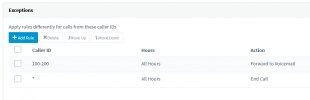
Here's what i did, and it seems to work with the very limited testing I did.

Make a firewall extension for your pager > forwarding rules > exceptions make something like this, changing to your extension range.

1646036350881.png
 
Status
Not open for further replies.

Forum statistics

Threads
111,974
Messages
590,083
Members
164,901
Latest member
Silent_Guru