- Joined
- Nov 17, 2022
- Messages
- 1
- Reaction score
- 0
Hello,
I work for an IT Support company and several of our customers are looking at VoIP systems.
Personally, I've used 3CX for as long as I can remember but only the on-premises install.
I am looking at deploying 3CX hosted solution for our customers but I'm running into a lot of problems getting the router settings right.
I've seen many guides and tutorials on the internet but they all refer to a local install of 3CX which uses port redirect to point to a specific IP, namely the 3CX server. This is not the case as there is no on-premises server and it's just cloud based.
What I'm struggling with is the Port Triggering.
Draytek's only accept port ranges up to 9999 so that cuts out a lot of the Media port discovery.
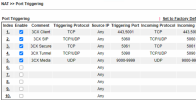
I've opened the following ports as per the guides:
5001 TCP
5060 TCP/UDP
5061 TCP
5090 TCP/UDP
9000-9999 UDP
But I just can't get the physical phones to provision.
How do I configure a Draytek for cloud provisioned phones please?
Thanks in advance.
Danny
I work for an IT Support company and several of our customers are looking at VoIP systems.
Personally, I've used 3CX for as long as I can remember but only the on-premises install.
I am looking at deploying 3CX hosted solution for our customers but I'm running into a lot of problems getting the router settings right.
I've seen many guides and tutorials on the internet but they all refer to a local install of 3CX which uses port redirect to point to a specific IP, namely the 3CX server. This is not the case as there is no on-premises server and it's just cloud based.
What I'm struggling with is the Port Triggering.
Draytek's only accept port ranges up to 9999 so that cuts out a lot of the Media port discovery.
I've opened the following ports as per the guides:
5001 TCP
5060 TCP/UDP
5061 TCP
5090 TCP/UDP
9000-9999 UDP
But I just can't get the physical phones to provision.
How do I configure a Draytek for cloud provisioned phones please?
Thanks in advance.
Danny