• We do not provide troubleshooting help for unsupported phones. Please try with a supported phone.
  • V20 Update 10 Alpha 2 Learn more

How to force UDP Transport?

Status
Not open for further replies.

TierList123

Bronze Partner
Basic Certified
Joined
Jun 26, 2020
Messages
22
Reaction score
9
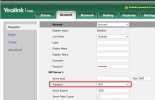
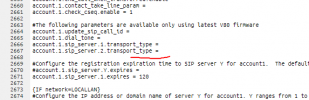
I have my own edited script which I use to auto-provisions phones for 5 Yealink T33's - However, by default they provison the phone to use TCP. What entry do I need to input below to force the phones to use UDP transport when they register? They are all registerd as "Direct SIP(Stun - remote).
1624543159558.png
 
Hi @TierList123

Just wondering why you think they would use TCP by default?

1. The template screenshot shows that there is no value assigned there telling it to use TCP

2. As far as I'm aware our currently supported firmware does not default to TCP (both before and after provisioning)
1624543824369.png

Question: did you perhaps manually set TCP at some point and then forgot to reset the phone to factory default?
 
  • Like
Reactions: TierList123
Hi There, I set them to UDP as TCP was not registering on the clients network (They were originally setup as TCP to be used over LTE) but since they client is not on fibre, I've set it to UDP, and now they register on UDP over fibre. Since then, the phones have rebooted while my provisioning script was loaded and when I logged back into them earlier today, they were back on TCP again....

Please tell me what value I can put into those transport_type fields in order to allow for registration on UDP.
 
It sounds like the provisioning script is probably doing this.

I would recommend the following actions:

1. Ensure they are running the 3CX Supported firmware

2. Factory reset them to clear everything back to defaults (not just reboot)

3. Avoid using your provisioning script, and instead provision them using the default 3CX template as per our guide


The expected result is that the phone should provision and use UDP transport
 
  • Like
Reactions: TierList123
It sounds like the provisioning script is probably doing this.

I would recommend the following actions:

1. Ensure they are running the 3CX Supported firmware

2. Factory reset them to clear everything back to defaults (not just reboot)

3. Avoid using your provisioning script, and instead provision them using the default 3CX template as per our guide


The expected result is that the phone should provision and use UDP transport
Thanks a lot. I will definitely do that. If I wanted to hypothetically speaking, register them as UDP with my script, what value can I place in transport_type field next to the = sign to allow for UDP transport?
 
I'm not aware but, based on what you said above, I suspect your script had the transport_type field included.

If were to not include it at all, a reset phone would almost certainly remain in UDP (since it's the default)
 
  • Like
Reactions: TierList123
Status
Not open for further replies.

Forum statistics

Threads
112,148
Messages
590,963
Members
165,169
Latest member
Isaac415