


- Joined
- Nov 28, 2021
- Messages
- 5
- Reaction score
- 0
Hi there,
I can see threads on the forum with information on how to turn off the 'please hold while I try to connect you' prompt, however I have the opposite issue -
External calls are connected to an IVR, which upon user input either transfers them to an extension, or a Ring Group.
Is there any way to *enable* the prompt PLSHOLD
This is my IVR Config -
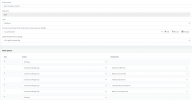
I can see the PLSHOLD prompt in the promptset, which I will replace with our own recording, but nothing actually plays before the transfer.
Many thanks in advance!
I can see threads on the forum with information on how to turn off the 'please hold while I try to connect you' prompt, however I have the opposite issue -
External calls are connected to an IVR, which upon user input either transfers them to an extension, or a Ring Group.
Is there any way to *enable* the prompt PLSHOLD
This is my IVR Config -
I can see the PLSHOLD prompt in the promptset, which I will replace with our own recording, but nothing actually plays before the transfer.
Many thanks in advance!


