I am having the same issue, customer sends in message through WA to 3CX the messages comes in fine but message from 3CX to WA is not going through. what's can i do to resolve this?
This is a message to everyone to help troubleshoot your issues with WA.
To resolve a potential conflict with SMS which is a common cause of the above issues raised here, is a trunk conflict with SMS. So if you are receiving messages but can't send them try this. The 3CX Trunk setup has an issue with the number for WhatsApp being the same number you are also using for SMS with 3CX. You
cannot use the same number at the time of writing and this has been the case from the beginning with 3CX WA; so if you are you'll have to use a different number for one or the other.
Other things to check off...
Check you have your call queue set up so that WhatsApps can be received by the agents in the call queue.
I have a call queue extension set to RingAll. I have the agents I want to receive WhatsApps assigned to that queue.
In the WhatsApp
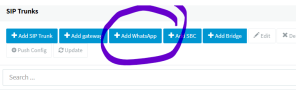
Trunk Details - check you have entered the
Access Token (from developers.facebook.com under WhatsApp > Quickstart >
API SETUP) known as the
Temporary access token.
Also check that you have added the correct
Phone Number ID,
not to be confused with your WA phone number, it is the Phone Number ID. It's specifically shown on the same page as the Temporary Access Token below your
FROM phone number that is stated.
Also check in Step 3 of the above
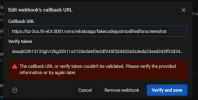
API setup page that you have setup / copied across the 3CX Webhook URL, that 3CX creates for you, into your Quickstart configuration (same WhatsApp area of developers.facebook.com). It is called the
Callback URL in Meta and has the verify token next to it that 3CX gives you as well.
For inbound issues. Check your Route settings in the Trunk, check you have the WhatsApp number setup and the Destination for calls during office hours and outside office hours setup. Choose an extension for the destination and set it to your Call Queue as the destination - the queue that has your WA agents in it.
In META (developers.facebook.com) (WhatsApp > Configuration) make sure you have subscribed to
messages under
Webhooks (Webhook fields).