How to setup WhatsApp integration

KaterinaK_3CX

Joined
Feb 24, 2016
Messages
246
Reaction score
36
WhatsApp integration enables agents to send a reply to WhatsApp messages directly from 3CX. Read the guide carefully for any known WhatsApp limitations. Use the guide to walk you through the steps required to:
  • Create WhatsApp application
  • Adding a phone number
  • Set up an Admin role
  • Generate a new token
  • Configure in 3CX
  • Configure your webhook
Read the guide.
 
I hope the trunk thing gets fixed soon.
I am having the issue where if the user calls that number, it goes to the WA queue instead of following the Call Flow App even with the 0000000 workaround.
Also, how do you initiate a WA conversation from 3cx? Is there something else needing to be setup too for that?
 
  • Like
Reactions: hsanchez and jonfry
I also had the same number for whatsapp and for a sip trunk, when I changed it so they both were differnt it started working fine.

I have 2 questions:

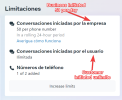
1, How to start a Whatsapp conversation? (not from a replay), I see I have 50 business initiated conversations available.
1659559818627.png

2. Is there a way to include an automatic welcome message? I'd like to include the business hours in case a customer writes al night or weekends.
 
I also had the same number for whatsapp and for a sip trunk, when I changed it so they both were differnt it started working fine.

I have 2 questions:

1, How to start a Whatsapp conversation? (not from a replay), I see I have 50 business initiated conversations available.
View attachment 31337

2. Is there a way to include an automatic welcome message? I'd like to include the business hours in case a customer writes al night or weekends.
That's some good questions.
I will have this same questions too.
 
  • Like
Reactions: jonfry
Currently, you cannot start a conversation yet. You have to create templates in the Meta-portal and get those approved.
That usually just takes a few hours. After that, you can send those templates outside the 24h window.
But Nick mentioned support for actually sending those templates will come in a later update.
 
  • Like
Reactions: N_G
Anyone have issues with sending images from WA and not receiving in 3CX?
 
  • Like
Reactions: ODD Network BV
Anyone have issues with sending images from WA and not receiving in 3CX?
I tried and it is working fine. I send pictures video audio messages all are working fine.
 
Same, working fine now I am using a different number to our SMS number. (Hope this gets fixed).

Inbound initiation works, and replies to same. Would love to initiate outbound also, but get that Meta has their restrictions on same.
 
We already figured that one out: the number used for WA, may not appear in any other trunk as a DID. Please see this thread for possible work-arounds to get the routing of voice calls to that number correctly when you have removed it as a DID. We hope 3CX will resolve this with the next alpha or beta. But the work-arounds will allow things to work and allow you to continue testing.
It works for us too. We were using a DID in a voice SIP Trunk for the WhatsApp SIP Trunk, when we have deleted that DID from the voice SIP Trunk, the WhatsApp chats start to works fine.
 
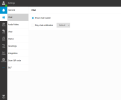
My 3cx Web client has no option Called "Office Settings" to configure WhatsApp.

3cx serer Version number: 18.0 (Build 965)
 

Attachments

  • Screenshot.png
    Screenshot.png
    52.5 KB · Views: 31
My 3cx Web client has no option Called "Office Settings" to configure WhatsApp.

3cx serer Version number: 18.0 (Build 965)
worked after upgrading to 18.0.5.331
 
I can't see the the '+ Add Whatsapp' Button you've mentioned under SIP Trunks in a PRO License.
 
I can't see the the '+ Add Whatsapp' Button you've mentioned under SIP Trunks in a PRO License.
Hi,

you need to upgrade your 3cx to 18.0.5.331
 
Did somebody already try to have multiple apps in the meta portal to support multiple PBX servers? How would you do this if a customer wants the Whatsapp integration? It would be nice to have all our customer's app in our own meta developer portal.
 
Hello team.

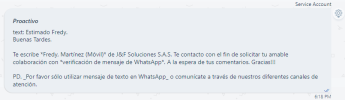
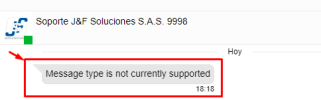
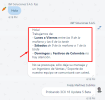
When receiving proactive messages from another WhatsApp Business account, it appears as an unsupported message, I illustrate with screenshots the origin (third-party tool) and the destination (3CX):

Third party tool:
1661902399829.png

In 3CX V18 Update 5 Beta:
1661902531038.png
I appreciate the attention given to the enrichment of the integration with the tool. Interesting projects are coming...
 
Last edited:
Hello team,
Good day.

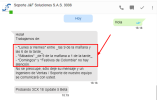
Additionally, it is required that the text format be properly represented.

I illustrate below message sent:
1661903575442.png

Message received in 3CX: (You have to help with the presentation to the End User)​
1661903651775.png
I appreciate the attention given to the enrichment of the integration with the tool. Interesting projects are coming...​
 
I just can't find even a single instruction on my instance. It's 32 SC ENT hosted on AWS
 
Hi, It would be good to review the call that 3cx makes to the WhatsApp API since after 24 hours the user can be contacted, only the user must accept the conversation and it has a cost. That is not a problem, but it is the lack of editing the WhatsApp API template, that is, it takes by default the one that has the "hello World" WhatsApp API and does not allow it to be edited.
 
Afternoon, I tried the suggested workarounds but I just cant get a reply working.
Receiving the msgs works perfectly.
Mine shows a red x as soon as I reply.
Any advice would be greatly appreciated.
 
  • Like
Reactions: javcove
Afternoon, I tried the suggested workarounds but I just cant get a reply working.
Receiving the msgs works perfectly.
Mine shows a red x as soon as I reply.
Any advice would be greatly appreciated.
Same here.

All reply messages from 3cx to WA appears with a red X this using iOS 3CX App and message never received in WA.

I´m able to receive messages from WA with text and images. But it's impossible to respond. I tried recreating token, removing WA trunk and re add, rebooting 3CX server. Nothing works. I checked all steps like 3 times, I'm sure I did everything from the instructions.

Note. I´m using the Test number provided by meta.
 

Attachments

  • IMG_3337.jpg
    IMG_3337.jpg
    509.8 KB · Views: 14
I'm on Enterprise 18.0 Update 5 (Build 418), Debian on premise (ESXi 7). When I try to register a Whatsapp sip trunk I get the following error in 3CX's activity log,

Code:
 Lc:10000(@WhatsAppAH[<sip:@:0/UDP>]) has invalid configuration: primary target is empty

My business Whatsapp number is working (sending out test messages from WA Developer Console or via Postman arrive on my smartphone). Sending to 3CX not.

If I call my WA webhook I get "0".
 
Last edited:

Forum statistics

Threads
112,090
Messages
590,699
Members
165,061
Latest member
AlenaAAA