HTTPS Port forwarding is not configured when setting up O365 integration

Status
Not open for further replies.

Kim heng

Free User
Basic Certified
Joined
Jan 13, 2021
Messages
6
Reaction score
1
Hi everyone,

I am new to this setup, we got our MS exchange installed on primes and 3CX on primes. We also got our Azure AD and Microsoft 365 admin online. We got our SSL certificate from Go Dadday that are verifying for all our domain. I have followed the documents to setup the integration and we got the dial pad and user sync with our 3CX management console, but on the Direct Routing in MS Teams management, it kept saying TLS Connectivity status is Inactive. Then when we checked the Microsoft 365 Integration, it was saying as follow:

  • Real Time Notifications to Microsoft 365 changes will not work because it seems that HTTPS port forwarding is not configured. This means that when changes occur, they will not be updated real time. A synchronization will still occur every night.
  • Code: InvalidRequest Message: The underlying connection was closed: Could not establish trust relationship for the SSL/TLS secure channel. Inner error: AdditionalData: date: 2021-09-28T00:10:15 request-id: 56dde1c0-53ee-49ad-aa38-fef6ddd7b2fe client-request-id: 56dde1c0-53ee-49ad-aa38-fef6ddd7b2fe ClientRequestId: 56dde1c0-53ee-49ad-aa38-fef6ddd7b2fe
Our 3CX is 18.0 Update 1 (Build 214) Version
We checked the Teams User setting, they all have MS Phone licence and phone number attache to it.
We open port as follow, 5000, 5060-5062, 5090, 9000-9398, 10600-10998, 9040, 3478, 5066
We have left the system connected for over 24h, and nothing change.

 

Attachments

  • teams user 2021-09-28 082641.png
    teams user 2021-09-28 082641.png
    3.4 KB · Views: 35
  • Call direct 2021-09-28 082837.png
    Call direct 2021-09-28 082837.png
    10.6 KB · Views: 35
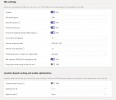
  • SBC setting 2021-09-28 082959.png
    SBC setting 2021-09-28 082959.png
    41.7 KB · Views: 35
The issue here sounds like a port forwarding issue, You need to ensure port 5001 TCP (if this is your system https port) for user sync to work, and TCP 5062 for the team's communication if the teams' SBC FQDN is not within the same domain as the 3cx systems FQDN, are forwarded from your firewall to the 3cx system. You can check ports from the internet using tools such as ping.eu to check whether these ports are forwarded and able to reach the 3cx system.

Another check is to ensure that the TLS certificate used for your team's SBC, covers the entire SBC FQDN and contains the intermediate and root certificates for the CA.
 
Last edited:
  • Like
Reactions: Evolute IT
Hi Charles,

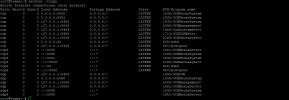
Thanks for your reply. Yes, we figure out that the issue is with the Debian 10 where the ports are not open for 5061 and 5062. I have just reinstalled the System again and uploaded the back, but now the port 5001 and port 5062 are not open.

Please help with this.
Thanks.
 

Attachments

  • debian netstat 2021-09-28 154602.png
    debian netstat 2021-09-28 154602.png
    52.6 KB · Views: 31
What is your HTTPS port, is it 5001? and also is the SBC FQDN within the same domain as the 3cx systems FQDN?
 
yes, we using the default port 5001 after the configuration from port 5015. However after the configuration, we cannot access the port 5001.

Yes the FQDN is within our O365 Domain.
 
Just to clarify you can not access your management console from the internet using https://FQDN:5001? and also is the FQDN for the management console a custom domain that is within the same domain as the 365 email domain?
 
Yes, for some reason. I have tried to reinstall the 3cx and it kept missing port 5001 after the installation from port 5015. Even I do the fresh install.
 
I have sent you a PM so we can check some information regarding this.
 
  • Like
Reactions: Kim heng
Thanks Charles for the support to find out the ultimate issue for this error.

To sum up, the main issue of this error is the incorrect SSL Certificate, so if anyone got the same error when setting up the O365 Teams integration, first thing that need to check is the SSL Certificate for FQDN then the error will disappeared.

P.S I got some interesting question as follow:

We got our customer that is going to deploy the same setup as we are now, but they have multiple domain under their O365, what is the best way to get this setup done?

They are at least 4 domains under O365 and are going to use all of them as they have multiple departments/branches under their company name.
 
This should not be a problem, the 3cx SBC FQDN can be created for one of the 365 email domains and as long as the certificate covers the entire FQDN (no wildcards) then the provisioning of the users will use the SBC FQDN to be provisioned with.

Then user sync can be enabled to sync the users from Azure, providing they are all under one Azure account, into the 3cx system as extensions, and will use their matching email addresses to do so.
 
  • Like
Reactions: Evolute IT
OK, will update once the site is ready to deploy the system. Cheer.
 
Status
Not open for further replies.