I cannot forward to my mobile phone.

Status
Not open for further replies.

atlantisegidek

Forum User
Joined
Jan 6, 2020
Messages
56
Reaction score
3
My English is weak, sorry about that. I hope I can explain.

All our phones are Yealink. I enter all phones 3CX Central. But i have a problem. Phone forwarding does not work.
I mean, There is a key on the phone. I am sending your photo. I press this key, enter the number, but I cannot forward to my mobile phone.

There was such a problem after identifying the phones 3CX Central. It was working before.

Thank you.
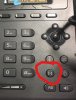
 

Attachments

  • xx11x1.jpg
    xx11x1.jpg
    312.2 KB · Views: 15
Are trying to transfer an active call to your mobile?

Or are your trying to divert all calls to your mobile?
 
  • Like
Reactions: Evolute IT
You cannot use the phone device to perform the forward to mobile.

The way 3CX is designed, the call forwards are done either from the Webclient, Mobile Client, or Desktop client.

We provide multiple extension Statuses and each one has a different forwarding destinations according to the rules the extension has. So effectively, the forwards are done directly from the PBX even if your deskphone stops working or goes offline, the forwards will still work.

https://www.3cx.com/3cxacademy/videos/intermediate/configuring-extensions/
 
I think "bw.feature_key_sync" to 0 on custom phone template may resolve that problem with direct call forward from Yealink.
 
That's doable if you want, but keep in mind that it will make you system not officially supported by 3CX and your call forwards based on statuses can misbehave when the phone does something the PBX does not expect.

Some unexpected consequences:

- the phone forwards the call before the timeout you set in the Extension Status

- the phone may become unregistered/unresponsive/offline and the forwards will stop working

- calls to a ring group may be forwarded elsewhere by a single device, breaking the destination if no answer and sending the call to an unexpected destination or causing loops

Bottom line, avoid it if you can and use the official method, or if you start facing issues because users perform unexpected forwards etc then revert back to the original 3CX templates.
 
That's doable if you want, but keep in mind that it will make you system not officially supported by 3CX and your call forwards based on statuses can misbehave when the phone does something the PBX does not expect.

Some unexpected consequences:

- the phone forwards the call before the timeout you set in the Extension Status

- the phone may become unregistered/unresponsive/offline and the forwards will stop working

- calls to a ring group may be forwarded elsewhere by a single device, breaking the destination if no answer and sending the call to an unexpected destination or causing loops

Bottom line, avoid it if you can and use the official method, or if you start facing issues because users perform unexpected forwards etc then revert back to the original 3CX templates.

Yes, I know it's an unsupported feature but some clients that don't use Webclient or 3CXPhone need this option enabled to make manually call forwards. I think 3CX must consider enable it again by default.

Thanks John.
 
Understood for that very specific scenario where you have reduced functionality requirements (ie. a deskphone only customer), and of course as a Gold Partner you are aware of the limitations.

We must make sure though that the forum members are also aware of the possible consequences, especially if they are new to 3CX. They should be informed to preferably use the system as intended until they have a chance to learn about more advanced details and setups and how one thing may affect another.
 
Status
Not open for further replies.

Forum statistics

Threads
111,938
Messages
589,836
Members
164,821
Latest member
M_R