


- Joined
- Feb 21, 2019
- Messages
- 168
- Reaction score
- 41
Good Day,
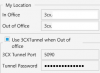
How does the 3CX Softphone determine which DNS FQDN to use between the "In Office" and "Out of Office" choices under "Configure Accounts?"
We use a split-tunnel VPN solution. User Internet traffic goes out through their normal connection, while business traffic goes down the VPN tunnel to our servers. However, when we have the VPN active, we are seeing softphones unable to connect and port 5090 aged-out traffic on the firewall. 5090 should only be used when the softphone is out of office, so it looks like the softphone thinks its out of office when that traffic should be going down the VPN link direct to the phone server.
Split tunnel VPN comes to our internal DNS so 5090 should not be touched at all in my mind. Understanding how 3CX determines which to use would be helpful in fault finding this.
Thanks.
How does the 3CX Softphone determine which DNS FQDN to use between the "In Office" and "Out of Office" choices under "Configure Accounts?"
We use a split-tunnel VPN solution. User Internet traffic goes out through their normal connection, while business traffic goes down the VPN tunnel to our servers. However, when we have the VPN active, we are seeing softphones unable to connect and port 5090 aged-out traffic on the firewall. 5090 should only be used when the softphone is out of office, so it looks like the softphone thinks its out of office when that traffic should be going down the VPN link direct to the phone server.
Split tunnel VPN comes to our internal DNS so 5090 should not be touched at all in my mind. Understanding how 3CX determines which to use would be helpful in fault finding this.
Thanks.


