Inbound Rules Not Working

Status
Not open for further replies.

metalcoat

Joined
Oct 14, 2019
Messages
8
Reaction score
2
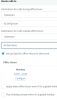
I have several DIDs with one provider. I'm trying to setup specific hours for inbound rules. Basically we are open until 9:30 and at 9:40 I want the voicemail to pickup and say we are closed etc.. I setup these rules and set office hours accordingly and nothing works, just goes right into the queue!
1591156263168.png
 
Is this the ddI number, if so check the activity log to see what number is being presented to 3cx. You may have to change the format on the number within 3cx.

note ; you can use * in the number as per info here https://www.3cx.com/docs/manual/inbound-did-call-routing/

dial *64 on a handset to set the system to use default office hours in case this has changed - https://www.3cx.com/docs/pbx-dial-codes/#h.5iojpph3e8ff

Couple of notes

on the screenshot, you have only setup office hrs for monday

destination for calls outside of office hrs, you can set this to go directly to voicemail , instead of ringing the extension
 
Last edited:
  • Like
Reactions: JohnS_3CX
So this directs calls to queue 100% of the time as is. It's almost like it doesn't care about the out of office info.
 
Do you check the activity log ?
 
Nothing appears in the activity log.
 
Check the settings for activity log, within Activity Log click on the setting button on the top right. You may have to set it to Low or medium

All incoming calls will be logged
 
Hi @metalcoat

- Does Wednesday also have defined hours?
- Are there any public holidays defined at the moment in the global 3CX settings perhaps?
- Did you by any chance force the entire PBX into In-office hours?
- Is the PBX server time correct?
- Is the PBX server's OS timezone correct?
- is the Managment Console > Settings > Timezone correct?
 
  • Like
Reactions: craigreilly
06/03/2020 8:54:17 AM - Call(C:14735): from Line:10001<<1private: Office hours override is active, now it is set to IN office hours

Is this what is blocking this?
 
Go to your Management console, Settings, Dial Codes and find the code for "Force 3CX Phone System to IN or OUT of office"

If the code is for example *9, then dial *9 to set the PBX back to default hours.
https://www.3cx.com/docs/pbx-dial-codes/#h.665f9ex1w4m3

Example:

*9 = Default Hours
*91 = Forced In Office always
*92 = Forced Out of Office always
 
I have a bunch of other DIDs that we use to set in and out of office hours, is there a way I can have just this one override?
 
I have a bunch of other DIDs that we use to set in and out of office hours, is there a way I can have just this one override?

No it is a system setting so affects all of the 3CX system.
 
You have the global hours, and then you can have explicit hours that override the global.

However as you can understand, if you forced the system, you forced them system :)

All the other DIDs and Extensions that have custom hours will still be honored so long as the system is not forced. What you can do (which is probably what you wanted originally) is to not define global hours at all, and define custom hours on each DID separately.
 
We have other DIDs that we use the global forced *91 to change the phones over to an answering system when no one is at the premise.

Is there another way we can set this for the other DIDs? Hours aren't set a traditional way as it is a 24/7 business
 
Yes, you can leave the PBX in default hours mode always, and if you wish to "open" or "close" specific departments on demand, you can first send their calls to a dummy extension and change the forwading of the dummy extension to the following

Available: Forward to the usual destination (ie,. your ring group)
Do not disturb: forward to your answering machine

Then whenever you want to open or close that department, simply change the status of the dummy extension either from your webclient, or management console
 
Status
Not open for further replies.

Forum statistics

Threads
111,952
Messages
589,895
Members
164,845
Latest member
tdzski5