


- Joined
- Oct 31, 2024
- Messages
- 161
- Reaction score
- 110
Hello,
when a BLF key is configured in 3CX, it is synchronized to both the Yealink phone and the 3CX Windows App.
On the Yealink phone, pressing the BLF key while the monitored extension is ringing automatically performs a call pickup (internally using *20*).

In the Windows App, the same BLF key is displayed, but clicking it does nothing while the monitored extension is ringing.
As a workaround, we have to create additional pickup-specific BLF keys in the Windows App.
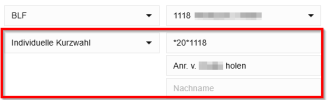
Is there a reason for this inconsistent behavior? If call pickup works via a standard BLF key on supported desk phones, I would expect the 3CX Windows App to behave the same way.
Thanks
when a BLF key is configured in 3CX, it is synchronized to both the Yealink phone and the 3CX Windows App.
On the Yealink phone, pressing the BLF key while the monitored extension is ringing automatically performs a call pickup (internally using *20*).
In the Windows App, the same BLF key is displayed, but clicking it does nothing while the monitored extension is ringing.
As a workaround, we have to create additional pickup-specific BLF keys in the Windows App.
Is there a reason for this inconsistent behavior? If call pickup works via a standard BLF key on supported desk phones, I would expect the 3CX Windows App to behave the same way.
Thanks




