Intermittent issue - 3CX inbound call popping up over all other windows and will auto-answer after pressing ENTER.

Status
Not open for further replies.

codestoner

Bronze Partner
Joined
Nov 14, 2020
Messages
3
Reaction score
1
Hello,

We have multiple users who are having an issue with 3CX automatically answering calls. It won't happen all the time - it usually happens when an inbound call comes in while in the middle of typing a message on Teams/Browser/email, the 3CX window will put itself on top of all the others and so hitting ENTER (in the middle of typing) will answer the call immediately. Please can you let me know what we can try to prevent this?

Thanks,

Rob.
 
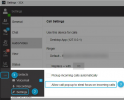
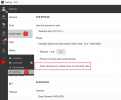
If what users are using is the 3CX Desktop App then they can disable the following option to prevent this from happening:
1650540670212.png
 
Hi Chris,

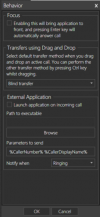
Thanks for your quick response, this looks like it may be the cause. I will go back to the users and ask them to confirm if this setting is ticked or not. They are using the 3CX Client for 3CX Phone System Version 16.3.0.264 (Screenshot attached of what the user sees)

Many thanks,

Rob.
 

Attachments

  • 1650543361844.png
    1650543361844.png
    68.5 KB · Views: 51
  • Like
Reactions: ChrisC_3CX
For the Legacy 3CX Windows App that would be the equivalent setting yes.
 
  • Like
Reactions: Evolute IT
Hi Chris,

So today my colleagues have come back to me and said that Focus is turned off on 3CX but it still takes focus anyway. Is there a reason why it is doing this on the Legacy 3CX App?
 
So today my colleagues have come back to me and said that Focus is turned off on 3CX but it still takes focus anyway. Is there a reason why it is doing this on the Legacy 3CX App?
This should not happen, have you seen this behavior yourself? If it's always happening it should be fairly quick to check. Also, what version of the 3CX Legacy app are you running?

Check in "Settings >> Advanced Settings >> About":
1651676165239.png
 
Hi @ChrisC_3CX ,

We are a school and just switched to 3CX, we have approximately 10 admin staff members who are receiving queue calls.

Staff/users want to see the call alert on top of apps using the "Allow call pop up to steal focus on incoming calls", BUT they don't want to answer the call using the ENTER key.

They have dual screens and might be typing something in Word or Outlook and accidentally answer a 3CX call when moving to a new line. However, they want the freedom to be able to answer the call with the call notification on top.

We switched from Microsoft Teams calling and Teams calling ignored the ENTER key for notifications.'

Can you please look into this? Other people have been screaming out for this functionality for years. See the following posts:

Option to Disable 'Enter Key' to Answer | 3CX Forums
Calls being dropped with enter key | 3CX Forums
Disable Enter button to accept/decline/end call | 3CX Forums
 
@ChrisC_3CX I guess technically, the keypad isn't a call notification. Can you develop proper system notifications for 3CX?

Our 3CX partner suggested using the PWA, however this had the following challenges with Microsoft Chromium Edge:
  1. Calls do not ring unless you open the PWA. You have to keep the PWA open, not minimised.
  2. Edge notifications that pop up and you go to answer it (with the PWA closed) and it doesn’t open the PWA to answer the call.
  3. Ring notifications do not sound with the Edge notification.
Any suggestion that the PWA is better and the future way forward is false. The full client will always have better access to the system than a PWA.
 
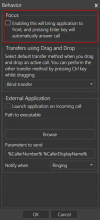
3CX Legacy Windows App.

When the option for the focus is disabled or enabled, you will have to close and restart the application in order for this to take effect.

1653909052127.png

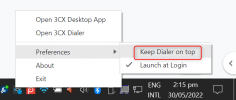
3CX Desktop App

In order for the desktop app to NOT interfere with current work on the PC, the option to keep the dialer on top will need to be disabled

1653909360284.png

Then from the settings of the 3CX Desktop app, you will need to disable the option to steal the focus from other apps.

1653909510390.png

Now it will just flash in the task bar at the bottom when a call comes in. Pressing enter will NOT answer the call.

Progressive Web Application (PWA)

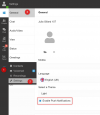
The progressive web app has PUSH notifications so when the app is closed it will open when a call comes in.

1653911054553.png

Pressing Enter will NOT answer the call from the desktop notification.

3CX Web Client

The web client has the same settings as the PWA and also has PUSH notifications and the call will not be answered by pressing Enter.

Long story short, if the dialler is at the top, or pops up the call will be answered via the Enter key. If it is just the desktop notification or ringing in the background, it will not.

It is important that the machine is up to date, so is the browser when this is in use, and when configuring something, that the client exits and restarts. Have you tried turning it off and on again will always solve a lot of niggles.
 
Status
Not open for further replies.

Forum statistics

Threads
111,974
Messages
590,081
Members
164,899
Latest member
mazet