iOS Beta 2 Release: Incoming call enhancements!

ThomB_3CX

Staff member
Joined
Apr 28, 2022
Messages
833
Reaction score
1,268
The latest release of our iOS application is available to TestFlight members. We have made further improvements to our contact matching functionality, allowing users to receive incoming calls with the full name of any CRM contact - even those that are not yet synced to the 3CX phonebook! Read on to discover more....
Continue reading the Original Blog Post.
 
As a note, these reports were addressed in this 18.6.4.686 beta, so you can check:

@ConceptsWeb
All I want is support for the CallKit to show the Caller name from the CRM when found, like the DesktopApp.
And not just during the call but before even answering it.

@Gianpiero Pi4you
NOW is ready H264 on IOS?
 
"Easter Egg" :cool:
« Secret troubleshooting mode » Lol
 
  • Like
Reactions: Evolute IT
I am still having video problems on the iOS app with new version. Either incoming or outgoing calls to video doorbell have audio but no video. The android app works fine.
 
I am still having video problems on the iOS app with new version. Either incoming or outgoing calls to video doorbell have audio but no video. The android app works fine.
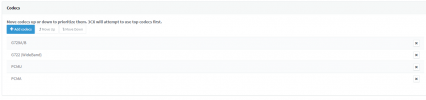
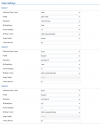
Can you post here a screenshot of the doorbell codec configuration page? That should clarify the reason and also show which codecs should be enabled.
 
Last edited:
Just curious how the WatchKit integration is coming along. Sometimes I miss calls if I only have my watch with me and my phone in the other room.

Also curious if you have any general comments on support for the Watch in general. A lot of companies seem to be dropping support for it. I hear it’s difficult to develop for.
 
  • Like
Reactions: Evolute IT
Can you post here a screenshot of the doorbell codec configuration page? That should clarify the reason and also show which codecs should be enabled.
On 3CX:
1693321898811.png
On the Doorbell:
1693322011050.png
 
@Charles-Voip We've found the issue and build 18.6.4.688+ will fix the H264 compatibility with your GDS3710 doorcam.
Thanks for reporting!
 
The new build solves the video problem. I was encountering the same no video issue with incoming calls from the doorbell, however found that the problem is using ring groups from the doorbell to ring simultaneously several extensions. When answering a call for a ring group, the mobile app doesn't show the enable video dialogue box. If I have it call individual extensions, then I get the dialogue box and video works.
If I wait a while to activate the video, the video options seem to freeze even after hanging up. To re-enable it I have to force-quit the app and restart it.
 

Forum statistics

Threads
111,993
Messages
590,175
Members
164,931
Latest member
admintest