Ip Phone registering failed

Status
Not open for further replies.

Christopher.LC

Gold Partner
Basic Certified
Joined
Dec 21, 2020
Messages
6
Reaction score
0
Hello Everyone,

When registering an IP Phone with the FQDN instead of IP the phone is stuck in registering and then failed. I have a Yealink T48G and on the web interface under server host if I change the fqdn and replace it by my internal PBX ip address it works.

On my firewall I have opened the required ports and the firewall check pass with all green.
All the incoming traffic to my public IP is redirected to my internal IP address.

What can I do in terms of firewall rules to allow the FQDN registration on port 5060?

Thank You
 
Hello,

Well I made it work changing on the phone configuration TCP instead of UDP...

Have a nice day,
 
  • Like
Reactions: JohnS_3CX
Hi Christopher,

We don't exactly support the registration in the way you described.

What we do support is following the guide linked above by @kieferschild to set up the phone in STUN mode.

For STUN you also need to do some extra work before it works reliably:

- PBX port forwards must be correct, the firewall check helps you verify this https://www.3cx.com/docs/ports/

- The extension must be have the Option "Disallow use of..." disabled (otherwise it gets blocked)

- The extension must have the option "PBX Delivers Audio" enabled (otherwise you might not have audio)

- The phone must be set up based on the relevant guide above (to ensure compatibility with 3CX)

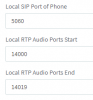
- The firewall at the remote site where the phone sits must also have static port forwards towards that phone device, covering the ports you see at the 3CX Provisioning tab
1608634935067.png

- SIP ALG or SIP Helper services must NOT be running on any of the two sides' firewalls.

Note: you might be best off not choosing 5060 for the phone, just in case the remote side's modem has the port reserved by the ISP


Good luck!
 
Hello,

We're implementing Failover so if it was a single server without failover no problem I could use the IP address of the server.
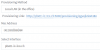
But when provisioning the phone from 3cx documentation you have to change it to your fqdn server here:

1608647445115.png

I have change the phone Template to force TCP over UDP and now I'm able to user the fqdn interface.

FYI: stun over sip do register the phone but you don't have any incoming sound.
 
I address the sound issue above regarding STUN.

What's the use case though? Where is the PBX and where are the phones in relation to the PBX network-wise?
 
Hello,

Our PBx is installed in our network with Linux version.
Our phones are in our network too.

We wanted to implement a failover server.

So server A internal IP 192.168.0.10 -> External IP xx.xx.xx.80
server B internal IP 192.168.0.11 -> External IP xx.xx.xx.81

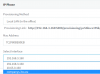
Per the 3cx documentation when implementing a failover configuration we have to modify the phones setup to point to the FQDN (in our case a 3cx hosted FQDN)

Picture bellow taken from: www.3cx.com/docs/failover
1608651657109.png

When aplying this configuration to our IP phone we get stuck in registereing and the reason why is that it's using UDP. When modifying the transport protocol to TCP the phone gets registered.

Cheers
 
I think the reason you resort to that is because you are using local phones+PBX, but public FQDN.

There is also the ability to use a local FQDN, but for your specific needs have you considered using a split DNS in addition? https://www.3cx.com/docs/creating-fqdn-split-dns/

This should make things a lot smoother, and give you more control over the process and there should no longer be a need to use TCP or custom phone config.
 
Last edited:
Status
Not open for further replies.

Latest Posts

Forum statistics

Threads
111,990
Messages
590,161
Members
164,925
Latest member
batarong