Solved Issue since upgrade cp860

Status
Not open for further replies.
any updates on this?
 
any updates on this?
the firmware update on the phone seems to fix the issue, but for some people getting the firmware to show up inside of 3cx is another issue. you can manually do the firmware yourself to fix problem phones.
 
To those who are experiencing the issue please navigate to C:\ProgramData\3CX\Instance1\Data\Http\Interface\provisioning\xxxxxxxxxx\firmware_new\yealink and let me know if you see the CP860-37.81.0.10.rom file in the folder.
Let's see if the issue is the same for all
For Linux the path would be /var/lib/3cxpbx/Instance1/Data/Http/Interface/provisioning/xxxxxxxxxx/firmware_new/yealink
 
To those who are experiencing the issue please navigate to C:\ProgramData\3CX\Instance1\Data\Http\Interface\provisioning\xxxxxxxxxx\firmware_new\yealink and let me know if you see the CP860-37.81.0.10.rom file in the folder.
Let's see if the issue is the same for all
For Linux the path would be /var/lib/3cxpbx/Instance1/Data/Http/Interface/provisioning/xxxxxxxxxx/firmware_new/yealink
I have that in the folder path but still not showing up as new firmware in the update screen. I am on Windows.
 
Yes, the firmware is there on Linux as well.
 
I have the firmware in the folder on Windows. I have 2 CP860's which have been manually updated and show as up to date. I also have one CP860 that shows as up to date but is on 37.80.0.10 and has the dropouts symptoms.
 
I have the file CP860-38.81.0.10.rom in the directory, but the phones does not show as upgrade needed.
 
We have identified the issue with the firmware update on CP860 model. The issue originates from the fact that in the new Yealink provided firmware the user agent name is different than others. So this is why the management console did not identify the model. We have found a way to fix it from our side and have pushed out a new template for these phones. It should be available in your updates section for download.

For those of you that do not have the firmware already downloaded the only thing you need to do is download the new template and provision the phones with that.

For those that have already downloaded the firmware you need to perform an additional step to have the phone working. After you download the new template navigate to : C:\ProgramData\3CX\Instance1\Data\Http\Interface\provisioning\xxxxxxxx\firmware_new.
The path for linux is /var/lib/3cxpbx/Instance1/Data/Http/Interface/provisioning/xxxxxxxxxxx/firmware_new/.

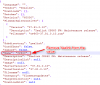
Edit the firmwares.json file. Find: "Name": "Yealink CP860", and change it to: "Name": "CP860",

Save the changes and restart management console service. You should be able to upgrade your phone after this change.
2017-09-13_11h29_08.png
Thank you all for helping identifying the issue and helping us resolve it.
Please let us know if that works for you
 
Confirmed that editing the firmwares.json corrects the problem.
 
Thank you for the feedback and glad this worked for you
 
Thank you so much , I also work for me.


~~~ appnaz.com ~~~
 
Last edited:
Thank you for your feedback
 
Status
Not open for further replies.

Members Online Now

Forum statistics

Threads
111,859
Messages
589,433
Members
164,699
Latest member
CLTedu