Solved Issue with incoming calls from SIP Trunk (GSM Gateway)

Status
Not open for further replies.

Praetor

Free User
Joined
Jan 15, 2022
Messages
7
Reaction score
0
I have a problem with configuration of my GSM gateway. 3CX (ver. 18 up. 2) is installed on win10 computer and its working fine. 3CX server and gateway is on the same LAN (no subnets, NATs and so on) with static IP. My GSM Gateway is 2N Voice Blue Light. Outgoing calls are working like charms - no issues there. Device is configured as Generic SIP Trunk, with authentication thru ip.
Problem is with incoming calls. Of course I configured inbound rules. If I set on my gateway to play a message and receive DTMF, when i put DTMF of my user ext. nothing happens. I have no records of incoming calls in call log on 3cx.

Obvious conclusion is that my gsm gateway is not communicating with 3cx when there is inbound call. I check all setting in gateway many times. My suspicion is something with authorization or some settings in inbound parameters. I place in attachment a quick gateway installation guide.

Please help :(
 

Attachments

Problem is with incoming calls. Of course I configured inbound rules. If I set on my gateway to play a message and receive DTMF, when i put DTMF of my user ext. nothing happens. I have no records of incoming calls in call log on 3cx.
So if I understand correctly, you are attempting to use the GSM gateway as a DISA trunk (provide dial-tone,accept digits, then pass onto 3CX).

I don't know why, at this point, you don't see an incoming call attempt (and that's all it will be) in the 3CX Activity log, but never the less, it won't function that way. Does the trunks show, in 3CX, as registered?

A "normal" 3CX trunk will not accept dialed digits, you'd have to be using a Bridge trunk for that to work.

First of all, I would attempt to get incoming calls to route to a destination, such as an extension in 3CX, skip the collecting digits part, in the gateway. Once you have that working successfully, then you could send callers to a Digital receptionist, to allow them to dial various destinations, or extension numbers.

What you are attempting, would have to have the gateway registered to a Bridge trunk, or an extension, to be able to collect incoming digits.
 
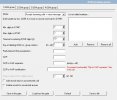
Thank you very much for reply. Playing massage with DTMF readout was only a method to check if my gateway is able to receive calls (to "pickup the handset"). I want to check if it works when someone is calling. I presume that if i hear the message my gateway is fine. I don't need in my setup ext selection with DTMF. That was only means to check if my gateway is ok. I don't wan't to use a GSM gateway as a DISA Trunk - i only want to receive calls which a i cannot do right now (calling out is fine).

Authorization is ip based - i am not able to run it thru account. After all i am no able to route my connections to any extension (i try even a vmail) in 3CX. I think there is no communication between a trunk and 3CX when there is an incoming call.

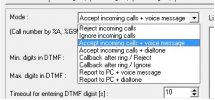
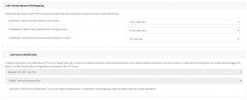
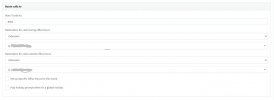
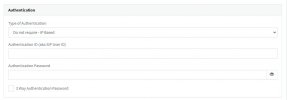
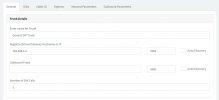
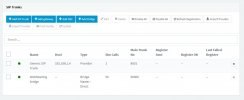
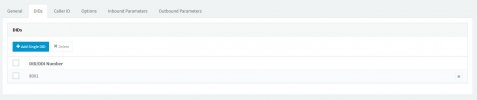
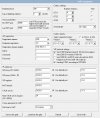
I place in attachment screenshots of my configuration both in 3CX and in the gateway. For my understanding i should set my gateway to receive mode to accept incoming calls + dialtone, and timeout for entering DTMF digits as 0.

I think there is some stupid error in my configuration because in other treads i read that my gsm gateway works perfectly fine with 3CX:
https://www.3cx.com/community/threads/gsm-cards-for-3cx-pbx.31394/
https://www.3cx.com/community/threads/2n-voice-blue-lite-problem.28874/
 

Attachments

  • GW_VoiP Parameters.jpg
    GW_VoiP Parameters.jpg
    102.4 KB · Views: 23
  • GW_Receive mode.jpg
    GW_Receive mode.jpg
    33.5 KB · Views: 22
  • GW_GSM incoming groups.jpg
    GW_GSM incoming groups.jpg
    59.1 KB · Views: 21
  • 3CX_Inbound parameters.jpg
    3CX_Inbound parameters.jpg
    94.7 KB · Views: 18
  • 3CX_General settings 3.jpg
    3CX_General settings 3.jpg
    56.2 KB · Views: 19
  • 3CX_General settings 2.jpg
    3CX_General settings 2.jpg
    30.3 KB · Views: 18
  • 3CX_General settings 1.jpg
    3CX_General settings 1.jpg
    45 KB · Views: 19
  • 3CX_Gateway status.jpg
    3CX_Gateway status.jpg
    50.8 KB · Views: 21
  • 3CX_DIDs.jpg
    3CX_DIDs.jpg
    31.5 KB · Views: 21
I place in attachment screenshots of my configuration both in 3CX and in the gateway. For my understanding i should set my gateway to receive mode to accept incoming calls + dialtone, and timeout for entering DTMF digits as 0.
Not having used that gateway before, I'm not speaking from experience. I suspect that the "dialtone" setting may refer to outbound calls, not incoming, as in..."do you want callers to hear dialtone before calling out"

You also seem to have it installed as a Generic SIP trunk and not a Generic PSTN Gateway. A SIP trunk will want registration from 3CX, whereas a gateway will register with 3CX.

Go down to , Setting up 3CX... https://www.3cx.com/blog/docs/topex-gsm-gateway/

I'm also not certain why you have the DID involved. at this point anyway. DID information, to route calls in 3CX, would have to be sent by the gateway, either a default number, or one you have put in. It is useful in a multi port gateway as a way to identify which, of several trunks, the call came in on. If you are using a single trunk, then a DID is unnecessary. You simply tell the trunk where to send calls, in the inbound trunk settings.
 
My first choice was Generic Gateway Device, but i am checking randomly all options (like a chicken without a head). I change that but there is no progress. If I set "timout for entering DTMF digits" to 0 my gateway refuse to accept call - there is call rejection. If i put one second i have a long beep and after approximately 20 seconds an connection is lost. Of course no records on 3CX log. I read article about topex gsm gateway. I test it all out before posting a thread. I think there is some simple error. Maybe its about sip registration (it is going thru ip authentication). I find on some russian site new firmware and upgrade my gateway. No result.

There is just no communication when receiving a call. Maybe this will help - it is a log from my gateway when i am calling to my gateway:

cha-layer3 cc-layer4 cha-layer3 dial clip grps conn durat.
------------------------------------------------------------------------------
vxx-NULL <++MORE g00-OVRECV 48123123123 1/V 0:03 000:00
NULL ---:--
NULL ---:--
NULL ---:--
 
The gateway should be registering with 3CX, in the same manner as a SIP phone/ ATA. The difference with a gateway is that you must specify the IP (of your gateway) and port, where outgoing calls are to go. Registration alone does not guarantee that outgoing calls will work.

I really don't know where DTMF is going to come into play until after a call has been established, and that will be from end to end, and most likely not involve the gateway directly other than, perhaps, a Codec.

Calls outbound are set up with a SIP Invite (no DTMF involved). Same thing with an inbound call.

You may need to start anew. Setup up the 3CX trunk as a generic PSTN type gateway, then set the GSM gateway to register with 3CX, and confirm that this has occurred, in the Activity Log.

I'm assuming that the 3CX server, and the gateway are on the same local LAN.

If 3CX is hosted, off premise, then you will have issues, as that is not supported.

I assume that log is from the gateway...I have no idea what it means.

You did read through this? https://www.3cx.com/blog/voip-howto/2n-voiceblue-next-gsm-gateway/
 
Calls outbound are set up with a SIP Invite (no DTMF involved). Same thing with an inbound call.
This is why i think something is wrong with my configuration. If outbound calls failed to work I'ill be sure that the gateway is broken. But i can call from my 3CX...

I'm assuming that the 3CX server, and the gateway are on the same local LAN.
3CX - 192.168.1.3, GSM gateway - 192.168.1.4. No VPN, subnets and so on. As simple as it can get.

I tried clean setup with new trunk, and i was configuring my gateway to the letter with provided instruction mentioned above. I can find every option, but i still have call rejection. It is strictly related with 0 sec of timout for entering DTMF digits (long beep mention above). I am now a little bit confused:

  • on the "CLIP Routing table" node:
    • Click the "Add" button.
    • Set "GSM number (CLIP)" to "+".
    • Enable "auto dial".
    • In the "dial to VOIP" enter the Virtual Extension Number assigned to the device.
    • Click "OK".

What i should set in Virtual Extension Number: my DID/DDI nr, extension number of default call group/telephone (i try both but i want to be sure)?

Next strange thing is that i cant log into my gateway thru sip account - i set my log to verbose, and there is no mention in log about any failed registration to 192.168.1.4 but of course i see "red light" - indication of no communication with my gateway. Despite that outgoing calls work fine.
 
i set my log to verbose, and there is no mention in log about any failed registration to 192.168.1.4
If that is the IP of the gateway, then there won't be a log of a registration to it, there should be a log of it, registering to 3CX, if all is working correctly. Now...outgoing calls could work correctly, even if the trunk is not registered, as the call destination (IP and port of the gateway) should be in the trunk settings, this way 3CX knows where to send a call. In fact, registration is really not required for this to work. However, when there is an incoming call, if the gateway is correctly configured, there should, at least, be a call attempt, in the activity log.

What i should set in Virtual Extension Number: my DID/DDI nr, extension number of default call group/telephone (i try both but i want to be sure)?
I'm going to assume that that is for your DID number. In reality it can be any number, as long as it matches the DID rule you create in 3CX, if that is the way you are routing incoming calls. And again, this is only useful if you have multiple SIM calls, all coming in over one trunk. If you have one SIM per trunk, then it is not important as you would not need DID rules to route the calls.

What happens to an incoming call (what does the caller hear?)...does it just continue to ring, or is it answered by the gateway?
 
I see on their website, that 2N offers technical support. There may be one simple parameter that you've overlooked. Perhaps they can assist in troubleshooting. They do show the gateway being compatible with 3CX, maybe they can offer a guide, that has additional information.

If you do not see an Activity Log of an incoming call, then I have to assume that the gateway is not set to direct the call to the correct destination, or is awaiting some condition
 
I have to possibilities':
1) I set receive mode as in 3cx blog manual that was kindly mentioned above for 2n VoiceBlue Next:
  • Set "mode" to "Accept incoming calls +dialtone".
  • Set "Minimum digits for DTMF" to "0".
  • Set "Minimum digits for DTMF" to "0".
  • Set "Maximum digits for DTMF" to "0".
  • Set "Timeout for entering DTMF" to "0".
In that mode I have an instant call rejection and voice information from my operator that number is not available. The call is not answered in gateway (no record in log of gateway).

2) I set values mentioned above as <>"0" - the call is answered by gateway, but nothing else happened (long beep). Call is definitely received (positive record in log of a gateway and information in sim card diagnostics window with time of connection) but is not pass the connection to 3CX.
 
It would seem to require the second option, but why the call is not being sent onto 3CX, what the gateway is waiting for, I do not know. I'm assuming that the beep the caller hears is a prompt for DTMF input, but the 0 setting, should send on the call immediately.

I'm surprised that there is not an option to disable this completely as it causes all calls to be answered, even if there is no answer by 3CX.

Since no one else , on the forum, has offered a solution, yet, I have to assume that there are not a lot of these in use, with 3CX.

The gateway would seem to be waiting for an input, or a timeout, before sending the call onto 3CX. There may be something else (missing) that is preventing it from routing to the correct destination. It could be that there is another field, that requires the 3CX IP address.

Have you contacted 2N to see if they can offer any assistance?

Doing a search, I came across this...

https://2nwiki.2n.cz/pages/viewpage.action?pageId=7353359

and...

https://blog.provu.co.uk/how-to-configure-your-2n-voiceblue-next-to-pass-incoming-calls-to-your-pbx/
 
Ok, i am very close to crack that nut. I received my first call (!) - this is a little break thru. I place my whole second number (my mobile phone number) by witch i am testing the gateway in CLIP Routing table ...and it works. I can't find any documentation to place in clip routing table wildcard (for example * -> 0001) but we are close. What is strange in articles above there is no mention about clip routing table.

Yesterday i find something like this with example setup:
https://freeswitch.org/confluence/display/FREESWITCH/2n

It can be usefull.
 
Ok problem solved - there is a parameter "List of called numbers" - there i need to place a nr for my DDI. Thank you for help :):):) Maybe someone will have same problems as I was so i place a configuration file in attachment (need to change ext from txt to ini). thnx again :)
 

Attachments

Glad to hear you got it working. I'm wondering if there is a difference, because of the firmware version being used?.

Hopefully, if someone else makes use of that gateway, this thread will be of some help.
 
Status
Not open for further replies.

Latest Posts

Forum statistics

Threads
112,325
Messages
591,898
Members
165,477
Latest member
Mueller