Solved Issues with intercom (extension to extension calling)

Status
Not open for further replies.

mgiara

SOHO User
Joined
Feb 19, 2022
Messages
38
Reaction score
6
Hello

I have a hosted by 3CX Professional setup.

I've enabled "Can intercom" under the "Rights" tab in the "Phones" left menu for each extension.

I asked the employees to try pressing the extension on the screen, dialing it, and dialing *9 before the extension number. They told me when they do, any extension they dial does indeed ring, but only extension 100 is able to answer the intercom call for a conversation.

What might I be missing?
 
Can you please provide more info on this setup: https://www.3cx.com/community/threads/information-to-provide-when-requesting-help.67558/

What IP Phones are used by the affected extensions, what firmware are they running and what is extension 100 using?

Also, are the extensions in different groups or are they all in the same one?
Yes, my apologies.

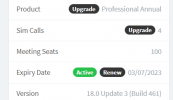
  • 3CX Version, Professional Annual 18.0 Build 461
  • Server OS, Hosted by 3CX
    3cx_version.PNG
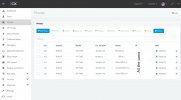
  • IP Phone Make/Model/Firmware version, phones.PNG
  • Provisioning Method: STUN
  • Trunk Provider or VoIP Gateway Make/Model, Telnyx
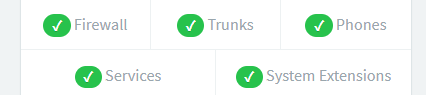
  • Has the Firewall Checker passed: YES
    3cx_status.PNG
  • Are custom Phone Templates being used: I'm not sure, I don't think so?
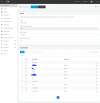
Yes

3CX_Group.PNG
 
Sorry if I was unclear, when I asked if they are in different groups I meant in Extension Groups not Ring Groups. You can check in "Dashboard >> Users >> Groups".

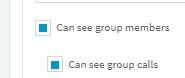
The reason I am asking is because that, Intercom not only requires the "Can Intercom" right to work, but also requires that presence information is available to the extension performing the intercom. That said make sure that the extension performing the intercom is in the same extension group as the other extension and has the following enabled in rights:

1650519585834.png

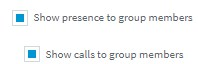
Extensions receiving an Intercom call should have the following in rights:
1650519605758.png
 
  • Like
Reactions: mgiara
Sorry if I was unclear, when I asked if they are in different groups I meant in Extension Groups not Ring Groups. You can check in "Dashboard >> Users >> Groups".

The reason I am asking is because that, Intercom not only requires the "Can Intercom" right to work, but also requires that presence information is available to the extension performing the intercom. That said make sure that the extension performing the intercom is in the same extension group as the other extension and has the following enabled in rights:

View attachment 29650

Extensions receiving an Intercom call should have the following in rights:
View attachment 29651
Thank you for the clarification!

Yes they are all in the same Extension Group. I will check on the settings you screenshot right now :)
 
Sorry if I was unclear, when I asked if they are in different groups I meant in Extension Groups not Ring Groups. You can check in "Dashboard >> Users >> Groups".

The reason I am asking is because that, Intercom not only requires the "Can Intercom" right to work, but also requires that presence information is available to the extension performing the intercom. That said make sure that the extension performing the intercom is in the same extension group as the other extension and has the following enabled in rights:

View attachment 29650

Extensions receiving an Intercom call should have the following in rights:
View attachment 29651
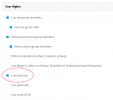
Alright, so the only checkbox that wasn't already enabled was "Can Intercom" under User Rights in the Extension Group
intercom_group.png
I've enabled it and asked the staff to please try again and let me know if there's any change.

Thanks again! :)
 
Sorry if I was unclear, when I asked if they are in different groups I meant in Extension Groups not Ring Groups. You can check in "Dashboard >> Users >> Groups".

The reason I am asking is because that, Intercom not only requires the "Can Intercom" right to work, but also requires that presence information is available to the extension performing the intercom. That said make sure that the extension performing the intercom is in the same extension group as the other extension and has the following enabled in rights:

View attachment 29650

Extensions receiving an Intercom call should have the following in rights:
View attachment 29651
After all changes and a reprovision of every extension, they're reporting that it's still not working.
 
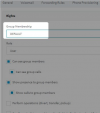
Have you've set these rights for ALL extensions? Also, have you made sure that, when you edit the extension rights, the Group selected on top is the Group that contains all extensions:

1650574883359.png
 
  • Like
Reactions: mgiara
Have you've set these rights for ALL extensions? Also, have you made sure that, when you edit the extension rights, the Group selected on top is the Group that contains all extensions:

View attachment 29685
Yes to both.

I downloaded the app on my phone and used the web UI for another extension and it is working.
I asked the staff to try again. If it doesn't work, I'm at a loss because it's working from the 3CX apps.
 
I downloaded the app on my phone and used the web UI for another extension and it is working.
I asked the staff to try again. If it doesn't work, I'm at a loss because it's working from the 3CX apps.
If it works from at least one app/client/ip phone then it should work from any (provided you're testing with the same extensions). Make absolutely sure they are using the correct dialcode as defined in "Settings >> Dial Codes >> Paging"

Let me know how it goes.
 
  • Like
Reactions: mgiara
If it works from at least one app/client/ip phone then it should work from any (provided you're testing with the same extensions). Make absolutely sure they are using the correct dialcode as defined in "Settings >> Dial Codes >> Paging"

Let me know how it goes.
Thanks again Chris!
Settings > Dial Codes > Paging field was blank so I changed it to *9 and saved.
I'm headed down to do some on-site work and will report back with my own testing late tonight/tomorrow.

Can't thank you enough for all the help!
 
Last edited:
  • Like
Reactions: ChrisC_3CX
You're very welcome! That must've been it!
 
You're very welcome! That must've been it!
Believe it or not, it's not working. I had to test myself in-person to believe it.

The call goes through properly and can be answered, there's just no audio in either direction once it is.
 
Are these users perhaps using the 3CX Webclient or another 3CX App in conjunction with the IP Phones too?

If the following apply:

Presence rights for all extensions.
• They are in the same group.
• The dial code for paging exists and is the one used.
• The "Can Intercom" right is enabled.
• The dial code for paging does not have any other overlapping dial codes (For instance, if paging is *8, make sure that you have
nothing that starts with *8)It should work.

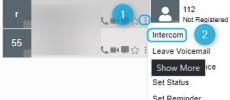
Can you check the following, access the Webclient of an extension you cannot intercom from, go to "People" and click on the three dots of an extension you tried to intercom with the dial code but failed and check if you have the intercom option available:
1651490806317.png

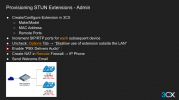
EDIT: Also, I had missed the fact that you mentioned using STUN so I highly recommend going over our guide and making sure that the mentioned configuration applies

Better yet, consider installing a 3CX SBC on that site as the issue you are facing may actually end up being related to STUN misconfiguration.
 
Last edited by a moderator:
  • Like
Reactions: mgiara
Are these users perhaps using the 3CX Webclient or another 3CX App in conjunction with the IP Phones too?

If the following apply:

Presence rights for all extensions.
• They are in the same group.
• The dial code for paging exists and is the one used.
• The "Can Intercom" right is enabled.
• The dial code for paging does not have any other overlapping dial codes (For instance, if paging is *8, make sure that you have
nothing that starts with *8)It should work.

Can you check the following, access the Webclient of an extension you cannot intercom from, go to "People" and click on the three dots of an extension you tried to intercom with the dial code but failed and check if you have the intercom option available:
View attachment 29912

EDIT: Also, I had missed the fact that you mentioned using STUN so I highly recommend going over our guide and making sure that the mentioned configuration applies

Better yet, consider installing a 3CX SBC on that site as the issue you are facing may actually end up being related to STUN misconfiguration.
Thank you so much Chris!!!

and the "PBX delivers audio" option was what needed to be ticked to resolve the issue :)
 
Last edited by a moderator:
  • Like
Reactions: ChrisC_3CX
We always recommend enabling PBX Delivers audio whenever configuring a STUN device

1651565978056.png
 
  • Like
Reactions: mgiara
Status
Not open for further replies.

Latest Posts

Forum statistics

Threads
111,951
Messages
589,884
Members
164,842
Latest member
abdullah.alshehri@rewaa