License Activation Issue

Status
Not open for further replies.

brshoemak

New User
Joined
Jul 8, 2022
Messages
3
Reaction score
1
We are having issues activating our license through 3CX.

We're currently running the latest non-beta version of 3CX on a Windows server.

If we set our primary DNS server on the server's NIC adapter to 8.8.8.8 it works fine and activates as it should. However, if we use the IP addresses of our internal DNS servers, which forward to external providers, it tells us the activation failed.

The FQDN of 'activate.3cx.com' resolves to the correct IP in either DNS configuration, but only activates properly if 8.8.8.8 is primary.

We need to be able to use our internal DNS servers, as our users will authenticate to 3CX against our internal LDAP service (Active Directory).

There are no other network changes that have been made, the only difference between working or not is changing the primary DNS server of the server's NIC.

Can anyone tell me why this occurs? It seems to be a common thread on the forum, and the solution usually given is 'use 8.8.8.8' - but there is no explanation as to why this occurs, or how to overcome this issue.

Any advice is appreciated. Thanks.

-Brian
 
The why seems self explanatory. Your internal DNS is not resolving the same as going direct to 8.8.8.8. Have you tried setting your forwarder on the internal DNS to 8.8.8.8? Have you tried a wireshark capture to compare the traffic to actually we what the difference is?
 
  • Like
Reactions: N_G and ClsVip
We have the same issue in our environment. Changing NIC DNS to 8.8.8 allows the activation to go through immediately, but we can't leave it like this as it prevents AD logins to the server.

What is the long term solution, it doesn't look like this was an issue until the introduction of the new activate.3cx.com url.
 
As a quick workaround, you can always add your ad domain to your host file, but this is a poor solution.

Here's a linux PBX querying a Windows AD DC/DNS server, which in turn queries a external resolver. This works fine. Looks to just be a straight A record lookup...
1657674750250.png
We're likely going to need 3CX to weigh in on what's happening that cause so many to have issues.
 
Regarding your issue and specifically DNS requirements, when on a domain, you will need to make sure that you have forwarders configured to 8.8.8.8. The DNS requirements for the activation have always been this way and require a clear and precise answer from DNS in order to activate. You can check this by starting a Wireshark capture on the machine or through the management console (providing Wireshark is installed ont the PBX machine) opening a new tab into the Activity log > choosing all interfaces and pressing capture, then back to the other tab into the management console and under the Settings > licensing section pressing refresh license ley information. Tip: Before doing this, under CMD issue the command ipconfig /flushdns. Then once the error appears in the license section, stop the capture and download the dump.pcap, open it, and enter DNS in the search area check the DNS query for activate.3cx.com and see if there is an A record response for the query.
 
@Charles_3CX We've already set the DNS Forwarder on our DC to only use 8.8.8.8 and it still fails.

Just to clarify, we've always been able to correctly resolve the A record for activate.3cx.com, even when 3CX server's NIC was only set to our DCs DNS servers (AD), and the DNS Forwarder was set to our ISPs DNS - so basic resolution has never been an issue. I'm not sure how even setting the DNS Forwarder to something besides 8.8.8.8 would cause a non-'clear' DNS request to be sent to 3CX.

I'll look into doing a packet capture on the 3CX box to see if anything sticks out.

Thank you for your insights.
 
  • Like
Reactions: Charles_3CX
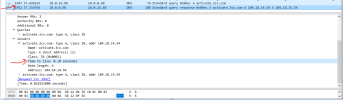
@Charles_3CX We were able to do a packet capture today and the results are below. This is with the AD DNS Forwarder set to 8.8.8.8. The DNS cache was flushed immediately before the capture was started.

2022-07-14 21_23_56-Window.png

Our internal 3CX server is 10.0.16.88 and our DC is 10.0.0.60. You can see the DNS query from the 3CX server to the DC, then DC would have to query 8.8.8.8, and then the DC sends the results of the lookup back to the 3CX server.

The interesting part to me was that the response/answer had a TTL of 0 seconds. I'm not sure why it would be and if that would be causing the issue. I checked other DNS records on our network and they all had TTLs of more than 5 minutes, so it's not defaulting newly created records to 0.

What are your thoughts?

Thanks.
 
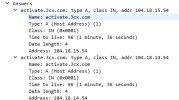
In my capture replies had a TTL greater then 0 seconds
1657855333128.png
 
To clarify, if you put 8.8.8.8 as the primary DNS on the PBX machine, this works, but when you put your DC as the primary DNS, this fails correct? If so, you need to check the DNS on the DC and correct the issues there, as this is a reply from your DC and not does not sound as though it has anything to do with 3cx itself.
 
Status
Not open for further replies.

Latest Posts

Forum statistics

Threads
111,934
Messages
589,822
Members
164,814
Latest member
Ruben756