License error on V18 Update 8(935)

Status
Not open for further replies.

brienf

Platinum Partner
Advanced Certified
Joined
Feb 5, 2020
Messages
6
Reaction score
3
Hi all suddenly this afternoon our linux instances on premise and self hosted are showing the following error on the license screen "(license_error.HttpsErr_InvalidTrustedStorage)", anyone else know what is causing this or is it a 3CX error.
Logging it with them too.
 
Hi Brienf, We are aware of the issue and are currently investigating.
 
  • Like
Reactions: brienf and N_G
I'm having this error on all of my instances, in several cloud environments. Two are waiting on license renewals and it won't update because of it.
 
Yup - client called with BLF issues, no active status change
seen it before with a client was switched to FREE because they had not registered (we had but they had not)

I can confirm today this issue is affecting my clients - the one above is currently on .935
and my own in house system. cannot refresh license info
They are investigating - we did have another AWS issue with Automate RMM this morning. brief. let's hope this is too.,

https://www.3cx.com/community/threa...vation-failed-license_error-httpserror.50217/
same error back in 2017
 
Last edited:
Hi,
I have the same problem: license_error.HttpsErr_InvalidTrustedStorage
Please resolve the problem soon.
Thank you
 
Add another one to the list of affected users with a new license trying to get registered.
 
We are working on this, its an issue with SSL.com certificate. Unfortunately its going to require an update to be installed. However all systems will continue to work you can just not renew your subscription at this point. We hope to have an update within 24 hours. Apologies for this inconvenience.
We will just have to wait
 
  • Like
Reactions: N_G
Yes, this does affect systems that have an expiring license that expire TODAY but have been actually renewed but our systems cannot reach out for updated license information, so if it's not fixed by tonight, I have systems that have purchased renewals that still will expire. Updated SSL certificate shouldn't take this long to resolve.
 
On trying to deploy new system:
1694457909750.png
 
Several wasted hours before reading this post.
 
I reinstalled the new system thinking I did something wrong, but here we are
 
Several wasted hours before reading this post.
Same here. Thought I lost my mind spinning up a new instance on a new computer for a client, so un-installed and re-installed a few times till I found this thread with the exact same issue. Hopefully it is resolved soon enough.
 
Same here. Thought I lost my mind spinning up a new instance on a new computer for a client, so un-installed and re-installed a few times till I found this thread with the exact same issue. Hopefully it is resolved soon enough.
Fingers crossed.
 
Today, when installing a new system on a client, the same error appears. As we are in the testing phase, we would validate later, but I see that the error is systemic.

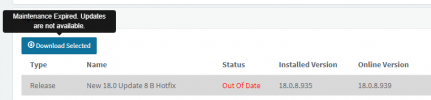
Including informing that the maintenance has expired. This is a POC license, just for the customer to test.

1694459138021.png
 
Hi there, we where impacted too and unfortunately we are in the middle of a brand new On premise installation so our product is not active and updates are not available either. What to do ? Please...

1694461837143.png

1694461944313.png
 
  • Like
Reactions: CPMM and bb9
We are trying to activate a new licence and new instance. How do we get an update on a new instance as updates need an active licence.
 
  • Like
Reactions: CPMM and DixIT
Maintenance Expired...
1694464016749.png
 
  • Like
Reactions: DixIT
Thanks for posting, I was just about to start a new install. For those of you that are partners, I usually install with a trial license anyway then purchase the correct size. I wonder if that is allowed? Perhaps I should wait until tomorrow, when (hopefully) the ISO is updated.
 
Status
Not open for further replies.

Forum statistics

Threads
111,973
Messages
590,078
Members
164,896
Latest member
sameage