Solved Limited external calls from Queue and Ring group

Status
Not open for further replies.

akovac93

Forum User
Joined
Nov 17, 2020
Messages
17
Reaction score
2
I have a Enterprise license with 8 simultaneous calls and a trunk with unlimited simultaneous calls.
I have 6 agents in the Ring group (Ring All Strategy) or Queue. I set on all extensions Forwarding Rules -> External Calls -> Forward to Mobile to make calls go directly to the mobile phone (external call).
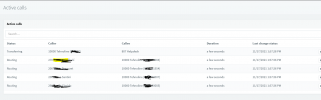
The problem is that it rings only 4 random agents, it should also ring 6. If one of the agents hangs up, it rings the next agent. As if there is a limit of 4 "Ringing status".
Can this limit be removed?

Thank you
 

Attachments

  • 3cx-limit-ringing-from-queue.PNG
    3cx-limit-ringing-from-queue.PNG
    32.4 KB · Views: 9
Hi @akovac93,

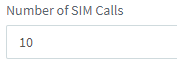
Can you check your SIP trunk for the number of SIM calls?

1637156882436.png

Do you only have one call coming in when testing this?
 
Hi @VasilisV_3CX

Number of SIM Calls: 10

1637158255552.png

Yes, an incoming call goes to a queue that calls agents on a cell phone. At the same time it rings on only 4 cell phones. It should be at 6.
 
@akovac93,

To be sure, while this happens, there are no other calls on the PBX (in other words, no way that your license limit could have been reached)?
 
@VasilisV_3CX

Yes.
At that time there were 5 calls (1 incoming and 4 outgoing calls). The limit is 8.
 
Hi @akovac93,

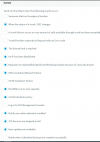
Can you enable the license limit notification in Settings >> Email >> Notifications. Do you receive an email when you repeat the test?

1637161131338.png
 
Hi @akovac93,

I think it's better to test this using only internal extensions. You'll need a clear PBX (no calls in or out).

Have an internal extension call the queue, what happens?

If only 4 get called, can you check the activity log to see if the others were attempted?
 
I set on all extensions Forwarding Rules -> External Calls -> Forward to Mobile to make calls go directly to the mobile phone (external call).
This means...4 calls to agents = 8 simultaneous calls. One in, and one back out for each agent.
 
How many trunks have you got with your SIP provider?
 
Hi @ttelekom,

Can you enable verbose logging on the system? From the Dashboard >> Activity Log >> Settings >> Verbose. Run the scenario again. Check the activity log to see what is happening, it will give you a play by play of what the PBX is doing so you can better isolate why the other extensions aren't polled.
 
Hi @VasilisV_3CX

Selects only 4 extensions.

Code:
2021/11/19 08:23:45.433|28200|0008|Info|207,Created,350000,350000:655000
2021/11/19 08:23:45.470|28200|0008|Info|207,PBXCallId,83
2021/11/19 08:23:45.470|28200|0008|Info|207,Waiting
2021/11/19 08:23:45.470|28200|0008|Info|207,CallerInfo,350000,350000:655000
2021/11/19 08:23:53.773|28200|0009|Info|207,Polling
2021/11/19 08:23:53.773|28200|0009|Info|207,Selected,[270@807, 200@807, 250@807, 290@807]
2021/11/19 08:23:53.854|28200|0008|Info|207,DialAgent,807.dc180d1a96164af0b8408295377a5b67,270,270
2021/11/19 08:23:53.856|28200|0008|Info|207,DialAgent,807.6679b966eef9493bb5a909950c493a8d,200,200
2021/11/19 08:23:53.896|28200|0008|Info|207,DialAgent,807.14bd260d573c4dd09d278018283ef9b3,250,250
2021/11/19 08:23:53.999|28200|0008|Info|207,DialAgent,807.780bac5258c142199e4ba88ccc2eda0c,290,290
2021/11/19 08:24:16.987|28200|0008|Info|207,OutCallEnd,807.14bd260d573c4dd09d278018283ef9b3,487,Cancelled
2021/11/19 08:24:16.987|28200|0008|Info|207,OutCallEnd,807.6679b966eef9493bb5a909950c493a8d,487,Cancelled
2021/11/19 08:24:16.987|28200|0008|Info|207,OutCallEnd,807.780bac5258c142199e4ba88ccc2eda0c,487,Cancelled
2021/11/19 08:24:16.987|28200|0008|Info|207,OutCallEnd,807.dc180d1a96164af0b8408295377a5b67,487,Cancelled
2021/11/19 08:24:16.987|28200|0008|Info|207,InCallEnd,487,Cancelled
2021/11/19 08:24:16.991|28200|0008|Info|207,QCallEnd
2021/11/19 08:24:16.991|28200|0008|Info|207,Q.807: [350000] (hist_id: 0000017D37146760_83)
  Time: 11/19/2021 8:23:45 AM - 11/19/2021 8:24:16 AM (00:00:31.5217235)
  Waiting: 00:00:08.3035361
  Polling: time: 00:00:23.2142471 (1 rounds), agents dialled: 4, rejected: 0, timed out: 4
  Failed: Caller dropped the call
 Result: WP
 
I see, so in this log, it looks like Extensions 270, 200, 250 and 290 were polled.
Are these same Extensions polled on EVERY call? Or on the next call do these extensions change?

If it always polls the same 4 extensions, the check that the other extensions:
  • Are "green" in the Management Console --> Users
  • Are logged in to the Globally Logged into the Queue
  • Explicitly logged into this Queue. To check this set an extension as a Queue Manager to this Queue, log into the WebClient and from the Panel, check that they are logged in.
 
Extensions are changing.

Code:
2021/11/19 08:55:36.599|28200|0009|Info|229,Selected,[270@807, 250@807, 260@807, 201@807]
 
Extensions are changing.

Code:
2021/11/19 08:55:36.599|28200|0009|Info|229,Selected,[270@807, 250@807, 260@807, 201@807]
Do me a favor, replicate it again, then go to the upper-right corner of your Management Console there is the "Support" drop-down, then click on "Generate Support Info" (while in Verbose logging of course).
This will send an email with a download link to the admin email.
Download the file, upload it to a filesharing service of your choice, then send me the download link in a PM.

PS: If you haven't any 3rd-party apps that interact with 3CX in any way, remove them and try again.
 
  • Like
Reactions: Evolute IT
After investigation it seems that the extension that were not ringing were either explicitly logged out of the queue or they were not registered.

For anyone else experiencing any similar issue or question, I'd suggest taking a look at the 3CXQueueManager.log file for more info which will provide information with regards to extension registration status and which extensions are being polled per call.
 
Extensions have been deregistered. The problem was solved by placing a check mark on "Ring my mobile simultaneously".

Thank everyone for your support!
 
  • Like
Reactions: NickD_3CX
Status
Not open for further replies.

Forum statistics

Threads
111,974
Messages
590,081
Members
164,899
Latest member
mazet