Unsupported Linksys spa 3102 help please:(

Status
Not open for further replies.

xxxsatrvxxx

Free User
Joined
Oct 3, 2021
Messages
17
Reaction score
0
Hi , I have a Linksys spa 3102 that i want to use as an fxo gateway for 3cx , I have seen multiple forums and tried all that k could but no avail:(. I hope that you could help me because my other PBX has failed and I'm looking for an alternative (3cx) as Fast as I can , my issue is that it will not register as a gate way , on the config site of The gateway it shows "Registration State: Failed". Can some ob release help me on this issue and if any info is needed please ask , thank you!!
 
Update , it registers on my laptop but not on the pc that I am trying to get it to run on.
 
If you are in a hurry it seems it would be easier to call forward to a SIP trunk with a supported provider for now, which will give you time to get the SPA3102 sorted out.
 
  • Like
Reactions: YiannisH_3CX
Are you familiar with the 3102? Is the 3102 on the same LAN as the 3CX server?
 
  • Like
Reactions: xxxsatrvxxx
If you are in a hurry it seems it would be easier to call forward to a SIP trunk with a supported provider for now, which will give you time to get the SPA3102 sorted out.
It ok , the phone is corrected directly at the moment so it's okay for now :)
 
If you do a search of the forum, I have previously gone into detail, about configuring the 3102 to use the FXO port. Pay attention to the local port being used by the FXO and FXS (they must be unique), that is where many people have problems.
If you still require assistance in getting it to work, post back.
 
  • Like
Reactions: xxxsatrvxxx
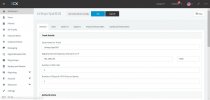
Yes, I have both of the internet ports set to 5062 I have tries every way , connecting the ethernet wire directly to the system in question and try to run it , but no :( send screen shots of the screens and I hope you can help me.
 

Attachments

  • 3cx console.JPG
    3cx console.JPG
    76.8 KB · Views: 36
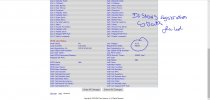
  • Failed reg.JPG
    Failed reg.JPG
    114.7 KB · Views: 37
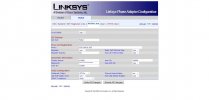
  • spa3102  config.JPG
    spa3102 config.JPG
    75.2 KB · Views: 37
The middle post also shows the line voltage at zero, which means there is no PSTN line detected.

As far as the no registration.... what does the 3CX Activity Log show? Any failed attempts? Incorrect password, etc?
I assume you assigned the 3102 a static IP, and you are using the Internet (blue) port to connect to your network.
 
The PSTN line is not connected yet as I just want to make it register before I check it fully. I have connected the internet wire to to the blue port ,I will turn the pc on and send you the activity log , thanks for your help.
 
Change your Register Expires to something like 1700. 90 seconds is way too often to re-register. Make sure that the IP, of the 3102, has not been blacklisted by 3CX.

"Update , it registers on my laptop but not on the pc that I am trying to get it to run on."

Can you explain what you mean by this...
 
so I have a new laptop , so I decided to try it on that , and it registers and it works perfectly fine as intended , so I thought it was a firewall issue and I replicated the laptop setup on my other laptop that I am trained to run it on , but it didn't work :(
 
I'm still not clear... you installed the 3CX PBX on one laptop, and the 3102 was able to register, or, you installed the 3CX windows phone on the laptop, and it was able to register with your 3CX server?

If it's the former, then obviously something (some sort of firewall setting?) is preventing communication , in one direction. In this case, then I have to assume that the 3102 settings are good. You'd have to make use of the Activity log to see if, the second install, that fails, is getting a registration attempt, or it is, but is not reaching the 3102.
 
If I give you access of the computer , will you be able to have a look at it , or can you please give me your phone number so I can call you and we can sort something out , thank you.
 
Neither of those are a good idea..
What does the 3CX Activity Log look like (you may need to set to Verbose), when using the computer that does not work?

Does it show a registration attempt, and failure?

If not, then you have a computer/firewall/network issue that you will have to work out yourself.

As I said, if the 3102 works correctly,(calls in both directions), when 3CX is running on one computer, then it is not a 3102 configuration issue, it will be something different, on the non-working computer settings or something is blocking, or misdirecting the registration attempt.
 
okay , im going to have a look and ill reprt back to you with any more info , thank you for your help.
 
Okay , So the Activity log doesn't show any trace of the registration , I can see the Web Meeting hub gets registered but not the Linksys Spa 3102 , I then installed 3CX on another laptop and it also didn't register or show any trace of it trying to register , I am very confused and I need help thank you!
 
On the 3102, did you install a Primary NTP server, to set the time correctly? If not, try doing that to see if it is able to get an outside connection. Check the Status page to see if the time is correct. If that does not work, then the network settings on the 3102 may not be correct. If it does work, then the 3102 may not be trying to contact 3cx on the correct IP./ port

If it does not work, then post the Router/WAN setup page (advanced settings), and the full PSTN page. Don't worry, passwords don't show, and anything that does is all internal settings and not accesable to a hacker.

Did you do a full "factory reset" on the 3102 before setting it up for 3CX?
 
Yes , I did install a NTP server and the time is correct. I have reset the device a few times and it's still not working. I'll send you the photos as soon a s I get home , again , thank you a lot for your help.
 
Do you currently have Line 1 disabled?
 
Status
Not open for further replies.

Latest Posts

Forum statistics

Threads
112,324
Messages
591,897
Members
165,475
Latest member
lastshadow