Solved Login with Microsoft 365 SSO

Status
Not open for further replies.

Vinnied

Silver Partner
Advanced Certified
Joined
Apr 3, 2019
Messages
68
Reaction score
27
Hello,

Could there be an option to make Microsoft SSO login more easy.
Maybe if you give an ID or name in the app there your beeing directed to the right 3CX server.
Or maybe something in the background with Microsoft Entra/Intune so the app gets autoprovisioned?
1702985490201.png
 
Hi @Vinnied

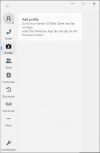
The new 3CX Softphone can only be provisioned via the Web Client or PWA, after a user logs in. You can install it via InTune or the Microsoft Store but the provisioning is done individually by the user.
 
  • Like
Reactions: Evolute IT
Oke so there is no option for SSO login in the new Microsoft Store 3CX App?
Only through sso login in the webclient and then provisioning.
Feels like 3 or 4 steps extra, this should be able to do easier and faster.
I know its not there now, but maybe you could find a better solution in the future.
Especially for mass out implementation.
 
  • Like
Reactions: EPSupport
This only needs to be carried out once. Once provisioned the application will start automatically. It is a client that will be used for making/receiving calls. Chat, meetings, etc will still utilize the web client or PWA.

The provisioning requires a VERIFIED and AUTHENTICATED user to provision initially.
 
I personally think the app should have a "login" button on it when it's not been provisioned, this should take you to the web client url where you can login with Microsoft 365/extension & password. It should then pass the provisioning details back to the app in some form to configure it.
 
This only needs to be carried out once. Once provisioned the application will start automatically. It is a client that will be used for making/receiving calls. Chat, meetings, etc will still utilize the web client or PWA.

The provisioning requires a VERIFIED and AUTHENTICATED user to provision initially.

Hi Nicholas,

If you have multiuser computers, those people need to do that everytime / computer.
How about admin access to all deployment packages so we can provision the app on user login to a computer?
Right now, we would need to manually collect the packages / internal number.

This way, it would not even be necessary for a user to login to the webclient at all.
It easily gets confusing for a user to tell all the softphones apart (webclient, PWA, MS Store).
Every manual action we can reduce, makes the product a step user friendlier.

This is just a suggestion, would make SSO login obsolete, as the user would already be logged in to windows which in turn activates the deployment script.
 
Status
Not open for further replies.

Forum statistics

Threads
111,954
Messages
589,921
Members
164,851
Latest member
DrunkeMeister