Massive database size

SweetAction

3CX MVP
Gold Partner
Advanced Certified
Joined
Jan 19, 2018
Messages
3,458
Reaction score
2,314
3CX v20, U8, 8SC with a 256gb SSD backing it
Came in to find no free space on disk. Vast majority of consumed space in postgressql,

schema | table_name | total_size

-----------------------+---------------------------+------------

_timescaledb_internal | bgw_job_stat_history | 189 GB

public | cdroutput | 1955 MB

public | cl_party_info | 446 MB

public | callcent_ag_dropped_calls | 185 MB

public | cl_calls | 180 MB

public | myphone_callhistory_v14 | 121 MB

public | callcent_queuecalls | 90 MB

public | blacklist | 5328 kB

public | callcent_ag_queuestatus | 3384 kB

public | cdrrecordings | 2920 kB

(10 rows)

I ran the 3CX database maint command from inside 3CX dashboard and also updated this instance to u9, I'm just wondering if this is common or some sort of edge case?
 
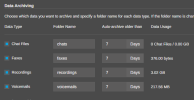
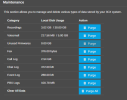
Hi, how big is the call log and chat log in this system? go to the System menu ---- Maintenance

From what you shared above the actual application data (cdroutput, cl_party_info, cl_calls, etc.) is completely fine and only taking up around 2.5 GB combined. However you may compare this with the info available from the System menu ---- Maintenance

The entire 189 GB bloat comes from a single internal table: _timescaledb_internal.bgw_job_stat_history.

My suggestion to avoid touching the DB
  • Take a 3CX Backup via the Management Console
  • Download the .zip backup off the server.
  • Reinstall 3CX using new clean VM/instance.
  • The restore process rebuilds the database schema completely fresh, leaving that 189 GB table behind.
 
Last edited:
  • Like
Reactions: SweetAction
Hi, how big is the call log and chat log in this system? go to the System menu ---- Storage

From what you shared above the actual application data (cdroutput, cl_party_info, cl_calls, etc.) is completely fine and only taking up around 2.5 GB combined. However you may compare this with the info available from the System menu ---- Storage

The entire 189 GB bloat comes from a single internal table: _timescaledb_internal.bgw_job_stat_history.

My suggestion to avoid touching the DB
  • Take a 3CX Backup via the Management Console
  • Download the .zip backup off the server.
  • Reinstall 3CX using new clean VM/instance.
  • The restore process rebuilds the database schema completely fresh, leaving that 189 GB table behind.
It's fairly small.
1786030848162.png
1786031267283.png

What is the _timescaledb_internal.bgw_job_stat_history table used for?

(ETA to add second screenshot)
 
Last edited:
What is the _timescaledb_internal.bgw_job_stat_history table used for?
That was weird, the specific table records background worker job stats, it could be that a background job got stuck or encountered an error loop, that then can write thousands of entries per minute into this log table, you could also check the postgresql logs.

However, as mentioned before, I suggest you archive your existing recording and voicemails, take a backup and move the pbx to a fresh VM, instance.
 
  • Like
Reactions: SweetAction
take a backup and move the pbx to a fresh VM, instance.
I'd love to do this, but it means putting someone on a plane (or driving 900 miles) to reinstall 3CX on a physical box (Lenovo uSFF, without vPro). Any other options are welcome, but understand if we don't have any.
 
  • Like
Reactions: Evolute IT
I'd love to do this, but it means putting someone on a plane (or driving 900 miles) to reinstall 3CX on a physical box (Lenovo uSFF, without vPro). Any other options are welcome, but understand if we don't have any.
remote support tool?? cheaper than a plane ticket!
 
I'd love to do this, but it means putting someone on a plane (or driving 900 miles) to reinstall 3CX on a physical box (Lenovo uSFF, without vPro). Any other options are welcome, but understand if we don't have any.
@SweetAction The thing is we are talking about the database, lets say you try to truncate that table for clearing the contents and free up disk space, but if something goes wrong, or do something improper to the database, corrupting it or something similar, you will have to reinstall the PBX using the backup. So better going and reinstall it in a fresh vm/instance if it is possible for you. Archive your recording and voicemail files, take a backup off the server and a snapshot.

Have a good day!
 
  • Like
Reactions: Evolute IT

Latest Posts

Forum statistics

Threads
111,782
Messages
588,963
Members
164,575
Latest member
yggggyyg