Migrating 3CX to Different Environment

Status
Not open for further replies.

tovar

Customer
Joined
May 1, 2019
Messages
7
Reaction score
1
I am looking to move our 3CX instance to Amazon Web Services.

I have a few questions on best practices for migrating to a different environment.

Ideally, I would like to restore an existing backup configuration, however I don't want to cease services on the original PBX. From what I've read it seems that once the new instance activates the old instance will stop receiving traffic. I want to be able to test the new instance prior to decommissioning the old instance.

Is it possible to restore data that would contain phones, extensions, groups, SIP trunks, Inbound/Outbound rules, Ring Groups, and Call Queues?

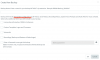
Is the "Full System Configuration" under Backup and Restore what I'm looking for to restore the above options? I would not check the option for "License Key Information, FQDN & Conference" (see screenshot below)

What happens when only the "Full System Configuration" is restored? Will any services cease on the original instance? Since FQDN was not restored, is there an an option to create a different FQDN?

Lastly, once I have tested the new instance, is it possible to reuse the existing license that was on the original instance? What are the challenges to reuse this license?
13023
 
Hi tovar,

There will be some downtime, you have to plan this during out of business hours.
If anything goes wrong you can turn on the old server and you would be working again.
You cannot migrate licenses or FQDN after installation. Here is what I would suggest you do:

1.) Get a free demo key. It costs you nothing and you can use it to practice setting up a PBX in AWS and ensuring it works well. When you are happy that you can set up a system there quickly, scrap the demo machine and go ahead with your migration. Don't experiment with a half-and-half migration, do it all in one go instead.

2.) You did not say where the old server is hosted. How are the phones provisioned? Local, STUN, SBC?

3.) You did not say if you use a 3CX or a Custom FQDN. This is important to make the right decisions before migration.

4.) You did not mention if this is a Standard/Pro/Ent license. It affects the DNS update of the FQDN.


Some general advice would be the following

  • Update your existing PBX and firmware first (makes things easier)
  • Take a full backup off the current machine
  • Plan your migration out of business hours
  • Shut down the old server
  • Restore your full backup in the new location
  • Bring the phones back online
  • Check they work and trunks can make calls
  • Update your trunk provider with your new IP if you use IP restriction
  • If you fail for whatever reason, shut down new machine and boot up old machine, you will have time to get a DNS update before the office opens
 
Hi John,

To answer your questions
You did not say where the old server is hosted. How are the phones provisioned? Local, STUN, SBC?
Old server is hosted locally in our office ESX host (VM). Phones are locally provisioned.

You did not say if you use a 3CX or a Custom FQDN. This is important to make the right decisions before migration.
We're using a 3CX FQDN

You did not mention if this is a Standard/Pro/Ent license. It affects the DNS update of the FQDN.
We're using a Pro license.

After reviewing the options outlined, it seems that obtaining a demo license to test the trunk and then doing migration will be the way to go. Does anything change after I've posted my answers to your questions?
 
Hi tovar,

Provisioning
Ok so since the server is local and it will move to the cloud, you will first need to decide how the phones will connect. Your options are to use STUN, SBC or VPN.
https://www.3cx.com/sip-phones/

- If you have local gateways / ATAs or Local-only type devices your only option is VPN (so they can continue to appear as local).

- If you have very few phones you can use STUN and manage your firewall config accordingly in the office for each and every phone (provided they are supported phones that can do STUN).

- If you have no gateways, and more than a handful of phones, I would highly recommend an SBC (which can by a physical machine or an ESXi VM) that takes care of a lot of hassle on both ends.

- See the guides here if you are not sure what provisioning your current devices support https://www.3cx.com/support/

FQDN
Since you are using a 3CX FQDN with a Pro license, it will take about 6 hours to update hence this needs to be done right after business hours (STUN and SBC and remote clients depend on it). It should update and be ready before the next business day, at which point the phones need to be reprovisioned (so the PBX can be reachable to them). If using VPN, you can provision straight away as local because it relies less on FQDN, but remote clients might have to wait until the next DNS refresh.
https://www.3cx.com/docs/fqdn-management-allocation/#h.a31p7g6iztpp

License
You will not be able to migrate a live system as you originally intended. Your existing Pro Key has your FQDN bound to it, and your demo key will also have your demo FQDN bound to it. When you try to replace the key after testing it will not allow you to proceed.

The replace key function is for people who upgrade to a new key that does not yet have an FQDN and this would instantly migrate their existing demo FQDN over to the Pro key (leaving the demo key now FQDN-less). Your only solution would be to reinstall the system from scratch (using a backup file with your FQDN included) in order to maintain your current FQDN in the new instance.


Let me know if you need any more clarifications and I will be glad to assist.
 
Status
Not open for further replies.

Forum statistics

Threads
111,934
Messages
589,819
Members
164,811
Latest member
aurorasigntrtechitnet