- Joined
- Aug 22, 2026
- Messages
- 1
- Reaction score
- 0
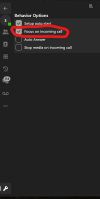
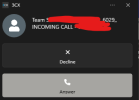
The "Focus on incoming call" setting is a 3CX great feature! When activated, see screenshot, a user can click on the button "Answer" on the windows notification, and this will bring the 3CX desktop app in front of the other applications.
However, if a call is answered using the physical button on the headset, the 3CX app does not come to the foreground. It would be fantastic if this function also worked when answering via the headset.
Reproduction details for this minor issue:
- Latest Windows build 1190
- Setting: "Focus on incoming call" enabled
- Integration active: Jabra Engage 75 SE or Jabra Engage 75; probably further (all?) headsets
- Answer call by pressing the physical button on the headset instead of the button in the notification
-> Result: 3CX app remains in the background despite the setting focus on incoming call
It would be great if this could be fixed in a future build to improve the client even further.
However, if a call is answered using the physical button on the headset, the 3CX app does not come to the foreground. It would be fantastic if this function also worked when answering via the headset.
Reproduction details for this minor issue:
- Latest Windows build 1190
- Setting: "Focus on incoming call" enabled
- Integration active: Jabra Engage 75 SE or Jabra Engage 75; probably further (all?) headsets
- Answer call by pressing the physical button on the headset instead of the button in the notification
-> Result: 3CX app remains in the background despite the setting focus on incoming call
It would be great if this could be fixed in a future build to improve the client even further.