


- Joined
- Jan 12, 2022
- Messages
- 5
- Reaction score
- 2
Hi
I am trying to get to live chat and have the latest version -
I am the admin and am confounded why I can not find the Messaging menu.
I did a migration to a new server from a backup. It was there before migration and after migration not there?
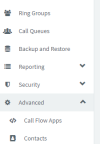
Screenshot 1 - current main menu with missing Messaging menu.
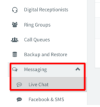
Screenshot 2 - What main menu should be with red markup showing menu items correctly.
Below for reference is where it should be. Any suggestions please?
Screenshot 1:
Screenshot 2:
I am trying to get to live chat and have the latest version -
| Version Number | 18.0 (Build 965) |
I am the admin and am confounded why I can not find the Messaging menu.
I did a migration to a new server from a backup. It was there before migration and after migration not there?
Screenshot 1 - current main menu with missing Messaging menu.
Screenshot 2 - What main menu should be with red markup showing menu items correctly.
Below for reference is where it should be. Any suggestions please?
Screenshot 1:
Screenshot 2:
Last edited:


