Mobile phone cannot access to 3CX server from 3G/4G network

Status
Not open for further replies.

Kane Wong

Free User
Joined
Oct 13, 2018
Messages
233
Reaction score
9
Hello all 3CX experts;

I am trying to configure my 3CX server to allow register mobile phone outside the LAN, the iphone and the android phone works fine with the 3CX app while using at LAN. When try to use through cellular network or from home wifi network, it is not able to registered the phone. I saw the following logs from the Dashboard.


The firewall check on 3CX server is success, all "Green" light except the "detecting SIP ALG... not detected".
The "Disallow use of extension outside the LAN (Remote extensions using Direct SIP or STUN will be blocked)" in Options of the extension is not enable.
The necessary tcp / udp ports are open subject to the 3CX sites.

What else should I check?

thanks!


Few minutes after, I try the app again, it is connected to the server and I can see the contact list in "Presense" but when I try to call another people, the call decline immediately.

Why?
 
check if all is done like it needs to be
https://www.3cx.com/docs/manual/firewall-router-configuration/

Try to re scan QR code to provision 3cx client
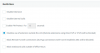
in extension settings, in provisioning tab, do you have this ticked
11341

Is your WIFI strong enough?
When in 4G, is your mobile provider giving you access to internet? is Voip use not blocked by your mobile provider?
 
Untick ' Block Remote Tunnel Connections (3CX App connections with Tunnel enabled & SBC will be blocked)' under Options
 
in options restrictions do you have this set up?
11346
 
What SIP transports are you using under 3CX app provisioning tab?

I had an issue before with mobile app using TLS for transport. The issue was under my "Security > Secure SIP/TLS" my certificate had disappeared. Could be relevant.
 
Is your FQDN resolving correctly?
 
I rescan the QR-Code again, it works.
 
But when I check the account settings on the 3CX app, the External PBX IP is pointing to the xxxx.my3cx.ca. If the external PBX IP must be use my3cx domain, not my company domain?
 
The external PBX IP will point to the external IP/FQDN you specified when you set up the PBX. Does your 3CX FQDN ping back with the correct external IP Address the 3CX PBX is going out on?
 
As above when you install the software you are given the option for 3cx domain or use your own domain.

3cx domain will save you so much hassle - the domain is managed, you get an let's encrypt ssl certificate which is applied to the server automatically.

If you select your own domain, you need to manage it and have the issue of applying an ssl certificate to the 3cx setup.

You probably need to setup spilt dns - so that internally the xxxx.my3cx.ca domain points to the internal IP of the 3cx server - https://www.3cx.com/docs/creating-fqdn-split-dns/
 
Few minutes after, I try the app again, it is connected to the server and I can see the contact list in "Presense" but when I try to call another people, the call decline immediately.

Why?

OK...so at this point, it did connect to the server. Which means the destination (FQDN), was/is correct, but, the dialled number failed. If you can get this to happen again, you need to look at the 3CX Activity log to see the reason for the call failure.
 
When I tested yesteray before rescan the QR code, I replace the external pbx ip with my own URL which is the company domain name but when the 3CX server setup, I believed that my coworker use the 3CX domain.

Which means, when I do the initial setup, if I use my own company domain and my own SSL, I can use my company domain for External PBX IP.
 
By using the 3CX domain, if the calls will be stored at 3CX company?
 
A domain name is just for us stupid humans so we don't have to remember IP addresses. It has nothing to do with where your 3CX is located nor the data inside.
 
Ohhh no. The call dialed from 3G/4G network decline again. No idea.
 
Yes, Standard License. in FQDN, I am using "xxxx.my3cx.ca".
Also, I am using Meraki MX64 firewall, the Fire Checker pass everything. I am wondering if the firewall drop something.
I can make calls from internal LAN.
 
If you did, originally, put in your own company FQDN, and that is still being used in the configuration file populating the device, then 3CX may be blocking registration/call attempts, because of that. Even though it is a valid FQDN resolving to the IP of your server. The 3CX Activity Log should show you any errors (and clues to what's wrong), IF the phone is making contact with the server, even if it is being rejected.
 
On mobile app, My account show myext@local_server_ip, eg. [email protected] where 192.168.1.200 is the 3CX server local ip, would it cause issue.
 
Status
Not open for further replies.

Latest Posts

Forum statistics

Threads
112,359
Messages
592,096
Members
165,533
Latest member
[email protected].