Need HELP with v20 FQDN & Firewall Checker using Sonicwall

Status
Not open for further replies.

tbc-tech

SOHO User
Joined
Jun 11, 2024
Messages
19
Reaction score
0
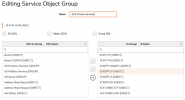
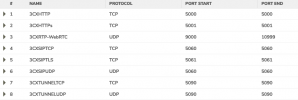
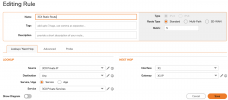
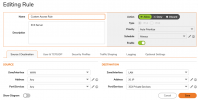
Hello and good day peeps. I am having issues and need some assistance with getting the FQDN to resolve the 3CX server private IP, so it will remove the "red error message" on the admin login landing page. Also with getting a good clean firewall check from 3CX. I have combed through all of the guides and forum posts that deal with or mention "sonicwall" settings and getting a good firewall check and setting up a "lookback" policy for the FQDN. I have created all of the settings manually and by using the "wizard" in the Sonicwall, but nothing seems to be helping. I know it is possibly something stupidly small, but I'm at a loss and need some help please. Check out the screenshots of how things are set up currently. Thanks

 

Attachments

  • 3CX NAT Rules.png
    3CX NAT Rules.png
    40 KB · Views: 39
  • 3CX Service Objects Group.png
    3CX Service Objects Group.png
    68.6 KB · Views: 36
  • 3CX Service Objects.png
    3CX Service Objects.png
    30.2 KB · Views: 29
  • 3CX Static Route.png
    3CX Static Route.png
    62.1 KB · Views: 31
  • WAN to LAN 3CX Access Rule Settings.png
    WAN to LAN 3CX Access Rule Settings.png
    63.5 KB · Views: 30
  • WAN to LAN 3CX Access Rule.png
    WAN to LAN 3CX Access Rule.png
    21.3 KB · Views: 36
Update, I was finally able to get most of the "firewall check" passed, all except for a couple of things. One being the SIP ALG "failed", yes I do have the "Enable consistent NAT" option active along with the "Enable SIP Transformation" disabled. The other thing is "3CX SIP Server" failed, but everything works good.
Also I can not get the FQDN to translate to the IP of the 3CX server, no matter what I do. Like I mentioned everything passes and seems to be working correctly except for those 2 things that have failed. I can log into the admin console using "https" and the ip of the 3CX server, but can not access using the FQDN.
Any help and/or guidance would be greatly appreciated.
 
Hi there.
We only have one guide for Sonicwall, but it's a bit outdated for the interface of the device etc.
Another guide here will explain to you in detail how the Firewall checker works in case you wish to use a Wireshark tool to dig deeper.
 
Hi there.
We only have one guide for Sonicwall, but it's a bit outdated for the interface of the device etc.
Another guide here will explain to you in detail how the Firewall checker works in case you wish to use a Wireshark tool to dig deeper.
Thank you very much for the help. Come to find out the SIP server "device" was not being recognized by the 3CX server whenever the scan was being performed. I got that resolved.

Now I just need help with with getting the 3CX server to recognize the FQDN login. Currently I can login to the admin console using the internal IP of the 3CX server over "https", but can not using the FQDN or the "external IP" as "recommended". Any help with this would be greatly appreciated.
 

Attachments

  • 3CX Admin console error.png
    3CX Admin console error.png
    12.2 KB · Views: 14
You are welcome, glad that the guides above were helpful.
So now, if you use URL and FQDN, do you see the same error?
Did you try from multiple PC in your network? Does it mean you edit your host file there or your PC does DNS request and contact your server directly?
 
You are welcome, glad that the guides above were helpful.
So now, if you use URL and FQDN, do you see the same error?
Did you try from multiple PC in your network? Does it mean you edit your host file there or your PC does DNS request and contact your server directly?
Yes, I do see the same error whether I try the FQDN or the external IP.
Yes, I tried different pcs and also macs, no different. Have not edited the host file and DNS request is from google 8.8.8.8, which is what is programmed in our router/firewall. We do not have an internal dns server.
I tried to ping the FQDN and it resolves to our external IP, but not the IP of the 3CX server. Which I think is the issue since the 3CX server is displaying that error message when I try to access the admin console using the FQDN.
Thanks
 
So in your case you have 3CX local to the Webclient, and Webclient connect to the 3CX via the Full public IP address?
 
So in your case you have 3CX local to the Webclient, and Webclient connect to the 3CX via the Full public IP address?
If you are referring to the "webclient" as accessing the admin console through a web browser, then I would say yes. Here is how it is set up. 3CX v20 is installed and set up on a computer/server, which in order for me to access the admin console I have to "log into" the admin console via a web browser from another computer on the same network as the 3CX server. My main thing is I want to get rid of the red error message box at the top of the login page (image in previous post). I mean I can login using the static IP of the 3CX server to manage what I need to, I just want to figure out how to remove the error message. I assumed it has to do something with how the software is interpreting the FQDN and the static IP of the 3CX server. I do not need any access from outside our internal network as we do not have any employees that use a phone remotely or work out of the office.
As for the "webclient" connecting to the 3CX via the public IP. I would assume this or connecting via FQDN are the two options the software is looking for, not sure if both are needed or just one of them. So to possibly answer the the second half of your question, the only reason I would want the 3CX server to pont back to the public IP, is due to the error message I get when on the login page of the admin console.

I hope this makes sense. Thanks again for the help.
 
If you are in the same network, you should contact the server directly. Are you able to create A record in your local DNS and point 3CX internally to the local IP of the 3CX System? So that when you request 3CX FQDN, your local DNS will return the local IP of the system? (as this is the requirement when 3CX is local to the user and split DNS is required)
If the connection is secure, you should not have that error message.
 
If you are in the same network, you should contact the server directly. Are you able to create A record in your local DNS and point 3CX internally to the local IP of the 3CX System? So that when you request 3CX FQDN, your local DNS will return the local IP of the system? (as this is the requirement when 3CX is local to the user and split DNS is required)
If the connection is secure, you should not have that error message.
Yes, I am connecting to the server directly.
To answer your question about creating a DNS record, we do not have a DNS server on-site all DNS queries are handled from within our firewall, which has our ISP's DNS configured, which I can change it to Google's DNS or anything else. I hope that makes sense to that question?
Question regarding FQDN request, this is what I've been trying to configure from within our firewall, is to make a rule that when I log into the 3CX server I don't get the error message in red at the top of the screen. Like I mentioned I can log into the server using "https://ip address:5001", so the server is seeing a "secure connection", but will not work with FQDN address, hence the "trying" of creation of a firewall rule to associate the FQDN address to the servers IP so it can be resolved when typing in the address bar on a local computer.
Like I mentioned previously all of the "firewall tests" have passed, just having an issue with getting the FQDN to associate with the IP of the 3CX server.
Hope this makes sense also. Thanks again for all of the help so far.
 
Your options are
1) setup a local DNS server to handle inside DNS or otherwise handle DNS (for example the Host file on a Windows PC)
2) Setup NAT Hairpinning / Reflection / whatever your device calls it
3) Live with the warning

The cert is for the named FQDN. You cannot get the cert to validate by visiting from an IP. Somehow, your FQDN will need to resolve to the machine for no errors to be present.
 
  • Like
Reactions: OlegR_3CX
@tbc-tech thank you for the update and description too.
As mentioned by @SweetAction it seems that you will need to use option 2 in your case, as if you go via IP address and https, this will always be the case (you can't remove it), and expected.
 
Your options are
1) setup a local DNS server to handle inside DNS or otherwise handle DNS (for example the Host file on a Windows PC)
2) Setup NAT Hairpinning / Reflection / whatever your device calls it
3) Live with the warning

The cert is for the named FQDN. You cannot get the cert to validate by visiting from an IP. Somehow, your FQDN will need to resolve to the machine for no errors to be present.
Thank you for the reply. I have tried to do option #2, but no success. I believe the "terminology" for our firewall would be "DNS Split" or "NAT Loopback". I have tried to follow the guides from the forums along with the guides in the KB section of "Sonicwall", but nothing seems to get it working. I may reach out to "Sonicwall" support to see if they can help me with the "DNS Split" or "NAT Loopback", so the FQDN error will go away on the admin login landing page. Any other suggestions from anyone is greatly appreciated. Thank you guys for all of the help so far.
 
  • Like
Reactions: OlegR_3CX
Status
Not open for further replies.

Latest Posts

Forum statistics

Threads
111,951
Messages
589,884
Members
164,842
Latest member
abdullah.alshehri@rewaa