New Chrome and Edge Browser Extensions (Beta)

N_G

Founder
Joined
Jun 6, 2006
Messages
4,857
Reaction score
9,291
Our new Google Chrome and Microsoft Edge browser extensions allow Click2Call from any website or CRM system. Available for 3CX users running version 18.

Click2Call from your browser or CRM​

With the 3CX extension, telephone numbers on any webpage or CRM system will be ‘hyperlinked’ allowing a simple click to initiate the cal...
Continue reading the Original Blog Post.
 
Last edited by a moderator:
Hi,
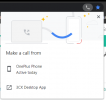
is there a way to disable the make call from mobile?
and have the 3CX desktop App by default
it will avoid an unwanted click
BR
1634239183272.png
 
Is it true you can't enable auto-dial? It seems like you have to click the call button in the webclient before the linked number will start a call.
 
Hi,
is there a way to disable the make call from mobile?
and have the 3CX desktop App by default
it will avoid an unwanted click
BR
View attachment 25163
@Mercuris This is not a 3CX dialog, its a dialog from the browser itself since it knows of more than one app registered for the tel protocol...... Basically asking you which one you want to use...
 
Last edited:
Is it true you can't enable auto-dial? It seems like you have to click the call button in the webclient before the linked number will start a call.
Yes its a good idea definitely something we will try to do if possible...
 
Hi,
is there a way to disable the make call from mobile?
and have the 3CX desktop App by default
it will avoid an unwanted click
BR
View attachment 25163
Hello @Mercuris ,

Unfortunately this is something that is coming from Chrome or Edge browser in case that you have configured an app for tel: protocol.

You will still get this prompt in case that you click on a tel protocol link, not matter if you have installed or not the Browser Extension.
 
  • Like
Reactions: N_G
Where can these tel: // entries be managed in Chrome, because every customer will have this problem.
 
Am I correct if I say the chrome extension will cease to work if we don't upgrade from v16 to v18 in a few weeks?
 
Hi All.

Good work on the extension. However, the make call from pop-up is making the browser extension not work as it should. It wasn't like this in ver 16.
 
  • Like
Reactions: N_G
Hello @10m ,

Can you please be more specific on what do you mean by "not work as it should"?
 
  • Like
Reactions: N_G
Hi @Constantinos Constantinou

Although the browser extension triggers the 3CX dialer with the number ready to be dialled, the Chrome pop-up requiring we select the app to use to execute the call did not present itself in the previous version. I know the issue is from Chrome but there was click-to-call in version 16 without this pop-up. So it is a bit frustrating to have this pop-up interrupt the call process.
 
Back in v16 if you are referring to the old extension that was opening the old windows app, the browser version approx. was Chrome 8x something :)
Yes browsers are updating and they change their logic. Now we have Chrome 9x. So browsers in order to safeguard that they get your concent as a user that you are OK to use the configured app on your pc, for the tel protocol they show this popup.

If you are referring to the browser extension with the dialer, yes it was direct communication between website and extension as it is now in the current extension the Web Client option. No interaction with the OS to get the tel configured app.
 
  • Like
Reactions: N_G and Evolute IT
You may need to set Windows default apps for TEL: to 3CX Desktop App. Ours was set incorrectly and we got the Chrome popup instead of the app. Once set, the Chrome was bypassed completely.

It's a bit slow to trigger the app tho, but it works.
 
Thank you @Frederick Marcoux

I have the default app for Tel: set to 3CX Desktop App but the pop-up to select mobile phone or the 3CX Desktop App still pops up. Is there any other thing that you did?
 
Thank you @Frederick Marcoux

I have the default app for Tel: set to 3CX Desktop App but the pop-up to select mobile phone or the 3CX Desktop App still pops up. Is there any other thing that you did?
Nope, beside not having set Chrome to do any calling (either via Android or else.)

It may ask you once to choose an app but then you can select Desktop App and it shouldn't ask again.
 
@Frederick Marcoux , unfortunately this should not be the normal case. On 94.0.4606.8 build of Chrome, I have tel protocol set to 3CX Desktop App and I get each time the prompt from browser to open the phone number with 3CX Desktop App.
 
@Frederick Marcoux , unfortunately this should not be the normal case. On 94.0.4606.8 build of Chrome, I have tel protocol set to 3CX Desktop App and I get each time the prompt from browser to open the phone number with 3CX Desktop App.
I will check my version but I should be on latest release + the beta extension and the latest app (beta I think.)
 
@davide.bonavita The plan is to replace the current extension with the new click 2 dial. This will work on both v16 and v18 however the current dialer interface will go. We are trying to reupload the old one as a separate extension but so far this has not been succesfull yet. Ideally you would move to v18. A mac version of our electron app is in the pipeline.... in case this was holding you back.
 
@davide.bonavita The plan is to replace the current extension with the new click 2 dial. This will work on both v16 and v18 however the current dialer interface will go. We are trying to reupload the old one as a separate extension but so far this has not been succesfull yet. Ideally you would move to v18. A mac version of our electron app is in the pipeline.... in case this was holding you back.
Hi Nick, thank you for your reply on Sunday! We're actually holding back because we have to retrain around 100 agents to use the new interface. They're scattered all around the world and they speak three different languages, and they are on Linux, Windows and Mac OS. Most of them uses the chrome extension on Windows, only a fraction uses the current client integrated in the web interface or the stand alone app. We were waiting until until v18 irons out all the wrinkles and with the clients available for all the environments.
So which are the current options for the MacOS users?

Thank you again and keep up the good work!
 
  • Like
Reactions: 10m

Forum statistics

Threads
111,994
Messages
590,183
Members
164,934
Latest member
bunthoeun.may