@NickD_3CX
Thanks for the information. It will take me some time to go through it and get some testing done. A couple questions, about terminology and my lack of understanding.
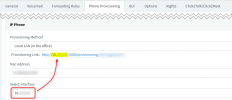
"The URL depends on what you have selected in the "Network" drop-down in the Extension Settings. In your case, make sure it is the 3CX NIC2 IP (VLAN3)."
I am guessing you mean the tab Phone Provisioning/IP Phone/Provisioning Method. If this is correct, I have it set to Local LAN (in the office) and the provisioning link shows the VLAN3 IP address with Port 5000. If this is not correct can you tell me where it is. I have looked through all the "Network" settings and they are set correctly.
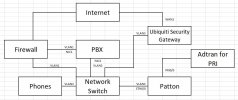
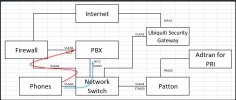
"Depending on the routing of the network, this *could* be arriving to the 3CX Server via 2 routes, and because the VLAN1 route is slower, it "overwrites" the entry on the MC as it has the same MAC and in fact is the same packet."
Would it be an option to have one of the NIC's ignore the multicast for that IP and port?
" if you want to provision this device even if it shows up like this, just select it, assign to extension, and before pressing "OK" in the Extension settings, in the drop-down select NIC2 which is the interface you want it to target and use."
Yes the phones are provisioning find even with the IP address incorrect in the MC and are usable. The main concern is the company phone book not showing up, but they all seem to be linked to the same issue.
"One more thing from the initial post I didn't quite get, do you have this problem with only 2 phones, or ALL phones?"
So most of the phones were provisioned when the PBX was on V16. The two I am having issues with were recently provisioned after updating to V18. Not saying there is a correlation to the upgrade since I have not provisioned a phone for quite some time before updating to V18, so some update may have changed before then that I did not see.
I will try and do some testing later today and see what I get.