• We do not provide troubleshooting help for unsupported phones. Please try with a supported phone.
  • V20 Update 10 Alpha 2 Learn more

New Phone Provisioning Issues

Status
Not open for further replies.

AMistich

Forum User
Basic Certified
Joined
Nov 25, 2020
Messages
27
Reaction score
1
  • 3CX Version: v18 U2 Enterprise Perpetual
  • Server OS: Windows 10
  • Is the 3CX Server Hosted and where? on-prem hosted
  • Trunk Provider? Comcast PRI
  • Has the Firewall Checker passed: Yes
  • Are custom Phone Templates being used: NO
  • Phones: Fanvil x3u
So I have 2 phones currently that I have done a factory reset on. When I provision the phones a few weird things is happening.
  1. The background that I have been using no longer is showing up on the phones.
  2. When dialing an extension, the name for the extension does not show up anymore
  3. In the 3cx Management console/Phones, newly added phones are showing the IP address of the security gateway. The phones do receive a proper IP address.
I have installed the newest templates and 3cx is up to date. All phones that have not been reset, still work the same. I have moved one of the phones to another switch to verify it is not a switch configuration issue. I have tried to reprovision the phones and factory reset them.

Has anyone else noticed these issues? Is it something with the new phone templates? Any help in where to start looking would be great.
 
Hi @AMistich

In the 3cx Management console/Phones, newly added phones are showing the IP address of the security gateway
This clues us in as to what may be happening, but only tells us half of the story.

You have not told us what firmware the phones are running, or what type of provisioning you used, and whether the phones are even on the same LAN range as the PBX or if the PBX is behind a different subnet/VLAN/DMZ situation. All of this is useful information in determining what may be happening.

If 3CX is seeing a different IP than the one the phones have then I would begin to suspect a couple of reasons as the bare minimum without making any assumptions:

a) You possibly misconfigured the phones as STUN instead of LAN (even though you say it's an on-prem deployment) and they report what they erroneously think is their public IP.

b) Your network/security gateway is changing something on the traffic coming from the phones, causing your PBX to see a different IP. This type of NAT can cause this issue.


I think you will need to investigate the networking side of things to get an answer because keep in mind that 3CX only reports what it is presented with.
 
@JohnS_3CX

I apologize, wasn't sure what information would be needed as I have only worked with VoIP systems for maybe 1.5 years. The Phones are on VLAN 3, the main domain network is VLAN 1. The PBX has two NICs one that is on VLAN 1 and one that is on VLAN 3. VLAN 3 IP addresses are given out by a Ubiquiti security gateway. The PBX is using the correct internal IP addresses. So the phones that show the internal IP address of the security gateway work correctly, and if you look at the IP address on the phone itself it has a unique internal IP address but on the phones tab of the PBX it is the internal VLAN 3 IP of the security gateway.

a)You possibly misconfigured the phones as STUN instead of LAN (even though you say it's an on-prem deployment) and they report what they erroneously think is their public IP.

Both phones are configured for LAN and are reporting an internal IP not our public IP address.

b) Your network/security gateway is changing something on the traffic coming from the phones, causing your PBX to see a different IP. This type of NAT can cause this issue.

The settings of the network and security gateway have not changed. Not sure what you mean about this type of NAT? I would not think it has anything to do with the IP address since it is showing an Internal IP address not a public one.
 
if you look at the IP address on the phone itself it has a unique internal IP address but on the phones tab of the PBX it is the internal VLAN 3 IP of the security gateway
This would then imply that the security gateway is performing NAT, so basically the phones are "hidden" behind a router and the PBX does not see them directly.

In this case, you would expect to see each phone pick up a unique IP when checking their screens, but on the PBX side you would see them all as having the same IP. This could lead to a number of issues with audio, provisioning and registration.

Here are some recommendations:

1. You are using two NICs on 3CX so make sure the NIC on VLAN3 does not have a default gateway defined in its IP settings. This entry should be blank for correct operation (so 3CX can understand that this is a separate VLAN).

Then, in the 3CX management console, under Network, you must pick the NIC that is in VLAN1 from the drop down menu (ie. the side facing the main network with internet access, not the side where the phones are). Do this first and reboot the server.

2. The Ubiquiti device may be misconfigured - or perhaps in the wrong place network wise.

Basically, the 3CX NIC2 that runs on VLAN3 should have an IP address in the same range as the phones (ie. if the phones are in 10.10.1.xxx so should the NIC2 of 3CX). But now, it appears that the phones are hidden behind the Ubiquiti, and 3CX is outside of the Ubiquiti network, appearing as an external entity. This is something that needs to be addressed. Not sure how to advise you to do this, but I'm hoping my description is enough to give you an idea of what needs to be done.

Finally look up RFC1918 addresses, and make sure that all your internal IPs for both VLANs are inside this range. If they are outside this range, 3CX does not support this setup and there is nothing that can be done unless you change the IPs to be compliant.

Let me know how it goes and we can take it from there!
 
1. You are using two NICs on 3CX so make sure the NIC on VLAN3 does not have a default gateway defined in its IP settings. This entry should be blank for correct operation (so 3CX can understand that this is a separate VLAN).

So Yes NIC on VLAN3 does have a default gateway that is set to the USG for the phone system. This has been setup by our 3cx vendor partner this way since the inception of moving to 3cx v16. The NIC on VLAN1 did not have a gateway. Removed gateway from VLAN3 NIC. When I did this, I could no longer get to the web or management portal using the FQDN. Put a default gateway on the VLAN1 NIC. Still no changed. Reverted back to default gateway on VLAN3 NIC and FQDN portal access was restored.

2. The Ubiquiti device may be misconfigured - or perhaps in the wrong place network wise.

The Ubiquiti device is setup and controlled by our 3cx vendor. Regular updates are done on the device. Configuration and placement has not changed since inception of 3cx v16. An update with the device could have added a new setting to change how 3cx sees the phones, so I will need to talk with the vendor.

Basically, the 3CX NIC2 that runs on VLAN3 should have an IP address in the same range as the phones (ie. if the phones are in 10.10.1.xxx so should the NIC2 of 3CX).

Phones and NIC on VLAN3 are in the same IP range. Also IP ranges are within RFC1918 addresses.

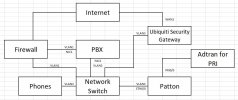
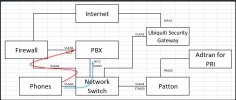
I have drawn up how the system was setup by our 3cx Partner vendor. Hopefully this clears some things up.
 

Attachments

  • PBX Setup.JPG
    PBX Setup.JPG
    69.3 KB · Views: 11
OK, now that we have a bot more information, let's recap. The issues you see are these:
  • The background that I have been using no longer is showing up on the phones.
    > IP Phones pull this via HTTP, with a request to the HTTP port of the 3CX Server (default 5000). The URL depends on what you have selected in the "Network" drop-down in the Extension Settings. In your case, make sure it is the 3CX NIC2 IP (VLAN3).

  • When dialing an extension, the name for the extension does not show up anymore
    > This could be happening because the phones have not retrieved the Phonebook from the 3CX Server, which is done exactly like the logo explained above, so same things apply.

  • In the 3cx Management console/Phones, newly added phones are showing the IP address of the security gateway. The phones do receive a proper IP address.
    > The way the entry appear in the Management Console is because the phone sends a Multicast message to 224.0.1.75:5060. Depending on the routing of the network, this *could* be arriving to the 3CX Server via 2 routes, and because the VLAN1 route is slower, it "overwrites" the entry on the MC as it has the same MAC and in fact is the same packet.
    Now the reason that you are seeing the Security Gateway IP, based on your diagram is confusing me a little, but obviously what is happening is that the Multicast is going via this device and it is sending onto the NIC of the 3CX but the Source IP is remapped to the IP of this device, replacing that of the IP Phone. This is not a problem really, if you want to provision this device even if it shows up like this, just select it, assign to extension, and before pressing "OK" in the Extension settings, in the drop-down select NIC2 which is the interface you want it to target and use.
    1641469453951.png

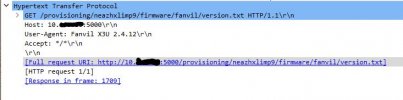
For troubleshooting the HTTP problem in bullets 1 and 2, what we do internally to troubleshoot similar things in our lab (yes, sometimes we do have cable spaghetti when testing...), port mirror the port of a phone having this problem on "Network Switch" hook a PC up and to the port so you can monitor all traffic, the Factory Reset the phone, assign via MC, set correct network interface in Extension Settings, then press OK. Let the phone do it's thing and once it is provisioned, in Wireshark you can filter with tcp.port==5000 (assuming this is the HTTP port you are using) and check what files the phone is requesting and checking if it is getting 200 OK with data from the 3CX Server, and to what IP/Port the requests are being sent to.

I have to admit though, I find it very peculiar that the phones manage to get SOME of the provisioning information but not ALL of the information.
If you see the same problem again, from Wireshark you can get the URL that the phones did the request to, put your PC on the same VLAN3, put the link in the browser and see if your browser downloads the file.


One more thing from the initial post I didn't quite get, do you have this problem with only 2 phones, or ALL phones?

Long reply, sorry, hopefully though it gives a few tips and explains how things work that might help you figure things out.
 
@NickD_3CX

Thanks for the information. It will take me some time to go through it and get some testing done. A couple questions, about terminology and my lack of understanding.

"The URL depends on what you have selected in the "Network" drop-down in the Extension Settings. In your case, make sure it is the 3CX NIC2 IP (VLAN3)."

I am guessing you mean the tab Phone Provisioning/IP Phone/Provisioning Method. If this is correct, I have it set to Local LAN (in the office) and the provisioning link shows the VLAN3 IP address with Port 5000. If this is not correct can you tell me where it is. I have looked through all the "Network" settings and they are set correctly.

"Depending on the routing of the network, this *could* be arriving to the 3CX Server via 2 routes, and because the VLAN1 route is slower, it "overwrites" the entry on the MC as it has the same MAC and in fact is the same packet."

Would it be an option to have one of the NIC's ignore the multicast for that IP and port?

" if you want to provision this device even if it shows up like this, just select it, assign to extension, and before pressing "OK" in the Extension settings, in the drop-down select NIC2 which is the interface you want it to target and use."

Yes the phones are provisioning find even with the IP address incorrect in the MC and are usable. The main concern is the company phone book not showing up, but they all seem to be linked to the same issue.

"One more thing from the initial post I didn't quite get, do you have this problem with only 2 phones, or ALL phones?"

So most of the phones were provisioned when the PBX was on V16. The two I am having issues with were recently provisioned after updating to V18. Not saying there is a correlation to the upgrade since I have not provisioned a phone for quite some time before updating to V18, so some update may have changed before then that I did not see.

I will try and do some testing later today and see what I get.
 
"The URL depends on what you have selected in the "Network" drop-down in the Extension Settings. In your case, make sure it is the 3CX NIC2 IP (VLAN3)."

I am guessing you mean the tab Phone Provisioning/IP Phone/Provisioning Method. If this is correct, I have it set to Local LAN (in the office) and the provisioning link shows the VLAN3 IP address with Port 5000. If this is not correct can you tell me where it is. I have looked through all the "Network" settings and they are set correctly.
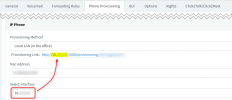
I am referring to this:
1641545412803.png

Depending on the drop-down value, the link also changes after you press OK, so the drop-down MUST have the IP of the 3CX NIC Interface you want the IP Phone to communicate with. This in the background doesn't only change the provisioning URL, but also the IPs in the config file that is fed to the phone, as well as the downloads link to the logo/phonebook files.


"Depending on the routing of the network, this *could* be arriving to the 3CX Server via 2 routes, and because the VLAN1 route is slower, it "overwrites" the entry on the MC as it has the same MAC and in fact is the same packet."

Would it be an option to have one of the NIC's ignore the multicast for that IP and port?
One solution would be to remove the listening of the Multicast Group 224.0.1.75 from the one NIC of the server, but I would better recommend, if possible, to block it from arriving on the 2nd NIC on the network level in the first place.
I have heard of cases that you think you remove it from the 1 NIC on the OS, but it ends up being disabled all together, then nothing appear in the MC


" if you want to provision this device even if it shows up like this, just select it, assign to extension, and before pressing "OK" in the Extension settings, in the drop-down select NIC2 which is the interface you want it to target and use."

Yes the phones are provisioning fine even with the IP address incorrect in the MC and are usable. The main concern is the company phone book not showing up, but they all seem to be linked to the same issue.
Yes, however this could have something to do with the first point in this reply (Network Interface drop-down, etc...).


"One more thing from the initial post I didn't quite get, do you have this problem with only 2 phones, or ALL phones?"

So most of the phones were provisioned when the PBX was on V16. The two I am having issues with were recently provisioned after updating to V18. Not saying there is a correlation to the upgrade since I have not provisioned a phone for quite some time before updating to V18, so some update may have changed before then that I did not see.
OK, if you have a new/spare phone that is supported lying around somewhere, pull it out of the box and try to provision this on a new extension and use it for testing. See if this one is doing the same. Alternatively, Factory Reset one of the ones that are OK and reprovision it from scratch and see if it does the same.


I will try and do some testing later today and see what I get.
I think this is best, the port mirroring way I think will reveal valuable information that should help you narrow down what is going on.
 
Depending on the drop-down value, the link also changes after you press OK, so the drop-down MUST have the IP of the 3CX NIC Interface you want the IP Phone to communicate with. This in the background doesn't only change the provisioning URL, but also the IPs in the config file that is fed to the phone, as well as the downloads link to the logo/phonebook files.

So I verified yes the provisioning link and Interface both have the IP address.

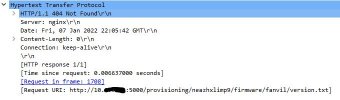
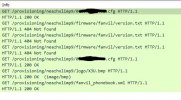
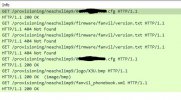
I did testing like you said and I think I found the issue. Here is the provisioning request.
Provisioning 1.JPG
Here is the ResponseProvisioning 2.JPG

Not sure why it is not seeing the file. If I click on the link in the MC it gives me the same 404 error.

I had a thought and one new thing that was added was using the SSO option through google. I just removed that from the PBX settings and now everything is working fine. I followed the instructions on the page for integration. One of the things I was looking forward to v18 was the Google SSO.
 
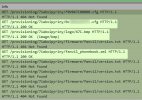
The phones will ask for multiple files, some of which we do not serve and will generate a 404.

That is not a problem to worry about. Look at the rest of the HTTP messages, specifically the ones highlighted which should generate a 200 OK

1641804940404.png
 
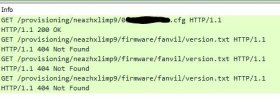
With the Google SSO Integration off, the phone I had previously had issues with, I reconnected and pulled the GET Information and this is what I initially received.
Get1.JPG
Only the one file was being requested. So I did a factory reset and reprovisioned the phone and the files were requested properly.

Get3.JPG

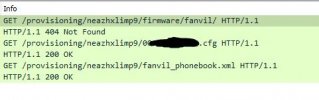
I turned back on the Google SSO Integration, did a factory reset and provisioned the phone again. Initially it did request the cfg file but did not request the logo or the phone book. I then went into Phones, selected the extension and pressed the reprovision button and it requested all the files properly.
Get2.JPG
I then turned off the Google SSO Integration, logged out as the global admin, did a factory reset of the phone, restarted the system service on the PBX and no change. I do not know if after turning off the Google SSO Integration if it takes some time to stop affecting the system, which is why it worked this morning and now it is not. I have a work around at least as long as after I initially provision the phone and go into the phone tabs are reprovision the phone it will grab all the files.

Not sure where to go from here though so I do not need to do the extra step.
 

Attachments

  • Get2.JPG
    Get2.JPG
    40.9 KB · Views: 0
Hi,

The phone is the initiator of the connection, and makes all the requests.
It has no way of knowing whether Google SSO is on or off.
Besides, Google SSO only applies to the web interface of the 3CX user login - not to HTTP requests for provisioning. I think this is just a matter of pure coincidence, or rather, the capture did not show everything.

How are you capturing the above? This could make a difference as to what you might or might not see in the pcap. For example, when I test a phone

1. I mirror a port on my switch, and send the traffic to my PC which is on the same LAN and same switch as the phone.

2. I then filter by MAC address to be 100% certain that any traffic coming or going to the phone appears in Wireshark.


If you are capturing traffic a different way (ie. using the pcap feature built in to 3CX) you might only be seeing what 3CX received, not what the phone actually sent. And since we suspect the network, then this would be an unreliable way to capture traffic.
 
How are you capturing the above? This could make a difference as to what you might or might not see in the pcap. For example, when I test a phone

1. I mirror a port on my switch, and send the traffic to my PC which is on the same LAN and same switch as the phone.

2. I then filter by MAC address to be 100% certain that any traffic coming or going to the phone appears in Wireshark.


I am doing the exact same thing using wireshark, but I am not filtering the traffic so I can receiving all the data sent. I am doing a display filter on tcp.port==5000 and http. I have saved the wireshark traffic so if I need to look at something else I can.
The phone is the initiator of the connection, and makes all the requests.
It has no way of knowing whether Google SSO is on or off.

That is what I was assuming was happening. The only two things that has changed since I last provisioned a phone was I upgraded to V18 and turned on Google SSO. I wasn't sure if the traffic was being routed differently since the web interface uses the same ports.
 
You should see a SIP NOTIFY going to the phone, and the phone should acknowledge it and then start downloading files in HTTP mode. Remove the port from the capture filter and inspect your pcap again if you can.

You could also potentially run a capture on the phone itself (it has a pcap capability) and then press the re-provision button in 3CX. Wait until the MWI light on the phone stops flashing before you end the capture, to indicate that the reprovisioning is over.
 
Status
Not open for further replies.

Forum statistics

Threads
112,149
Messages
590,965
Members
165,171
Latest member
Mahlon