- Joined
- May 15, 2019
- Messages
- 20
- Reaction score
- 0
Hello,
Im new to 3CX , Ive been googling for the last two days with no clue, I need to create a call flow app using CFD,
Almost all documentation examples like the one below mentions that I have to go to “Advanced” > “Call Flow Apps” in Management console to deploy the app,
but I dont seem to find this option in my console, below is a screen shot of my console, any hint ?
https://www.3cx.com/docs/cfd-creating-outbound-dialer/
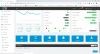
Im new to 3CX , Ive been googling for the last two days with no clue, I need to create a call flow app using CFD,
Almost all documentation examples like the one below mentions that I have to go to “Advanced” > “Call Flow Apps” in Management console to deploy the app,
but I dont seem to find this option in my console, below is a screen shot of my console, any hint ?
https://www.3cx.com/docs/cfd-creating-outbound-dialer/