No audio during call transfer

Status
Not open for further replies.

TLCtech

Customer
Joined
Oct 12, 2020
Messages
263
Reaction score
29
  • 3CX Version, e.g. Standard Annual 16.0.8.9
  • Server OS, Raspberry Pi
  • 3cx hosted locally
  • Provisioning Method: Local
  • Trunk Provider: Call Centric
  • Has the Firewall Checker passed: YES
  • Are custom Phone Templates being used: NO

My office keeps having issues with calls that are transferred but there doesn't seem to be any audio when the call is moved. It has happened with a couple extensions. This one just happened about an hour ago. I dont have verbose logs from this instance, but I do have them from last week which also may show this as well. I wasnt capturing for this issue last time so I dont know. We are all using softphones at the moment.

Anyway, here are the logs I have for this interaction:

03/02/2021 2:01:58 PM - Currently active calls [none]
03/02/2021 2:01:50 PM - Leg L:99.1[Line:10000<<12533652055] is terminated: Cause: BYE from local
03/02/2021 2:01:50 PM - [CM503008]: Call(C:99): Call is terminated
03/02/2021 2:01:50 PM - Leg L:99.6[Extn:00] is terminated: Cause: BYE from 127.0.0.1:5080
03/02/2021 2:01:37 PM - Leg L:101.4[Extn:10] is terminated: Cause: BYE from local
03/02/2021 2:01:37 PM - [CM503008]: Call(C:101): Call is terminated
03/02/2021 2:01:37 PM - Leg L:101.1[Extn:00] is terminated: Cause: BYE from 127.0.0.1:5080
03/02/2021 2:01:28 PM - Currently active calls - 2: [99,101]
03/02/2021 2:01:01 PM - Leg L:101.2[Extn:10] is terminated: Cause: 487 Request Terminated/INVITE from 127.0.0.1:5063
03/02/2021 2:01:01 PM - [CM503003]: Call(C:101): Call to <sip:[email protected]:0> has failed; Cause: 487 Request Terminated/INVITE from 127.0.0.1:5063
03/02/2021 2:01:01 PM - Leg L:101.3[Extn:10] is terminated: Cause: 487 Request Terminated/INVITE from 127.0.0.1:5483
03/02/2021 2:01:01 PM - [CM503003]: Call(C:101): Call to <sip:[email protected]:0> has failed; Cause: 487 Request Terminated/INVITE from 127.0.0.1:5483
03/02/2021 2:01:01 PM - [CM503007]: Call(C:101): Extn:10 has joined, contact <sip:[email protected]:56017/UDP>
03/02/2021 2:01:01 PM - [CM503007]: Call(C:101): Extn:00 has joined, contact <sip:[email protected]:5060/UDP>
03/02/2021 2:01:01 PM - L:101.4[Extn:10] has joined to L:101.1[Extn:00]
03/02/2021 2:00:59 PM - [CM505001]: Endpoint Extn:10: Device info: Device Not Identified: User Agent not matched; Capabilities:[reinvite, replaces, able-no-sdp, recvonly] UserAgent: [3CX Mobile Client] PBX contact: [sip:[email protected]:5060]
03/02/2021 2:00:59 PM - [CM503002]: Call(C:101): Alerting Extn:10 by contact <sip:[email protected]:5483/UDP>
03/02/2021 2:00:59 PM - [CM505001]: Endpoint Extn:10: Device info: Device Not Identified: User Agent not matched; Capabilities:[reinvite, replaces, able-no-sdp, recvonly] UserAgent: [3CX WebRTC proxy] PBX contact: [sip:[email protected]:5060]
03/02/2021 2:00:59 PM - [CM503002]: Call(C:101): Alerting Extn:10 by contact <sip:[email protected]:5063/UDP>
03/02/2021 2:00:59 PM - [CM505001]: Endpoint Extn:10: Device info: Device Not Identified: User Agent not matched; Capabilities:[reinvite, replaces, able-no-sdp, recvonly] UserAgent: [3CXPhone for Windows 16.3.0.220] PBX contact: [sip:[email protected]:5060]
03/02/2021 2:00:59 PM - [CM503002]: Call(C:101): Alerting Extn:10 by contact <sip:[email protected]:56017/UDP>
03/02/2021 2:00:59 PM - [CM503025]: Call(C:101): Calling T:Extn:10@[Dev:sip:[email protected]:5063;rinstance=9aebdac2654a0790,Dev:sip:[email protected]:5483;rinstance=278693cab4bce3c6,Dev:sip:[email protected]:56017;rinstance=0-2aa0c76579994a4d843a80e7bc7dacfd;ob] for L:101.1[Extn:00]
03/02/2021 2:00:59 PM - [CM503027]: Call(C:101): From: Extn:00 ("Reception" <sip:[email protected]:0>) to T:Extn:10@[Dev:sip:[email protected]:5063;rinstance=9aebdac2654a0790,Dev:sip:[email protected]:5483;rinstance=278693cab4bce3c6,Dev:sip:[email protected]:56017;rinstance=0-2aa0c76579994a4d843a80e7bc7dacfd;ob]
03/02/2021 2:00:59 PM - [CM503004]: Call(C:101): Route 1: from L:101.1[Extn:00] to T:Extn:10@[Dev:sip:[email protected]:5063;rinstance=9aebdac2654a0790,Dev:sip:[email protected]:5483;rinstance=278693cab4bce3c6,Dev:sip:[email protected]:56017;rinstance=0-2aa0c76579994a4d843a80e7bc7dacfd;ob]
Im still a noob here and am working my way through the university videos here. I appreciate any help you can give.
 
Last edited:
Information to provide when requesting help | 3CX Forums

But most likely the issue is the use of a unsupported SIP trunk provider. If that's the case, you can try toggling some of the knobs on the trunk to see if that resolves the issue.
Hey, thanks for that. I was looking for that earlier but it wasnt coming up.

I added that info to the OP. My trunk is Call Centric. The call comes in just fine, but once we xfer it internally, often there is no audio. Would the trunk still be the issue there? Any idea what I might change? I set up the 3cx with the call centric instructions.
 
The reply from Call Centric

Reviewing our logs for the 21:59:39 GMT and 22:03:52 GMT calls from 12533652055 to 12537786376 we can see that both calls were ended due to BYE packets from the 3CX trunk.

However, we do not see any indication of issues with the SIP signaling between 3CX and our system or the inbound termination carrier legs. As such, we can infer that the cause of the BYE packet is relevant to the local communication behind the 3CX that our logs unfortunately would not illustrate. Based on this would suggest providing full log files to 3CX support as they may be able to illuminate any possible issues that may be occurring on the local side for 3CX when transfers are attempted or otherwise.

We look forward to hearing from you, Thank you.
 
Was this a recent install? Sometimes trunk templates get small tweaks and the trunk either needs to be rebuilt or you need to adjust settings on it. Is PBX Delivers Audio enabled on the trunk?
 
Hey @TLCtech

Is this only affecting external calls or can it happen with internal calls as well?

If only external, have you made any changes to the SIP Trunk settings? Access the Management Console and go to SIP Trunks, edit the Callcentric SIP Trunk and go to Options, make sure that "Support Re-invites" and "Support Replaces" are both disabled.

Also, you mention using softphones, is it a mix of all or just some specific ones (Webclients, mobile app, windows app, etc)?
 
Was this a recent install? Sometimes trunk templates get small tweaks and the trunk either needs to be rebuilt or you need to adjust settings on it. Is PBX Delivers Audio enabled on the trunk?
This install has been running since October. Not super recent. PBX Delivers Audio is selected in the trunk, but not in any extention under troubleshooting.
Hey @TLCtech

Is this only affecting external calls or can it happen with internal calls as well?

If only external, have you made any changes to the SIP Trunk settings? Access the Management Console and go to SIP Trunks, edit the Callcentric SIP Trunk and go to Options, make sure that "Support Re-invites" and "Support Replaces" are both disabled.

Also, you mention using softphones, is it a mix of all or just some specific ones (Webclients, mobile app, windows app, etc)?
We have had issues with internal audio as well, but I wasn't sure if it was an issue with the user using the browser login (not extention, just logging in) but I've not had great luck with using the browser to make and receive calls. I've been able to but not from all extentions. So I figured it was something along those lines.

I haven't made any changes to the settings no, and those two boxes were not checked.

They use a mix of browser, windows app, and Android. The only way I can recreate any audio issues is when I logged into one extention in particular and used the browser to make internal calls. I could hear them, but they couldn't hear me. I was using Opera, and figured it may have been a permissions issue where opera wasn't asking for mic. The same extention uses Edge with similar results. I have previously used my extention on Opera and didn't have any issues, but it's been a few months. I'm not sure if that's related or not.

For sure, I can log into any extention on any of my devices, off site, and not run into these issues. But I guess my samples have been limited.
 
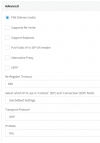
Your trunk's advanced settings should look like the below.
If not, then please delete and recreate the trunk to make sure you are using the latest CallCentric template:

1614766317350.png

Same goes if you changed anything else in the rest of the trunk settings and don't remember what.

Can you replicate the issue when using the latest version of Google Chrome for all involved extensions?

Also, do make sure that all required ports have been forwarded despite the fact that the firewall checker passes as the firewall checker does not test all ports.
 
Ok, sorry for the wait. Im PT.

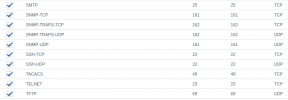
I checked the ports: I have them all except:

I have TCP 443 open but not 5001. Since 443 is used 2x. Should I open up 5001?
5051 TCP, it says optional?
5061 TCP - going to open this up
2528 TCP - It says dont forward it?

Ill open 5061 now. Should I open 5001?

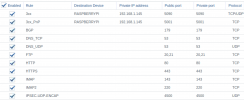
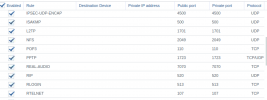
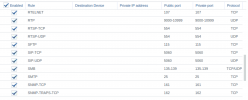
I attached screenshots of my ports now, before I make any changes. Not pictured is one port for VNC, 5900
 

Attachments

  • Router Ports 1.PNG
    Router Ports 1.PNG
    192.6 KB · Views: 10
  • Router Ports 2.PNG
    Router Ports 2.PNG
    161.9 KB · Views: 9
  • Router Ports 3.PNG
    Router Ports 3.PNG
    183.7 KB · Views: 7
  • Router Ports 4.PNG
    Router Ports 4.PNG
    124.4 KB · Views: 8
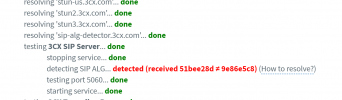
So I tested other extensions and no, I cant hear any audio from any extension on the web client, to my external phone. I found a thread about this that suggested running teh firewall check and I did, and nearly evry port is failing. We changed routers in January but as you can see, I have forward the ports. So I really dont know what to do.


Stop
  • resolving 'stun-us.3cx.com'... done
  • resolving 'stun2.3cx.com'... done
  • resolving 'stun3.3cx.com'... done
  • resolving 'sip-alg-detector.3cx.com'... done
  • testing 3CX SIP Server... failed (How to resolve?)
    • stopping service... done
    • detecting SIP ALG... detected (received 6b65d429 ≠ 5c033cde) (How to resolve?)
    • testing port 5060... full cone test failed (How to resolve?)
    • starting service... done
  • testing 3CX Tunneling Proxy... done
    • stopping service... done
    • testing port 5090... done
    • starting service... done
  • testing 3CX Media Server... failed (How to resolve?)
    • stopping service... done
    • testing ports [9000..9398]... failed (How to resolve?)
      • testing port 9000... full cone test failed (How to resolve?)
      • all full cone text failed
    • testing ports [10600..10998]... failed (How to resolve?)
      • all full cone failed
      • testing port 10998... full cone test failed (How to resolve?)
    • starting service... done
 
So I tested other extensions and no, I cant hear any audio from any extension on the web client, to my external phone. I found a thread about this that suggested running teh firewall check and I did, and nearly evry port is failing. We changed routers in January but as you can see, I have forward the ports. So I really dont know what to do.

Should these be in Port Triggering?
Should the device on each rule be the pi?

Stop
  • resolving 'stun-us.3cx.com'... done
  • resolving 'stun2.3cx.com'... done
  • resolving 'stun3.3cx.com'... done
  • resolving 'sip-alg-detector.3cx.com'... done
  • testing 3CX SIP Server... failed (How to resolve?)
    • stopping service... done
    • detecting SIP ALG... detected (received 6b65d429 ≠ 5c033cde) (How to resolve?)
    • testing port 5060... full cone test failed (How to resolve?)
    • starting service... done
  • testing 3CX Tunneling Proxy... done
    • stopping service... done
    • testing port 5090... done
    • starting service... done
  • testing 3CX Media Server... failed (How to resolve?)
    • stopping service... done
    • testing ports [9000..9398]... failed (How to resolve?)
      • testing port 9000... full cone test failed (How to resolve?)
      • all full cone text failed
    • testing ports [10600..10998]... failed (How to resolve?)
      • all full cone failed
      • testing port 10998... full cone test failed (How to resolve?)
    • starting service... done
 
So Im continuing to search for answers, I found on the manufacture's site that you can test the port forwards by enabled DMZ. When I did that, all the ports began working, minus one. I clicked the link and it just tells me how the test is run. And Im not sure why the dmz has to be on either. Im chatting with the manufacturer's tech support.
 

Attachments

  • image_2021-03-05_164028.png
    image_2021-03-05_164028.png
    101.1 KB · Views: 9
Ok, so after more searches, I sww that Sip passthrough isnt good? So I found this link where someone is also having similar issues.

Following that, I disabled the sip passthrough and tested again. Now, I get
  • detecting SIP ALG... not detected
Its green so I assume thats good?
 
So I noticed on the RTP port range you didn't have the device/IP specified like you do for the tunnel (5090). I also didn't see SIP (5060 UDP) open. And yes I would follow that guide and turn off the SIP pass through which looks to be what Synology calls their SIP ALG. Or you could make life easy and just spin up 3CX in the cloud and setup a SBC then you don't have any ports to worry about.
 
So I noticed on the RTP port range you didn't have the device/IP specified like you do for the tunnel (5090). I also didn't see SIP (5060 UDP) open. And yes I would follow that guide and turn off the SIP pass through which looks to be what Synology calls their SIP ALG. Or you could make life easy and just spin up 3CX in the cloud and setup a SBC then you don't have any ports to worry about.
When they get the money for it, I want to.

I wasn't sure if I needed to specify that. Ill specify that.

I do have both TCP and UDP ports open. Should I open 5001?
 

Attachments

  • 5060.PNG
    5060.PNG
    27.4 KB · Views: 2
You should open whatever HTTPS port you specifed for the web interface when you installed. So either 443 or 5001 (or a different port if you picked one)
 
When they get the money for it, I want to.
Well I assume your time is worth something and at this point that seems to be the cheaper route. But that being said, what money would need to be spent? 3CX hosting is free for the 1st year, and the SBC software would run on the Pi. No money needs to be spent.
 
Well I assume your time is worth something and at this point that seems to be the cheaper route. But that being said, what money would need to be spent? 3CX hosting is free for the 1st year, and the SBC software would run on the Pi. No money needs to be spent.
Its the cloud hosting. I think its the next step, but they dont want another bill atm. *shrug* Im hoping by the end of the year. "Something something easier to manage and power outage proof"
 
I think you missed the part about 3CX hosting being free for the first year.
 
I think you missed the part about 3CX hosting being free for the first year.
Hey, sorry. Thought I replied to this.
I caught it. I just need to present to them the costs after. But I agree. Im going to resent this to them as something we should do soon.

But so far that is the solution. Needed the DMZ turned on. No issues since. Been a quiet week so far.
 
Status
Not open for further replies.