Solved no incoming calls to extension

Status
Not open for further replies.

rvdbee

Joined
Sep 30, 2010
Messages
4
Reaction score
0
Hello,

Since a couple of days i have 2 new KX-HDV130.
The system is running under azure v15.
i can't get any incoming calls to the panasonic KX-HDV130. Not from a outside call or internal.
I can call with them.
with my old ip phones no problems.
What did i check:
1. firewall check is ok.
2. setup stun for kx (outside office, same as old phones)
3. read this forum.

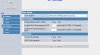
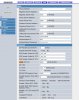
I have posted the setting from the phone, hopefully someone knows the issue.

error in log 3cx: 11/27/2018 2:23:47 PM - [CM503003]: Call(C:14): Call to <sip:606@1XXX:5060> has failed; Cause: 408 Request Timeout/INVITE from local
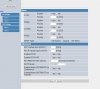
 

Attachments

  • voiplinesetting.jpg
    voiplinesetting.jpg
    115 KB · Views: 33
  • sip settings.jpg
    sip settings.jpg
    79.5 KB · Views: 30
  • sip account config.jpg
    sip account config.jpg
    193.9 KB · Views: 28
Some devices just do not like STUN.
So the new phones are not in the same office/network as the server?
Does the remote firewall where the phones are have ports opened?
I'm sure you have read this - but posting just in case.


Notes when using Remote Extension with STUN:
  1. Please make sure that your Remote Location has Static NAT implemented as well to the phones and that the SIP port and RTP port range for each phone as specified in Extension Settings >> Provisioning tab is correctly forwarded to the IP address of each phone
  2. If you have multiple IP Phones on the same remote network configured with the same SIP and RTP ports, you might have an audio problem caused by the way certain routers implement NAT. In this scenario, each phone must have a different SIP Port and a range of RTP ports must be configured per phone. To do this, click on the Provisioning tab, change the SIP and RTP ports and perform a re-provision of each phone from the Phones node.
  3. SIP ALG may interfere with the correct handling of audio and signaling. If you have audio issues, try to disable SIP ALG from the firewall. If you encounter such issues, you should check if your router has any known issues with SIP and VoIP. On most firewalls, SIP ALG needs to be turned off.
 
I'm assuming that the log you posted is not showing a call attempt to the remote (public) IP of the phone (the IP you X'd out). If that is the case, then either STUN, or another Network parameter is not set up properly on the phone, or access to the STUN server is being blocked. In any case, it may be (and can be confirmed in the activity Log), that the set is registering with it's private IP.

Plus all the stuff that Craig mentions regarding the local port.
 
first off all both thanks for the effort.
New phones, same as old are in a remote network. no port forwards in the remote office, not for phones.
1. no rtp range is setup, don't see that setting, see attachment.
2. they have different local sip ports, 46000,47000.
3. setting not visible in my router, its from isp, can 't access the setting.

11/28/2018 10:02:32 AM - Updating device Dev(1885643974):[sip:606@publicip:46000 / 606] by message: DevUpd Recv Req REGISTER from publicip:46896 tid=25da1f44 Call-ID=7410c149-c904321c0385f563d0950080f0808080@KX-HDV130NE: REGISTER sip:xxx.3cx.nl:5060 SIP/2.0 Via: SIP/2.0/UDP publicip:46000;branch=z9hG4bK25da1f44;rport=46896 Max-Forwards: 70 Contact: <sip:606@public:46000>;expires=600 To: <sip:[email protected]> From: <sip:[email protected]>;tag=1621565971 Call-ID: 7410c149-c904321c0385f563d0950080f0808080@KX-HDV130NE CSeq: 226 REGISTER Allow: INVITE, ACK, CANCEL, BYE, INFO, UPDATE, OPTIONS, MESSAGE, NOTIFY, REFER Proxy-Authorization: Digest realm="3CXPhoneSystem",nonce="414d53595bfe59a718:5c59d58f57a058566f75e3efec6e8190",algorithm=MD5,uri="xxx.3cx.nl:5060",username="606",response="3abc2d7be437277d02dc357f89af7e34" Supported: path User-Agent: Panasonic-KX-HDV130NE/08.101 (bcc342d7a27f) Max-Breadth: 60 Content-Length: 0

i will work now for let's see 10 minutes, i can call the extensions and audio and everything is there.
It will ring when call is comming in. but after that it don't work again until reboot phones.
as mentioned before old phones are working fine.
i did enable stun on server site is was off by default, server has static ip.

called my isp voor sip alg and they turned it off no difference
 

Attachments

  • ext.jpg
    ext.jpg
    138.3 KB · Views: 16
Last edited:
If it initially works, like right after the first registration, but then stops, I'm going to assume that it is something to do with the router and how long it "remembers" which device is using which ports. Perhaps there is a keep alive option that can be used, or it may require some other change on the router. In my experience, for one, and perhaps two devices, behind a remote router, port forwarding isn't usually required. that could change, depending on the router and it's current settings, along with any other SIP devices that are also behind it.

Updating device Dev(1885643974):[sip:606@publicip:46000

Why was this particular SIP port chosen, rather than something like 5061, 5062, etc.? was there a conflict? In the last log post it showed 5060.
 
upload_2018-11-28_23-13-42.png

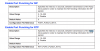
You'll want to adjust those settings. When incoming calls work right after a reboot or after making an outbound call that's because the firewall opens the port for return traffic but then closes it after the UDP timeout. If you can't do static port forwarding then adjusting these parameters will tell the phone to send a keep-alive packet every XX seconds. I'd start at 30 seconds and then adjust down in 5 sec intervals until it works. You *should* only need to do the SIP one but since they are right next to each other in the manual I clipped both.
 
Now that I looked at your pictures I see you already had those fields. I would turn off RPORT and I would delete the settings in proxy and outbound proxy. Just putting the 3CX address in the registrar field should work fine
 
You also didn't mention what phones your old phones were. If they worked, why replace? If they still work, check the settings in there.
 
@ leejor alive mode is just at 10 sec, is the lowest the phone supported.
Port is choosen random.
@ cobaltit when i turn that off in the phone, it won't registrar, same when proxy( outbound) server is not filled in.
Old phone is a tiptel ip 280 and a gigaset. tiptel hook is not working properly and gigaset is 8 years old so i wanted new phones.
there are rtp filled in. this is the same setting for local sip port i found out(didn't expect that).
In the 3cx there are 1500 ports open for that, starting from 9000.
So i changed 46000-->9050 and 47000-->9070.
I also checked keep alive on in the firewall secton of 3cx
Phones are ringing, now wait if it works later in time.
To be continued...

thanks for the replies so far!
 
Last edited:
fixed the problem with 3cx sbc, everything is working fine.
 
Glad to see the issue has been resolved and thank you for updating the thread with your solution.
 
Status
Not open for further replies.

Forum statistics

Threads
111,905
Messages
589,653
Members
164,771
Latest member
mjwhyman