No Push notifications on windous in Edge PWA

Hromodeus

Gold Partner
Basic Certified
Joined
Feb 13, 2023
Messages
2
Reaction score
1
Hi everyone,
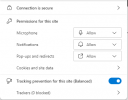
im new in V20.0 Update 3 (Build 806) and now have problem with call notifications. My system run in AWS with SBC on Raspberry. Several of my college use PWA and receives same problem. I already check all notifications in browser, but still have problem.
I also try this variant: https://www.3cx.com/community/threads/v20-notifications-error.127865/
no results
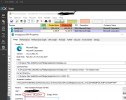
1728981340866.png 1728981375378.png

That would be great, if someone say, how to fix it

Thanks for Your time)
 
Last edited:
  • Like
Reactions: in.windows
Hi @Hromodeus

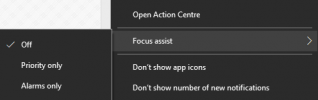
Check the notification settings of the OS as well and ensure that notifications are allowed for the PWA
 
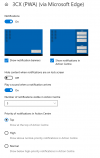
Thanks for advice. That, what I have (I use Windows 10):

1729153226694.png
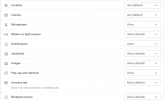
That my settings in Edge:

1729153301423.png

May be I lost some sing?
 
We face the same problem. Another v18 instance is working fine so OS settings should be good.
Any idea?
 
We face the same problem. Another v18 instance is working fine so OS settings should be good.
Any idea?
Seems they never mind, in V18 the same problem as in V20, last release: Version 20.0 Update 4 (Build 487 Release), notifications are working for some days, and then disappearing. The problem is not with the Windows notification service, as there are also no "1" or "2" digit of missed calls or chats indicated in task bar of 3cx PWA icon. As a test, when i launch as a second web app as well in the same MSEdge in parallel with PWA, Notifications from PWA become working. I thought firstly, that problem is with MSEdge engine to sleep unused tabs, so even added 3cx PWA URL to "Never put these sites to sleep" option in MSEdge with no luck.
 
Seems they never mind, in V18 the same problem as in V20, last release: Version 20.0 Update 4 (Build 487 Release), notifications are working for some days, and then disappearing. The problem is not with the Windows notification service, as there are also no "1" or "2" digit of missed calls or chats indicated in task bar of 3cx PWA icon. As a test, when i launch as a second web app as well in the same MSEdge in parallel with PWA, Notifications from PWA become working. I thought firstly, that problem is with MSEdge engine to sleep unused tabs, so even added 3cx PWA URL to "Never put these sites to sleep" option in MSEdge with no luck.
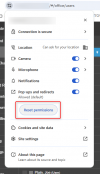
Sometimes you might lose the notifications in the Web Client when an update is done to the browser, needing to reset the permissions.
 
Sometimes you might lose the notifications in the Web Client when an update is done to the browser, needing to reset the permissions.
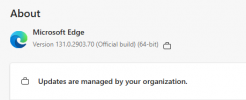
Group policy settings denying any updates, so no updates are installed for that time, when notifications become broken. With a help of procexp i can identify, which MSEdge main process (PID) is handling 3cx PWA, so even browser session is not restarted for about two weeks, PWA stopped to send notifications yesterday both in taskbar and in Windows notification bar.
 

Attachments

  • edge_update.PNG
    edge_update.PNG
    9.6 KB · Views: 30
  • PWA.PNG
    PWA.PNG
    53.1 KB · Views: 32
The missing PWA notifications on Windows can be fixed by resetting the browser permissions as described here:

And restarting the PC afterwards.

Sometimes adding a value 1 DWORD "Enabled" into the following registry key helps, if the issue persists (or the app isn't properly listed in the Windows notifications menu):

Computer\HKEY_CURRENT_USER\Software\Microsoft\Windows\CurrentVersion\Notifications\Settings\Microsoft.MicrosoftEdge.Stable_8wekyb3d8bbwe!https://3cx.mydomain.com/
 
  • Like
Reactions: Evolute IT

Latest Posts

Forum statistics

Threads
111,869
Messages
589,477
Members
164,714
Latest member
PRCinc