No RTP - DECT W60B

Status
Not open for further replies.

james_tech

Silver Partner
Joined
Jun 7, 2022
Messages
37
Reaction score
2
Hi there,

I have had reports of no speech/dial tone for a list of extensions that are all registered against all DECT devices, Initially there were some Firewall issues and the Firewall checker was failing. I have now got the checker passing all the rules, as well as all DECT Base 1 and Base 3 working (Base 3 is behind an SBC), and also had DECT base 2 working until today (was working for around a day).

However, Base 2 (Far Office) now has no speech and when I dial any of those extensions I cannot hear the ring noise and when they try and call out they get the same. I can see no RTP passing through the Firewall when I do a call to the phone, but when they do a call to the remote end I can see RTP packets.


Firewall - WatchGuard

Host - HyperV VM hosted (remote)

Local Firewall Logs: - only shows base 2 log when making a call from DECT, not showing when calling DECT from Remote Source

Outgoing-Call-Firewall-Log.png
PBX Firewall Rule:
Firewall-Config-Remote.png
Local Firewall Rules:
Firewall-Config-Local.png

Phones provision via STUN

Latest updates applied

Hope this helps! If anyone could help that would be great thanks
 
Does the firewall test pass ?

Have you configued the stun phones the 3cx supported way
 
Last edited by a moderator:
Yes, all the Firewall checks pass and the remote end has the correct configurations as per that document so I am confused to as to why this is not working
 
Are you not able to get an SBC at this site? Opening ports for this per phone would be a PITA. Does the DECT bases have static IPs?
 
There are two DECT devices on Site A, one works fine and I can see traffic flowing but the other DECT 2 is not working. They have static IP addresses and have around 5 DECTs per base.

Ideally want this working without an SBC as that would be avoiding the problem
 
There are two DECT devices on Site A, one works fine and I can see traffic flowing but the other DECT 2 is not working. They have static IP addresses and have around 5 DECTs per base.

Ideally want this working without an SBC as that would be avoiding the problem
So, you need to make sure both bases are set up with their own local SIP ports and RTP ranges.

I believe Yealinks require 12 ports per extension so you'd be lookin at opening however many UDP ports to the base.

Have you tried "PBX Delivers Audio" ?
 
Yes, that is what is configured too. You can see in the Firewall log that the traffic is being accepted
Base 1 - 5070 / 14061 - 14080
Base 2 - 5071 / 14081 - 14100

PBX Delivers Audio is also turned on :/

1655722832753.png
 
So you say it was working and now isnt - what did you change? Have you done a restart of the router?

have you got multiple WAN IPs set up on the router and the routing is incorrect?

next step is to run a trace from the mgmt console, do an echo test and see if the traffic is hitting it.
 
Hi James,

Ideally want this working without an SBC as that would be avoiding the problem
The SBC is exactly designed for that purpose: avoiding the problem of managing port forwards, SIP ALG, NAT, static IPs and generally going through the pain of troubleshooting STUN devices.
 
Last edited by a moderator:
No, it is not working but you can see traffic flowing from Base 2 when they do a test call but it still doesn't work; however when I call via DID no traffic hits the remote side.

Yes we have a lot of IPs, but the routing is correct

What does *777 actually do, does it send it from Remote > PBX < Remote? Testing all RTP?
 
Hi James,


The SBC is exactly designed for that purpose: avoiding the problem of managing port forwards, SIP ALG, NAT, static IPs and generally going through the pain of troubleshooting STUN devices.
Thanks but if I have the ports open etc then it should just work without an SBC? I have submitted a support case with all the support files you require - please can you take a look?

I will check that document :) but I have done the same forwards etc as the other DECT base and that works, its just 1 DECT base that isnt working.
 
Last edited by a moderator:
You should look at network captures to confirm that the IP address going out on is the same returning.
 
Just had a look and it is showing the correct IP address and SIP port
You should look at network captures to confirm that the IP address going out on is the same returning.
 
Thanks but if I have the ports open etc then it should just work without an SBC?
Yes exactly - it should work without an SBC. But this requires that your PBX side has its SIP port (usually 5060) forwarded, and its entire RTP range 9000 to 10999 also forwarded.

Then at the Remote Location:
  • Assign a static IP to each phone (or use DHCP reservation)
  • Port forward each phone's unique SIP port and RTP port range on the Remote Location Firewall
  • Disable any SIP ALG or SIP Helpers running on the Remote Location Firewall
You also mentioned the system is hosted under Hyper-V so make sure the Host machine is running Windows 10 (Pro, Enterprise) or Windows Server 2016 (Standard, Datacenter) as a minimum, The Hyper-V guest fulfills everything you read here, especially with regards to NTP and NIC: https://www.3cx.com/docs/installing-microsoft-hyper-v/
 
Yes exactly - it should work without an SBC. But this requires that your PBX side has its SIP port (usually 5060) forwarded, and its entire RTP range 9000 to 10999 also forwarded.

Then at the Remote Location:
  • Assign a static IP to each phone (or use DHCP reservation)
  • Port forward each phone's unique SIP port and RTP port range on the Remote Location Firewall
  • Disable any SIP ALG or SIP Helpers running on the Remote Location Firewall
You also mentioned the system is hosted under Hyper-V so make sure the Host machine is running Windows 10 (Pro, Enterprise) or Windows Server 2016 (Standard, Datacenter) as a minimum, The Hyper-V guest fulfills everything you read here, especially with regards to NTP and NIC: https://www.3cx.com/docs/installing-microsoft-hyper-v/
Yes, all those ports are forwarded as per screenshot and the Firewall passes the checks.

I have done all the listed, as well as checking the HyperV documentation.
 
If you restart the base, does the issue temporarily go away?
 
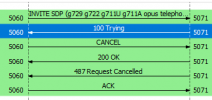
I have just done another PCAP, and it is not even getting to the 180 ringing.. only trying.

1655727696059.png

What could be the cause of this?
 
I have just done another PCAP, and it is not even getting to the 180 ringing.. only trying.

View attachment 30655

What could be the cause of this?
This is captured from the DECT, and I did a call to the DECT and it did register on the PCAP but as shown above it never rung the phones
 
Check the time difference between DECT trying and PBX sending cancel.

This would be normal if the phone was part of a group and the call was answered elsewhere, or they caller hangup while invite was going out.

You can also login to your DECT extension via webclient with the DECT base unplugged. This will help you understand if this is actually a DECT issue, or a call flow issue.
 
Check the time difference between DECT trying and PBX sending cancel.

This would be normal if the phone was part of a group and the call was answered elsewhere, or they caller hangup while invite was going out.

You can also login to your DECT extension via webclient with the DECT base unplugged. This will help you understand if this is actually a DECT issue, or a call flow issue.
Good point! I've just checked, and the time matches :(

I've done that, and it works - just doesn't ring the DECT (had it rebooting at time of call)
 
Status
Not open for further replies.

Forum statistics

Threads
111,973
Messages
590,078
Members
164,896
Latest member
sameage