No Video Availability via Web App

shahrad

Customer
Joined
Dec 19, 2025
Messages
30
Reaction score
1
Hello,

Trying to make video calls via the web app but the video option is greyed out and not available. Example, when you make a call and someone answers, I can't press the Video button to make that switch.
Settings on the computer itself are set to allow desktop to access the cameras. Any assistance is greatly appreciated! thanks.
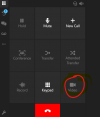
video 3cx.png
 
Hello,

Who are you calling, what device are they using?
 
In the provided screenshot, it seems that you are using the native 3CX Softphone App for Windows, installed via the Microsoft Store. Please note that this application does not currently support video calls.

If your users need video capabilities, they should use the PBX's web client or the PWA.

Could you please perform an internal test call between a web client user and a 3CX Mobile App user? Once the call is established, enable video and let us know your results.
 
Hello,

Who are you calling, what device are they using?
We were trying to call (currently extensions used from staff) the 3CX app for windows via the 3CX web client.
 
In the provided screenshot, it seems that you are using the native 3CX Softphone App for Windows, installed via the Microsoft Store. Please note that this application does not currently support video calls.

If your users need video capabilities, they should use the PBX's web client or the PWA.

Could you please perform an internal test call between a web client user and a 3CX Mobile App user? Once the call is established, enable video and let us know your results.
Yes I tried calling the 3CX app currently downloaded from the Microsoft store.
oh that is interesting news. I will pass this information along.

will try this out and see if that is something that we can work with. will let you know the results.
 

Forum statistics

Threads
111,973
Messages
590,074
Members
164,892
Latest member
Phone1stStop