- Joined
- Jan 11, 2023
- Messages
- 9
- Reaction score
- 0
New to 3CX, I'm currently configuring office hours and breaks.
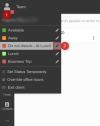
I see that by default, during office hours, my status switches to "Available" and during breaks "Away". Typically, our "breaks" are lunch breaks, is it possible to make it switch during breaks to the "lunch break" status instead of "Away" ?
Also, when out of office, why is 3CX switching to DND and not "away" ? These status name make more sense to me.
Thanks for your info.
I see that by default, during office hours, my status switches to "Available" and during breaks "Away". Typically, our "breaks" are lunch breaks, is it possible to make it switch during breaks to the "lunch break" status instead of "Away" ?
Also, when out of office, why is 3CX switching to DND and not "away" ? These status name make more sense to me.
Thanks for your info.