Office hours not respected

Status
Not open for further replies.
Hi YiannisH_3CX,

the system go in and out office, but doesn't respect my settings. I can't understand if it is shifted of 1 or 2 hour or something else.

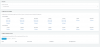
This is my hour settings
 

Attachments

  • officehours.png
    officehours.png
    66.4 KB · Views: 15
Is the time zone on the server correct?
 
The time zone on the server is CET and in 3cx is configured with all Italian settings
 
Can you monitor it and see when the office hours change?
I just tried on 2 different linux installations and it works for me.
 
I still have the same issue... my screenshot you can find above....
 
It seems are shifted about 1 hours and some minutes
 
I'm thinking of reinstalling the server, but I'm just affraid that the issue will be in the backup. Can you confirm the issue would dissapear when reinstalling and then restoring the backup ?
 
Hi fishblubcom,

We can not guarantee that your issue will be resolved but you could try it.
**Note : The backup file must be saved on different folder of your 3CX folder, in order to avoid deleted during un-installation of your 3CX Phone System.
 
Is there anyone who solved this problem?
 
Hi @YiannisH_3CX did you had any chance to investigate further on this matter? I have a fresh install of Debian+3CX, if you need specific testing.

I just configured break time between 15:00 and 15:20, dialed inbound at 15:01 and it went to the standard route, not using the OOO one.

Server time is synced with NTP, TZ is properly set in both the system and in 3cx. Please let me know if you need additional details.
 
After struggling with this same problem, I've finally discovered the SOLUTION. Hope this works for those of you that are having problems.

It turns out that my 3CX server was manually set for In Office Mode (using Dial Code setup in Settings --> Dial Codes), therefore always ignoring any OOO configurations.

In my case the dial code for "Force 3CX Phone System to IN or OUT of office" was set to *65. Dialing *651 set the mode to In Office, Dialing *652 set the system to Out of office, and dialing just the code *65 sets the system BACK to default mode.

So the solution for me was to just dial *65 and everything went back to normal and my out of office configurations for trucks, global, and Inbound Rules started working again.

When you dial *65 (or whatever your dial code is set to) the message you will hear is "3CX phone system is now using the default office hours"

Hope this helps!
 
  • Like
Reactions: PRE114
I just configured break time between 15:00 and 15:20, dialed inbound at 15:01 and it went to the standard route, not using the OOO one.
Break times do not affect trunks. Break times affect only extensions (if you have auto switch enabled). During break times calls will continue coming in normally through the trunk. Trunks are affected when the system is in Out Of Office hours not break times.
In short if during break times you want calls to be routed in the Out of Office route then you should configure office hours not break times. The screenshot attached shows a configuration that will push the trunks into out of office hours during 12:00 and 13:00.
 

Attachments

  • 2017-02-06_10h35_14.png
    2017-02-06_10h35_14.png
    11.8 KB · Views: 17
I can't solve the problem.. if i switch manually in-out office Hours it works, but if i use "automatic" office hours (settings -> Timezone and Office Hours) it can't switch automatically at the correct hour (the switch is not correct it seems one hour later) The Timezone of server is corret ut i can't understand where is the problem (the server is hosted in google cloud and the sip trunk is configured with messagent free number)
 
Hi,
i solved in this way.

Our Working hours are Mon-Thu 9-13 and 14:30-18:30. Fri 9-13 and 14:30 - 17:00

My configuration is 3cx in google Cloud Hosting, Messagent Italy account, 3cx Timezone +1 Italy Rome

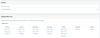
As you can see in the attached image, for automatic switching in/out Office message i must set the working hours as

Mon-Thu 8-12 and 14:30-18:30. Fri 9-13 and 14:30 - 17:00
 

Attachments

  • Schermata 2017-02-21 alle 13.12.10.png
    Schermata 2017-02-21 alle 13.12.10.png
    50 KB · Views: 18
I've had the same problem with 3cx on debian. logged on with ssh and did : dpkg-reconfigure tzdata
entered the correct time zone and did a restart.
 
Status
Not open for further replies.

Members Online Now

No members online now.

Forum statistics

Threads
111,832
Messages
589,286
Members
164,662
Latest member
DejanMDS