Office Hours - Not Working As I Thought.

Status
Not open for further replies.

Ritech Computing Services

Bronze Partner
Joined
Aug 12, 2022
Messages
20
Reaction score
4
Hi all,
PBX Details:
3CX Version: 3CX PRO 4SC (Hosted by 3CX).
18.0 Update 7 (Build 312)

I'm running into some issues with the 'Office Hours' Setting.
I navigate to the 'Management Console > Settings > Language & Office Hours Settings.
From here I enter the Office Hours 8:30AM-4:30PM Monday-Friday.
I was under the impression that the office hours configured here would be applied to all extensions and ring groups.

I assumed this would be all that is needed, and the PBX would check the time and if it is between 8:30AM-4:30PM Monday-Friday then the call will go through to the Ring Group, If it is outside those hours it should go to Voicemail Box.
This is not what happens as of now. All calls, at all times go through to the Ring Group.

If anyone help guide me in the right direction and where I might be going wrong, I'd be most grateful.
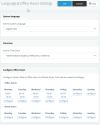
 

Attachments

  • 1.png
    1.png
    31.5 KB · Views: 48
Hi @Ritech Computing Services

Firstly these are the global office hours. If you are routing your calls to Groups then you should be using Group office hours.
Then you need to take into consideration that office hours affect trunks and inbound rules. Those should follow the office hours.
Also you can set each trunk or inbound rule to have different office hours. Make sure that is not the case.
Lastly you need to make sure that your calls match the correct trunk / inbound rule and therefore follow the correct office hours.

These are general points. If you can share your setup and call flow and provide more details we can help more.
 
Not meaning to hijack this thread, but since the OP hasn't responded since March I thought I would post here since I have the same issues / questions.

Using my own 3CX instance and also a clients new 3CX instance for trying to get this done correctly. I have different results between the two. I can understand because the setup is not exactly the same, but I have tried to make them similar. I will try to explain:

One thing...in both instances, I have tried using the *64x dial codes to put the PBX IN / Out / Default. Though I get the verbal confirmations, this has no affect on call processing. Also in both instances, nothing is configured in Settings...Language & Office Hours. Instead using Office Hours at the Group level. To my knowledge the Group Office Hours would override System Global? So the question here does the *64 dial codes only work with the System Global Hours?

Also in both instances, I have an extension (921 that forwards all calls to a mobile) for OOH.

My instance:
  • No special Group, using only DEFAULT. OH defined here
  • Inbound Rules: All calls go to Group DEFAULT
  • DEFAULT Group: IO calls go to RG, OOH calls to ext: 921.
  • Controlling IOH / OOH works when setting the Override Office Hours from the WebClient. Dial codes *64 have no affect.
Client Instance:
  • Self defined Group (BLS-Office...OH defined here).
  • Inbound Rules: All calls go to Group BLS-Office
  • BLS-Office Group: IOH calls go to RG, OOH calls to ext 921
  • Controlling IOH / OOH doesn't work whether using Override Office Hours in WebClient or with *64 codes.
That's it in a nutshell. I continue testing.
I sure hope someone can provide some insight.

Thanks
Lonnie
 
I have done more testing. Here is what I have learned.
  • On my clients instance, I determined that my User, belonging to multiple groups, the Main Group Membership for my User account was not set to the BLS-Office Group, so that was the reason Override Office Hours in the WebClient was not working. Changing the Main Group Membership for my User to BLS-Office, then setting the IOH or OOH or Default OH accordingly in the WebClient works as expected.
On ether instance I have found no way to get the Force IN or Out of Office dial codes to work. I tried clearing the DEFAULT Group's Office Hours and setting the System Global Office Hours and then trying the Dial Codes (*641, *642, *64) have not affect. If I can get this resolved, I will be good to go.

No responses yet here on the forums. I may have to contact support.

Thanks everyone.
 
Hi @lthibx

Dial codes *64 do not work with groups. In fact I would recommend not using them at all and at some point those dial codes will be removed. The override office hours is what you should be using.
 
Hi @YiannisH_3CX,
It seems that my testing verifies your feedback. In no scenario could I get the *64 codes to work. I will provide instructions for my client to use the webclient to control OH overrides. Time to teach an old dog new tricks. :)

Thanks for your feedback.
 
  • Like
Reactions: YiannisH_3CX
Glad I could assist.
 
Hi @Ritech Computing Services

Firstly these are the global office hours. If you are routing your calls to Groups then you should be using Group office hours.
Then you need to take into consideration that office hours affect trunks and inbound rules. Those should follow the office hours.
Also you can set each trunk or inbound rule to have different office hours. Make sure that is not the case.
Lastly you need to make sure that your calls match the correct trunk / inbound rule and therefore follow the correct office hours.

These are general points. If you can share your setup and call flow and provide more details we can help more.

Hello Yiannis,

(1) Do you have a diagram showing the flow of how office hours affect each underlying item?
Meaning, first comes the Global office hours, then I would guess it would be the SIP trunks and then the Groups , then extensions etc, is this correct though?

(2) Also what happens if an extension is a member of two Groups?


Thank you
 
Status
Not open for further replies.

Forum statistics

Threads
111,953
Messages
589,914
Members
164,849
Latest member
BillyAkansel