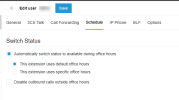
Hello, on startup pro I have set office hours however I'm still listed as available and I receive calls outside office hours. I would like to listed as do not distrub outside office hours. How can I do this (not manually) ?
Thanks
When setting your office hours, ensure you have set the extension to Auto switch using the default office hours from under the extensions' Schedule tab.
Can you send us a screenshot of the office hours you have set? And let us know at what time these were set? as in, did you set the office hours after the time set for them to end had already passed?