Paging not working on phones who also have the Windows Computer client software running

JPoro

Customer
Joined
Mar 9, 2021
Messages
20
Reaction score
1
All across our 50 or so phones, *11ext works for paging people...until we installed the Windows software so a few of our users can use webchat. When calling those users, they hear a quick Beep Beep, and it goes dead. As soon as they quit the windows client, the paging works as expected. I've attached the activity log for a couple of these calls.

 

Attachments

  • Screenshot 2024-02-05 at 11.28.56 AM.png
    Screenshot 2024-02-05 at 11.28.56 AM.png
    27.8 KB · Views: 7
Which one, the new Store client or the Desktop App? Or the v16 app?
 
Which one, the new Store client or the Desktop App? Or the v16 app?
The latest app available as of a month ago when I installed. Windows desktop app downloaded from their 3cx email/profile.
 
The desktop app, which is the electron app or any webclients, can not receive a page/intercom.
 
That makes sense, but why then does it not work on the physical phone?
 
This is not a feature/capability for 3CX webclients. Physical phones can receive an intercom and auto-answer it. It's a feature/function of IP phones, but with the webclient open on the same extension, there's likely to be conflict. Have you tried pairing the webclient with the IP phone in CSTA mode?
 
Last edited:
Correct...but then the IP Phone sitting right next to the computer does NOT work! How do we get it to work? It just goes beep-beep and the paging dies. I don't want the paging to ring to the computer, I want it to ring to the phone.
 
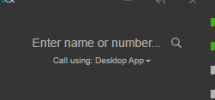
On the dialer window of the app does it show "call using" is the desktop phone? Screen cap:
1707167085454.png
 
  • Like
Reactions: Charles_3CX
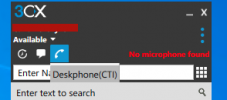
This is incredibly confusing!!! I figured it out, yes, but it could be more user-friendly and obvious!
It looks like deskphone is selected, but the opposite is true.
[see attached picture]
 

Attachments

  • Screenshot 2024-02-06 at 3.59.55 PM.png
    Screenshot 2024-02-06 at 3.59.55 PM.png
    15.7 KB · Views: 7
So you use the 3cx app for Windows V16 legacy app; this will need to be in CTI mode (paired with the IP phone for paging to work on the IP phone if the app is opened on the same extension as the IP phone is provisioned to.
 
Should I be using something less-legacy? This is the app that I thought was meant to be used after the big breach/security/whatever you call it.
 
Also, the users are telling me that it needs changed over to deskphone each day when they log in.
 
It can be used. It's just no longer in development and is gradually being replaced by the new v20 softphone, although it is still a beta release and does not have CTI functions.

I suggest checking under each user's extensions settings > phone provisioning tab > choose the 3cx app from your phone's drop-down menu, and under the preferences section > Call Control, choose the option 'IP Phone' from the drop-down menu and press OK at the top of the page. This will set the app to CTi mode whenever the app is opened.
 
Ok, I did that, thanks! I noticed you mentioned v20. Can that work with version 18? Maybe I'm not "up with the times" but there is absolutely no way possible that I can upgrade to 20 without losing significant features that would essentially break my system.
I also feel that v20 is like a little baby that needs a whole lot more growing up before anybody with an active system even tries to use it.

Here's why [and please tell me if I'm mistaken]:
  • Lack of multiple-IP support (have two WAN connections)
  • FQDN-only
  • Using Amazon Chime trunk
 

Forum statistics

Threads
111,974
Messages
590,081
Members
164,899
Latest member
mazet