Parking orbit and shared parking

Status
Not open for further replies.

NicholasBarnes

Customer
Advanced Certified
Joined
Dec 22, 2020
Messages
93
Reaction score
23
Hi all,

I'm getting thoroughly confused about parking in 3CX.

The page at https://www.3cx.com/blog/docs/call-parking/ talks about both Parking Orbit (ten slots accessible by *0x to park and *1x to retrieve) and Shared Parking (either 250 or 251 slots (says "250 slots from 0 to 250" which would be 251 slots) accessible by BLF only).

I have the following questions:
  1. If I place a call in Parking Orbit slot 1 by transferring it to *01, how can I see that there are one or more calls in that slot (or any slot, come to that)? Calls in Parking Orbit don't seem to show anywhere and there doesn't seem to be a way of setting up BLF lamps to show Parking Orbit status.
  2. In the Users --> BLF screen, I only seem to be able to add eleven slots - SP0 to SP10 to a user's BLF list. How do I add a Shared Parking BLF for, say, SP123?
  3. If I put a call into SP123 from my phone which has the Shared Parking BLF configured, how can I retrieve that call if I move to a phone where SP123 BLF is not configured?

Cheers,
Nicholas.
 
Shared Parking is nice because one can see the status from BLF, so as not to send a second call to it. Or it shows in Panel in the software clients. Parking Orbit shows in Panel also. One can right click in Panel and unpark.

Technically speaking you can dial "SP1" (with capital letters) to call that slot upon which it will connect the calls (unpark it). You can also forward to that number. This is one way to use shared parking on a mobile app as well (the other being, to create a new extension and forward that extension to SP1, so it shows in the list of extensions).
 
Shared Parking is nice because one can see the status from BLF, so as not to send a second call to it. Or it shows in Panel in the software clients. Parking Orbit shows in Panel also. One can right click in Panel and unpark.

Technically speaking you can dial "SP1" (with capital letters) to call that slot upon which it will connect the calls (unpark it). You can also forward to that number. This is one way to use shared parking on a mobile app as well (the other being, to create a new extension and forward that extension to SP1, so it shows in the list of extensions).
OK, thank you for the reply. I understand you right, you're saying SP0-SP10 can be done automatically in BLF, but if you want to use SP11-SP250, you have to do it by creating an extension/custom speed dial and you can't have a handset's BLF showing the state of the SP slot?

Nicholas.
 
OK, thank you for the reply. I understand you right, you're saying SP0-SP10 can be done automatically in BLF, but if you want to use SP11-SP250, you have to do it by creating an extension/custom speed dial and you can't have a handset's BLF showing the state of the SP slot?
No exactly, you can create a BLF for any SP. What @SteveITS said about directly dialing the SP is essentially just another way to use SP slots say if you do not have the BLF key for some reason.

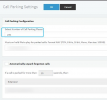
If you're only seeing SPs 0-10 you probably have the PBX configured with only so many SPs. Go to Settings >> Call Parking and set the following value:
1647256015864.png
 
  • Like
Reactions: Evolute IT
Oh good grief, thank you. Another setting somewhere else I missed. Out of interest, why not enable them all from the start?
 
Hi @NicholasBarnes,

Out of interest, why not enable them all from the start?
Just due to needless SIP registrations, most people won't need the max (999) SP slots, so we default 10 to keep the number of active registrations on the machine lower.
 
Status
Not open for further replies.

Forum statistics

Threads
111,973
Messages
590,076
Members
164,895
Latest member
jasonkkrause