Solved PBX Express URL

Status
Not open for further replies.

Rob Novotny

Bronze Partner
Basic Certified
Joined
Sep 5, 2018
Messages
70
Reaction score
10
Hi guys,

Would anyone have the PBX Express URL handy? I would like to run up a system in LightSail with an existing key to test some thing out.

Thanks, Rob.
 
The URL we previously used for all of our installations in LightSail is https://pbxexpress.3cx.com/

However, this does not seem to be working anymore. We now get taken to a login page, and after logging in, the option to launch the PBX Express does not seem to be available.

Can anyone else speak to this? We have a new instance to deploy, as well.
 
We need this as well, moving on on prem to Lightsail but this has stopped us in our tracks.
 
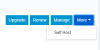
The option you are looking for should be under 'Self Host'

1605289690228.png
 
After running around the portal, I found out how to do this:
  1. Login to the portal and select Keys from the menu.
  2. Set the License Keys filter to "Assigned Keys" (unless you're setting up your own PBX).
  3. Locate the new license key in the list (Deployment Type should say "Not Deployed [Deploy to Hosted]").
  4. Click on the blue More button to the far right, and select Self Host
  5. Fill in the registration fields and press Next
  6. Select the time zone, country and language and press Next
  7. Choose your 3CX domain and press Next
  8. Select the desired extension length and press Next
  9. Complete the cloud provider information and press Next
  10. Choose the region and size of your VPS and press Next
  11. Accept the license agreement
Thank you, 3CX, for not removing this functionality. Ya coulda told us about the change, though!
 
Status
Not open for further replies.

Members Online Now

Forum statistics

Threads
111,831
Messages
589,277
Members
164,660
Latest member
RJenkinsROCK