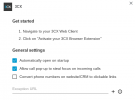
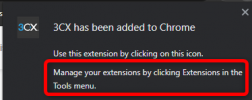
I think it's fair to compare it to getting into a car, starting the engine, then turning on the radio, then the engine stops working - not really acceptable is it (OK, if I lifted the hood of the car and messed about with stuff I'd understand it's outside your scope, but here I'm simply in the drivers seat having access to normal user stuff). When you install the extension, it even says "Manage your extensions by clicking Extensions in the 'More tools' menu".
I don't think that's a fair comparison, allow me to use your analogy: I sit in my car's driver seat every day but that does not let me mess with things under the engine hood. I have to physically get out of the driver's seat (so outside of 3CX in this case) and open the hood (the browser's settings) in order to break anything.
So by all means, give your users keys to the car, but keep a separate lock on the hood if you don't want them messing with the engine (Enterprise policies).
By the way, this is a Chrome notice that appears when installing pretty much any extension to Chrome, so again just like the Site Access matter we discussed above, this is a general Chrome notification, not a 3CX setting.
Indeed we went off topic but it's ok it happens sometimes!

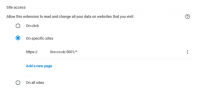
As for what the browser extension needs access to is your webclient URL but that is irrelevant, don't let it throw your off because that setting does not limit the extension to specific ACCESS URLs, it actually limits the extension to only run on specific SITES period. But the extension needs to always run in the background, regardless of what sites you are visiting (it doesn't care about those sites, it only cares that it runs)
The short version is, allow it access to all sites otherwise Chrome stops the extension from working, not because it accesses other sites, but because Chrome stops it from running altogether. That is again something that is controller by how Chrome works and we cannot change its behavior from our end.
So I hope I did not bore you above
but the main points are:
- Try to use enterprise policies to prevent users from accessing browser settings you don't want them touching
- Don't block site access, otherwise Chrome kills the extension due to the way it manages rights