'Play chat notification' setting

Status
Not open for further replies.

edfosho

Silver Partner
Advanced Certified
Joined
Apr 26, 2019
Messages
82
Reaction score
13
Under Settings > General > Chat Settings I find myself having to select 'Play chat notification' quite often. Is it reset after each 3CX server update or something?
 
Hi,

If the browser cache is emptied or cookies are removed/blocked, or you open it in an private browser window, then it will default back "unselected".

It is a local setting that stays in the browser.
 
Thanks, I thought that was the case.

Not sure why the setting is cleared randomly every-so-often (Chrome browser, on Chrome OS 87).

So, are you certain it's a client-side and will not be affected by 3CX server updates/changes?
 
Yep, you can confirm by setting it, logging out, and logging back in to find it there.

Then, log out again and log in from a private window, the settings will no longer be there because private browsing means that you don't access the cache and cookies of the previous session.
 
Yea I understand it's a local setting in the browser using a cookie - just odd that it randomly resets in my main browser session (cookies aren't cleared often, and other sites never have issues). Given that the site is hosted by the 3CX server, I assume the setting is being altered upon a server change.
 
I would look at whether there is a local policy on the machine or browser that may be clearing them out.

Or perhaps a 3rd party PC cleanup tool that clears temp files and such, and may be wiping that setting store too.

Is it across the board or specific customer / extension / pc ?
 
Last edited:
Seemingly only one machine at the moment, mine, Chrome OS 87 Google Pixel Slate. But, in the company I'm the only person that relies on that setting.

No local policies, nor 3rd party cleanup tools (to my knowledge).
 
Hit F12 while in the webclient page.

Application Tab > Storage > Local Storage > your URL > Key: wc.generalsettings > playNewChatMessageSound: true

This is where the setting is stored on your device. If this is getting cleared by your device then the setting will be lost.
 
Ok, thanks for detailing where to find it - I understand the setting is stored locally.

I don't clear this storage, nor do I know of any processes on my device that will target this specific item. Hence, I was asking could this be anything to do with server updates - you've confirmed it's not.

So my next question: is Chrome OS supported as an operating system? I ask because:

1) I know you have supported browsers for Web Client use, but I'm not sure about supported OSs, and
2) there's obviously something on my device clearing this specific item without my knowledge, and if it's something not supported and that's not catered for and tested during the development process I'd understand if you can't help me further with it (else I'm reporting a bug, happy to work with you to fix it).

My device specifically:

- Google Pixel Slate
- Chrome OS - Version 87.0.4280.109 (Official Build) (64-bit)
- Not a managed device as per https://support.google.com/chrome/a/answer/1289314?hl=en

Also, I'm aware Chromebooks and Chrome OS devices are becoming more popular as people move more business systems to the cloud, and as a 3CX partner I would like to know if it is or isn't supported by 3CX.

Thanks.
 
Last edited:
So my next question: is Chrome OS supported as an operating system?

The question does not really apply, since we develop the Webclient for the supported browsers (rather than supported OS) and it should be OS independent so long as the client runs within a Chrome environment.
 
Ah ok, cool, so purely browsers are supported for the web client and browser extension - that's fine, means my Chrome browser on Chrome OS is supported.

So, my issue still stands... Under Settings > General > Chat Settings I find myself having to select 'Play chat notification' quite often.

I will keep an eye on the next time my system needs an update and check it's local storage.

Please note, I'm a 3CX partner, and I'm not being difficult here, I just want an understanding of how supported things are when it comes to Chrome OS (and you've answered that, thank you) - basically, need to know if Chromebooks are a viable option for supporting all things cloud hosted for our customers. Please also note, I occasionally test the Chrome browser extension on my Chrome OS machine and it's close to unusable (to the point that I was convinced Chrome on a Chrome OS device was never part of your development and testing process). I'm happy to do some testing with one of your engineers to get this to a better point.
 
Hi,

No problem and we appreciate the feedback, if the product has issues we want to know about them. We use Chrome OS device here too as daily machines and don't seem to have any issues so I did have some trouble understanding what you mean by "it's close to unusable", are you perhaps referring to something very specific that applies to your workflow?
 
I was referring specifically to the browser extension, sorry if I wasn't clear - the web client as a 3CX 'hub' for controlling my 3CX extension is ideal, and no matter what OS is used I encourage our users to use it.

Do you frequently use the browser extension on Chrome OS?
 
Yes I do, we test daily. Oher than the notification sound issue you mentioned, what problems have you faced that make the browser extension unusable for you?
 
I tried it 2-3 months ago, and 6 months ago, and 9-10 months ago, and each time lots of things from audio stream issues to re-connecting issues- the whole thing just seemed an un-polished product not ready for Chrome OS (I say that because my testing of it on Chrome on Windows 10 it worked well, and of course I encourage any Windows 10 users to utilise it when needed).

I have installed it again this morning, and made an internal test call and so far, so good. I will use it for a week and report back any issues I find.

I am using this device:

- Google Pixel Slate
- Chrome OS - Version 87.0.4280.142 (Official Build) (64-bit) - Stable channel
- Not a managed device as per https://support.google.com/chrome/a/answer/1289314?hl=en

I do not have any other audio streaming extensions in Chrome, my only other extension is LastPass.
 
We have a lot of our customers on Chrome OS devices, and actually 3CX team members using LAN connected Chromebox devices on a daily basis, both for messaging and voice so they are constantly put to the test :)

Do note that the versions of Webclient and Chrome extension are the exact same product that runs on Windows 10 as that that runs on Chrome OS. There isn't a special version for Chrome OS that would be less or more polished than that on Windows. Your customers on Chromebooks or Chromebox should be supported and working as expected.

So unless this is a WiFi issue, or something specific to the Slate, you should be getting the same experience across the board. Please test it on other Chrome OS devices too if you have any and let us know how it goes.
 
Ok, and good to know! Thanks for confirming.

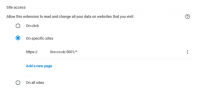
Just as I'm getting it set up, please can you confirm what sites the browser extension needs access to in order to use it for calls? I'm not using the CRM/click2call feature (so I don't need it to read all websites).

So:

1610708122731.png

and

1610709878745.png

When I restrict it to only my 3CX web client's URL, it doesn't reload/reconnect for call connectivity.

I'm aware it may work flawlessly when installed as default (e.g. read all sites), but the options are there to change things - if the product stops working when you tweak standard settings the end user is able to tweak, then it's an issue encouraging people to use it. Yes, I understand most users will leave it as default, but as soon as someone privacy conscious uses it and wants to use the standard Chrome extension settings to restrict what sites the extension can see, then the extension can't be used as intended.

Edit: added 'Site access' settings.
 
Last edited:
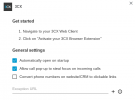
Regarding the General Settings, it can make numbers clickable on all sites apart from the ones you add in the exceptions list. The exceptions only apply to this feature: "Convert numbers to clickable links"


Regarding Site Access:

"..but the options are there to change things.."

Do you actually have such an issue or is it more of a "what if" question? The default setting works out of the box so we do not consider this an issue. Note that you are changing a Chrome option by doing this, not a 3CX option so this is on you if you go tweaking the browser and it ends up "breaking" the application. This goes beyond our scope so it's more of a Chrome browser administration question rather than a 3CX question, so you might want to look at Chrome Enterprise policies if you wish to be proactive.
 
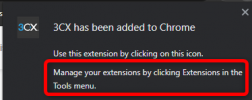
I think it's fair to compare it to getting into a car, starting the engine, then turning on the radio, then the engine stops working - not really acceptable is it (OK, if I lifted the hood of the car and messed about with stuff I'd understand it's outside your scope, but here I'm simply in the drivers seat having access to normal user stuff). When you install the extension, it even says "Manage your extensions by clicking Extensions in the 'More tools' menu".

Also worth mentioning, if there's the option to de-select "Convert phone numbers on website/CRM to clickable link" (presumably if a user has a conflicting feature in their browser), then why does the browser extension need access to all sites?

I'll ask again, please can you confirm what sites the browser extension needs access to in order to use it for calls? (if you can't answer, just say)

In response to "Do you actually have such an issue or is it more of a "what if" question?", yes, I have an issue understanding this aspect of the browser extension, and as a 3CX partner I would like to understand and troubleshoot with you if needed. I have also had a customer query it when I was installing their browser extension for them, and to be honest, there wasn't much I could say... I don't think they use it any more.

In general, yes the browser extension is a great addition to the 3CX feature set. This just seems an aspect of it to polish. Of course, if you deem it out of scope and it won't be considered for support, at least take this as feedback. It'll be different if I was going deep into settings and looking for stuff to query, but I'm not, I'm doing simple things that Google make clear within their product's use.

Also note, the above 'read all sites' concern isn't related to this thread's title (sorry, I went off topic), I will wait for the next server update and check the 'play chat notification' setting again.
 
I think it's fair to compare it to getting into a car, starting the engine, then turning on the radio, then the engine stops working - not really acceptable is it (OK, if I lifted the hood of the car and messed about with stuff I'd understand it's outside your scope, but here I'm simply in the drivers seat having access to normal user stuff). When you install the extension, it even says "Manage your extensions by clicking Extensions in the 'More tools' menu".

I don't think that's a fair comparison, allow me to use your analogy: I sit in my car's driver seat every day but that does not let me mess with things under the engine hood. I have to physically get out of the driver's seat (so outside of 3CX in this case) and open the hood (the browser's settings) in order to break anything.

So by all means, give your users keys to the car, but keep a separate lock on the hood if you don't want them messing with the engine (Enterprise policies).

By the way, this is a Chrome notice that appears when installing pretty much any extension to Chrome, so again just like the Site Access matter we discussed above, this is a general Chrome notification, not a 3CX setting.
1610974849470.png

Indeed we went off topic but it's ok it happens sometimes! :)

As for what the browser extension needs access to is your webclient URL but that is irrelevant, don't let it throw your off because that setting does not limit the extension to specific ACCESS URLs, it actually limits the extension to only run on specific SITES period. But the extension needs to always run in the background, regardless of what sites you are visiting (it doesn't care about those sites, it only cares that it runs)

The short version is, allow it access to all sites otherwise Chrome stops the extension from working, not because it accesses other sites, but because Chrome stops it from running altogether. That is again something that is controller by how Chrome works and we cannot change its behavior from our end.

So I hope I did not bore you above :) but the main points are:

- Try to use enterprise policies to prevent users from accessing browser settings you don't want them touching

- Don't block site access, otherwise Chrome kills the extension due to the way it manages rights
 
Status
Not open for further replies.

Forum statistics

Threads
112,025
Messages
590,368
Members
164,978
Latest member
FringeIT-Eric