Solved Polycom VVX 300 not Provisioning

Status
Not open for further replies.

jmh-itsjessnetworks

Free User
Joined
Oct 2, 2020
Messages
39
Reaction score
3
Hi, I'm trying to set up a Polycom VVX 300 Phone for one of my clients. For some reason I cannot get the phone to provision! Is there something I'm doing wrong by chance? I have an SBC set up. Should the Phone point to the SBC for provisioning? Our 3CX PBX is cloud hosted. We have tried accessing the web interface of the phone and it continuously refuses to connect. Also our router does not support Option 66.
 
Last edited:
So you can't access the interface after factory resetting per the guide?
 
So you can't access the interface after factory resetting per the guide?
Correct. Is there not a way I can use the phone itself to input the settings?
 
Sure you can, it's documented in the Polycom manual as that's not 3CX specific. But have you tried accessing the phone over HTTPS and seeing if it loads?
 
  • Like
Reactions: JohnS_3CX
Sure you can, it's documented in the Polycom manual as that's not 3CX specific. But have you tried accessing the phone over HTTPS and seeing if it loads?
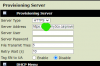
I was able to access the page to set the server. Should the provisioning server be HTTP or HTTPS? Tried HTTP and the phone still hasn't provisioned.

EDIT: I decided to try to setup the first line with pbx info. It still will not register with 3CX.
 
Last edited:
The provisioning field is selected in in the 5th step under 'Step 3: Configure the phone in 3CX'.
 
The provisioning field is selected in in the 5th step under 'Step 3: Configure the phone in 3CX'.
Does not work..
1606502345559.png Should the server type be HTTPS or HTTP?
 
Last edited:
The firmware is too old. Follow this but upgrade to the version recommended in the setup guide for the VVX model you have which is the legacy one.
 
The firmware is too old. Follow this but upgrade to the version recommended in the setup guide for the VVX model you have which is the legacy one.
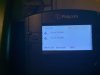
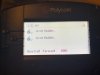
The phone has now appeared to gotten its settings and has provisioned. But, it states that the extension unregistered and in the top right corner of the screen it displays, " URL calling is disabled". does the phone need an additional setting to register the line? For error message(s) view attached pictures. (Top right of display)
 

Attachments

  • IMG_7470.jpg
    IMG_7470.jpg
    74.4 KB · Views: 11
  • IMG_7468.jpg
    IMG_7468.jpg
    51.6 KB · Views: 11
  • IMG_7467.jpg
    IMG_7467.jpg
    52.5 KB · Views: 11
Last edited:
Is the SBC showing as registered under trunks? And do you have the correct IP for the SBC on the phone provisioning tab?
 
Is the SBC showing as registered under trunks? And do you have the correct IP for the SBC on the phone provisioning tab?
Yes the SBC is showing as registered under trunks. After originally provisioning the phone, should the server IP be set to the local IP of the SBC or should it be the PBX URL?
 
First to make an intro, the VVX 300, 310, 400, 410, 500, 600 are the "Gen 1" models and we are no longer actively supporting them, as I believe they are EOL from Polycom. This means that the last tested firmware is 5.6.0 and the configuration guide for them is here:
https://www.3cx.com/sip-phones/polycom-vvx-eol/

These should not be confused with the VVX 101, 150, 201, 250, 301, 311, 350, 401, 411, 450, 501, 601 which are the "Gen 2" and "Gen 3" models, that were updated recently.

Ok, so the good news is that the phone seems to be downloading the configuration from the 3CX server. Just to confirm, you are manually configuring the name right? Theses settings were taken from the PBX.

should the server IP be set to the local IP of the SBC or should it be the PBX URL?
By the time this is setup via an SBC, the Outbound Proxy should be the Local IP of the SBC and the Server Address should be the FQDN of your 3CX PBX.

By the time the SBC shows up in the MC as green and the phone is not being connected, I would suggest maybe running I capture on the SBC itself and see if the Phone is sending REGISTER sip messages.
 
First to make an intro, the VVX 300, 310, 400, 410, 500, 600 are the "Gen 1" models and we are no longer actively supporting them, as I believe they are EOL from Polycom. This means that the last tested firmware is 5.6.0 and the configuration guide for them is here:
https://www.3cx.com/sip-phones/polycom-vvx-eol/

These should not be confused with the VVX 101, 150, 201, 250, 301, 311, 350, 401, 411, 450, 501, 601 which are the "Gen 2" and "Gen 3" models, that were updated recently.

Ok, so the good news is that the phone seems to be downloading the configuration from the 3CX server. Just to confirm, you are manually configuring the name right? Theses settings were taken from the PBX.


By the time this is setup via an SBC, the Outbound Proxy should be the Local IP of the SBC and the Server Address should be the FQDN of your 3CX PBX.

By the time the SBC shows up in the MC as green and the phone is not being connected, I would suggest maybe running I capture on the SBC itself and see if the Phone is sending REGISTER sip messages.
Hi Nick, I understand that my particular model is no longer supported. In the end I was able to get the phone to register with 3CX. It has turned out that the Outbound Proxy needed to be set to my SBC and that my firmware out of date. I no longer need assistance with this issue, and this thread may be marked as solved, and locked.

Lastly I would like to say thank you to @cobaltit , @JohnS_3CX , and @NickD_3CX for assisting my team and I with this issue.

Have a fantastic day to you all!


Jessie Hadaller
CEO / Owner, iTs Jess Networks
+1 204 406 5854 | [email protected]
Website | About Us | Services Pricing
 
Hey Jessie. Your statement makes it sound like you manually set the outbound proxy in the phones. This should all be handled by the template so it should have been factory reset, upgrade firmware and then provision.
 
Status
Not open for further replies.

Forum statistics

Threads
111,974
Messages
590,081
Members
164,899
Latest member
mazet