Poor sound quality

Status
Not open for further replies.

Albert464

Customer
Intermediate Cert.
Joined
Oct 21, 2017
Messages
110
Reaction score
9
I tried to configure 3CX with Trunk messagenet, but I noticed that the audio quality of the messages reproduced by IVR and welcome is poor.

We come from a switchboard written with Asterisk and there the sound is much clearer, as codec we use G711 and I have also configured it within 3CX, but it seems that this has not changed things.

The audio messages played by 3cx seem more "muted" than those on Asterisk, moreover the format is the same.

How can this be solved? It must also be said that on Asterisk we do not use the Messagenet trunk, but another provider.

Used machine: Amazon Lightsail
 
I would confirm which Codecs are being used, and if any transcoding is happening. Check the 3CX Activity Log. Is the voice quality of calls affected, or just the messages? What about calls to a voicemail?
 
If you have converted across from FreePBX (trunk messagnet) then if all else fails you could try re-recording, it is not difficult and you can follow this guide: https://www.3cx.com/docs/converting-wav-file/

Also ensure your recordings are in the format of:

Format: WAV
Channel: Mono
Bit rate: 8 kHz
Sample: 16 bit

I do all of my recordings via audacity, FYI - I have done recordings for Asterisk (not FreePBX) in the past and they offer this online converter: https://www.digium.com/products/ivr/audio-converter
 
Hello @Albert464

Try calling the Digital receptionist directly from a local extension and see if the audio quality is the same. There is probably transcoding happening which affects the audio quality. You can use wireshark to determine which codec is negotiated between the provider and the PBX and which codec is negotiated between the PBX and the phone.
 
I would confirm which Codecs are being used, and if any transcoding is happening. Check the 3CX Activity Log. Is the voice quality of calls affected, or just the messages? What about calls to a voicemail?

In order the codecs of the trunk are:
g711 alaw
g711 ulaw
g729

The conversation is quite good, acceptable, it is the audio messages that are lower and less clear than Asterisk.

If you have converted across from FreePBX (trunk messagnet) then if all else fails you could try re-recording, it is not difficult and you can follow this guide: https://www.3cx.com/docs/converting-wav-file/

Also ensure your recordings are in the format of:

Format: WAV
Channel: Mono
Bit rate: 8 kHz
Sample: 16 bit

I do all of my recordings via audacity, FYI - I have done recordings for Asterisk (not FreePBX) in the past and they offer this online converter: https://www.digium.com/products/ivr/audio-converter

The files are of the correct version, they were made by a recording studio adapted to telephone exchanges. From the computer they feel very good, even the 8Khz wav version, 16 bit mono.

Hello @Albert464

Try calling the Digital receptionist directly from a local extension and see if the audio quality is the same. There is probably transcoding happening which affects the audio quality. You can use wireshark to determine which codec is negotiated between the provider and the PBX and which codec is negotiated between the PBX and the phone.

Calling the extension feels perfect, I tried to change VoIP provider and it feels better, but still it is not the best.

Can I use wireshark on linux amazon lighsail machine?
 
Can I use wireshark on linux amazon lighsail machine?
Yes, navigate to Dashboard / Activity log. You will find the capture button there.
 
Yes, navigate to Dashboard / Activity log. You will find the capture button there.

Thank you so much, I did as you said. Is there a guide that makes me understand where to look? Because it's all a series of infinite numbers, there are about 1000 lines.

Thank you
 
You will need to look to look to the Wireshark documentation for details on how to read the capture. Generally you go the telephony tab and select Voip calls. That should give you a list with calls. You can select the call you want and look at individual sip messages. The first thing you will need to determine is what codec is negotiated between the PBX and the provider. Wireshark can also export the audio so you can listen to the audio quality and if its the same with the one you are listening on the phone.
 
You will need to look to look to the Wireshark documentation for details on how to read the capture. Generally you go the telephony tab and select Voip calls. That should give you a list with calls. You can select the call you want and look at individual sip messages. The first thing you will need to determine is what codec is negotiated between the PBX and the provider. Wireshark can also export the audio so you can listen to the audio quality and if its the same with the one you are listening on the phone.

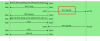
I did some tests and this is the graph that you can see of the call, the codec used is the one I have in the red box?
 

Attachments

  • Screenshot 2019-01-14 20.32.24.png
    Screenshot 2019-01-14 20.32.24.png
    65.8 KB · Views: 50
Yes... that says you are using g729 which would make sense why it sounds that way.
 
But if the priority of the codecs assigned to the Trunk is this, why is it going on g729? Does the g711 codec have precedence?

G.711 A-law
G729
GSM-FR
G.711 U-law
iLBC
 
It could be as simple as that your trunking provider requests G729 during negotiation with the PBX. G729 is a popular codec used across WAN links as it is compressed and thus uses less bandwidth.

If you do a Wireshark capture (or view your previous) look at the SDP body of the message sent from your ITSP, this will confirm what they support.
 
  • Like
Reactions: Albert464
To add a little more:

G.711 u/a law = Is an uncompressed codec with a base size of 64 kbit/s and a MOS score
of 4.3 (mean opinion score): https://en.wikipedia.org/wiki/Mean_opinion_score

G.729 = Is a compressed codec and has a base size of 8 kbits/s and a MOS score of 3.7.

Based on one way voice, the bandwidth per call can roughly equate to:

Within the local LAN:

G.711 codec = 95.2 Kbps.
G.729 codec = 39.2 Kbps.

Across a PPP (WAN):

G.711 codec = 82.4 Kbps bandwidth.
G.729 codec = 26.4 Kbps bandwidth.

PPP with cRTP (compressed RTP):

G.711 = 67.2 Kbps bandwidth.
G.729a = 11.2 Kbps bandwidth.

You can see from the above figures why G.729/compressed voice is often used across WAN links.

Further configuration of your network/router for cRTP could improve the amount of bandwidth utilized across your link but codec type will dictate the quality.
 
Hello @Albert464

The codec negotiated is G729 and even though you have G711 as your top codec your provider uses G729. You could as a test remove G729 from your trunk so that G711A is the first matching codec and see if that makes any difference. Navigate to your trunk settings / Options and remove G729 from the list. Press OK to confirm the changes
 
  • Like
Reactions: Albert464
Removing it from the list forcibly uses the G711, but I do not understand why I should remove it and the provider does not respect the hierarchy.
 
Look at the provider SDP, I think chances are they either prioritize or only support the G.729 codec.

If this is the case then the question is for them, but they will likely say it is for bandwidth reasons.
 
Removing it from the list forcibly uses the G711, but I do not understand why I should remove it

Why would you not simply remove it, if that works for you?
 
Removing it from the list forcibly uses the G711, but I do not understand why I should remove it and the provider does not respect the hierarchy.

You should remove it because it wasn't working when it was there. As to why it wasn't working that is question for your provider as it's not a 3CX issue. 3CX is correctly presenting the preferred codec order.
 
Removing it from the list forcibly uses the G711, but I do not understand why I should remove it and the provider does not respect the hierarchy.
Generally the "rule" is that the codec priority is determined by the initiator, however this is not always the case with providers as in many cases they prioritise low bandwidth codecs. You can force G711 by removing G729 from the list and force the provide to use that codec.
 
Status
Not open for further replies.

Forum statistics

Threads
111,911
Messages
589,698
Members
164,779
Latest member
affinity123