Pop-up notifications not working on Chrome Browser

ARamdass

Gold Partner
Advanced Certified
Joined
Jan 27, 2022
Messages
13
Reaction score
1
Hi,

It seems pop-up notifications have stopped working from the Chrome browser as well as PWA installed from chrome.
No issues with it when using Edge.

Tested from different systems with v20 update 5 to update 6 beta (619) all same result.
Notification only comes up after missed call.

Anyone else experiencing this issue? Work arounds welcomed.
 
@K_SAK, updated chrome to .120 as suggested still no notification on incoming calls or messages when minimized.
On 3CX v 20 u6 build 619 beta.
Special note, when tested with Microsoft Edge (which works), system notifications show "3CXFQDN (via Microsoft Edge)"
but when using Chrome, system notification shows "Google Chrome" only. Just an observation.
 
Have you tried rebooting the computer?
 
@Kyr_Sak
Yes. Issue has been confirmed on multiple systems from multiple 3CX PBX's.
 
Are you in a managed domain? Perhaps there is some Group Policy blocking this?
 
Same issue from my side on a customer site, no group policy, latest release of Chrome. No more popup...
 
Hello,

Did you re-authorise the notifications with the Bell icon on the left of the 3CX page / the browser page settings?
After browser updates sometimes the notification permissions are reset.

Best,
KS.
 
Already done.
Only missed call popup is displayed
 
With chrome - is it minimised or closed? Edge retains an active process at all times, Chrome does not if the user closes the browser.
 
With Edge notifications are working perfectly.
With Chrome, even if the Chrome app is just reduced on the bottom bar, no notification at all, only the missed call noticed at the end.
 
With Chrome, even if the Chrome app is just reduced on the bottom bar, no notification at all, only the missed call noticed at the end.

Same here (MacOS), but also on Edge. If PWA is closed (not Edge is quit), not notification except the missed call. If PWA is minimized I will receive notifications. Is that how it's meant to be?
 
Last edited:
@Roland-bg ,

MacOS is a different thing - Edge keeping a process active at all times is a Windows function.
 
And whats the best way to have a working client on Mac that also sends notifications reliably?
 
Keep PWA active, otherwise it is as if you are unplugging the phone.
 
But if the PWA is not on top/focused, there's still no notification showing up in Chrome at all and in Edge it's only a visual notification, no audio. Any idea?
 
Hi,

After a few checks it seems the latest Edge has a problem with correct Push notifications (Win & Mac). If you switch to Chrome, for in-browser and PWA use, you should have proper behaviour.
 
We have tried to replicate that here, 2-3 different Chrome versions, Windows and Mac, 2-3 versions of our software - Chrome has been working OK. On windows we know some users have local security settings etc that can block pop-ups, that are beyond our control. For Mac, it's a smaller user base, so not enough data.

Try to remove the PWA, open the web portal, remove all notification rights, clear cache, log-out, log-in, give rights, re-install PWA.
 
Try to remove the PWA, open the web portal, remove all notification rights, clear cache, log-out, log-in, give rights, re-install PWA.
That helped for me, thanks! Actually I did all of that, but not all together in that order. Fixed it for me in Chrome :)
 
Glad to hear that.
 
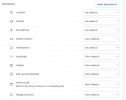
over Chrome there are some additional settings to allow. I fight with this problem for a couple of days. Although that the PWA ist installed, allowed, auto start and sign in are active, in windows 11 as well everything for 3CX is allowed, I had to go to site settings inside Chrome. I had to additionally allow a lot of things. Then it worked.

site_settings.png

I've changed them from Ask and Block to allow and then, refresh the webpage and the PWA app. Then it worked.
 
  • Like
Reactions: KyriacosS_3CX
@SWT ,

Thanks for sharing.

Sometimes when browsers update they do not carry over the notification settings correctly, and this re-enabling and refresh might be needed. Good to have this detailed info here, so others can find it quickly.
 
  • Like
Reactions: Evolute IT

Forum statistics

Threads
112,011
Messages
590,285
Members
164,954
Latest member
UHA