port 5060/5090 not working

Status
Not open for further replies.

TheNickHess

Customer
Basic Certified
Joined
Jan 26, 2023
Messages
10
Reaction score
0
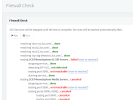
We are a nonprofit running 3cx on premise getting the following w fw check
1675109601167.png

We have created temporary fw rules allowing all traffic and are still not getting results in order to get phones(some supported by 3cx, some not) working with FQDN
- Interesting tidbit, my grandstream does work w fqdn,while the polycom310/311 and fanvil x3u do not.
- using ipsec currently to get it to work
- Sophos UTM 9 FW
 
The test shows you are not reachable from the outside, so you need to take care of your firewall port forwards.

We cannot help you on how to configure your firewall, but we can confirm that if you do it correctly, all the tests will pass.
Here is a list of our ports: https://www.3cx.com/docs/ports/

Have you considered switching to a system hosted by us in the cloud? We automatically take care of the firewall rules for you, updates, and backup. Plus in case your network or internet is down, the PBX is still active in the cloud. You can continue to use your phones on the mobile apps via 3G/4G data. And remote workers can continue using their service from home via the desktop app and webclient.
https://www.3cx.com/ordering/pricing/hosted-info/
 
"We have created temporary fw rules allowing all traffic and are still not getting results in order to get phones(some supported by 3cx, some not) working with FQDN"
Will the port forward fix the FQDN issue or is that something different?
 
It doesn't matter whether you are contacting the PBX via FQDN or IP, if the ports are closed you will have connection failures.

The firewall checker should pass if you take care of this, and then you can start looking at connecting your phones.
 
I'll see what we get. on the phone with Sophos in a bit here to ensure we are doing this correctly
will post results
 
Established Natrules appropriately, but it was blocking the ports in our UTM9. disabled global port scan, now we are here.
1675187585900.png
 
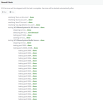
Passed the FW checker..
1675189483707.png

The FQDN still not working on old phones. grandstream is, fanvil in testing.
 
old phones being polycoms of 310 and 311
 
Is DNS correct on those phones? Presumably an internal DNS server?
 
Typically we don't mess with DNS settings on them. just reset from our previous VoIP provider and plug in the provisioning URL.
as long as IPSec works we at least can use the internal IP.

Can any DNS server be used? 1.1.1.1, 8.8.8.8, etc
 
You mentioned IPSec before...how is that involved if the phones are on the same LAN as the server?

3CX will tell you to use split DNS ... the DNS servers used need to resolve the hostname to the correct IP, internal if the phones are on LAN.
 
so the IPSec is there because they are not all on the same LAN.
I think I understand what you are saying. ran into a similar issue accessing a self hosted site at the URL, instead of local IP while on lan
 
If the phones are on a different LAN then you should use an SBC which will tunnel to the 3CX server and proxy all the phones. Otherwise one needs to use STUN with port forwards to each phone. The SBC is just plug and play...any new phone just shows up in the 3CX phone page.. SBC can be installed in a VM, a Windows PC that's always on, or on 18u6 there are some newer phones that can function as an SBC.
 
Okay, and the split DNS would fix the FQDN issue on main site?
 
It’ll connect using the server LAN IP. 3CX has posted split DNS will be required going forward.
 
so this morning we ran into no audio on outgoing calls, turns out after narrowing down the changes it was a full nat rule

Traffic Selector Any Source->Any service->External WAN Address
Destination translation: 3CX Server change to External WAN

Auto firewall rule

initial packets logged
Will look into the split DNS
 
Status
Not open for further replies.

Members Online Now

No members online now.

Forum statistics

Threads
111,835
Messages
589,289
Members
164,666
Latest member
infinititravels